7-8 Drawers
Installation Procedures
1-, 2-, 3-Cell Color Touch Installation and Service Guide/67-2014 Rev G © 2011 Omnicell, Inc.
Three-Drawer Pharmacy Module
A Three-Drawer Pharmacy Module is available to customers who have fewer medications to
track. It can only be installed in a 1-, 2-, or 3-cell cabinet or half-cell cabinet and may not be
installed in the same cell as a catheter rack.
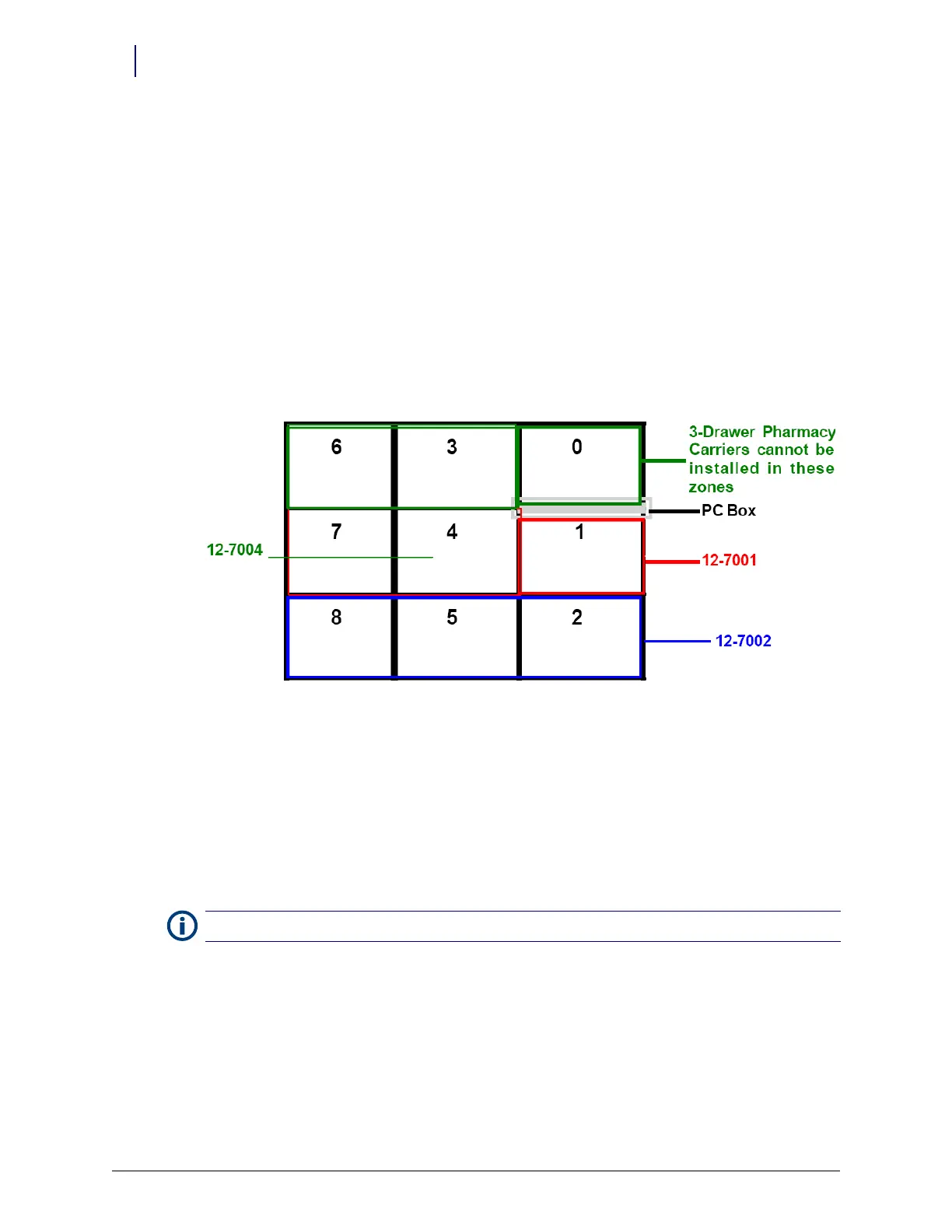
The Three-Drawer Pharmacy Module can only be installed in the bottom of zones 1, 2, and 4. A
separate install kit has been created for each zone location:
Zone 1 (kit #12-7001)
Zone 2 (kit #12-7002)
Zone 4 (kit #12-7004)
To install a Three-Drawer Pharmacy Module, all five switchpanels in the install zone must be
removed. The carrier occupies switchpanel positions one and two. Shelves can be installed in
switchpanel positions 3, 4, and 5, if necessary.
A Nine-Drawer Pharmacy Module cannot be retrofitted with a Three-Drawer Pharmacy Module
as the entire frame must be replaced to install a Three Drawer Module. A Three Drawer Pharmacy
Module can only be installed in the supply zones of full frame cabinet.
1. Perform a graceful shutdown of the CT PC box.
2. If a door exists in the zone where the three-drawer module exists, remove the door.
a. Open the door in the zone where the Three Drawer Pharmacy Module will be located.
b. Remove the two screws that hold the upper bracket of the door in place. Use a Torx T25
screwdriver.
c. Lift the door straight up off the lower hinge and remove the door.
3. Remove all switchpanels and shelves for the zone in which the module will be installed.
4. Remove any switchpanel connector covers on the frame in the zone in which the Three Drawer
Pharmacy Module needs to be installed.
5. Remove the black rubber door bumper on the frame of the unit where the carrier will be
installed.
Note:
Hold onto the door while removing the screws.



 To Next Page