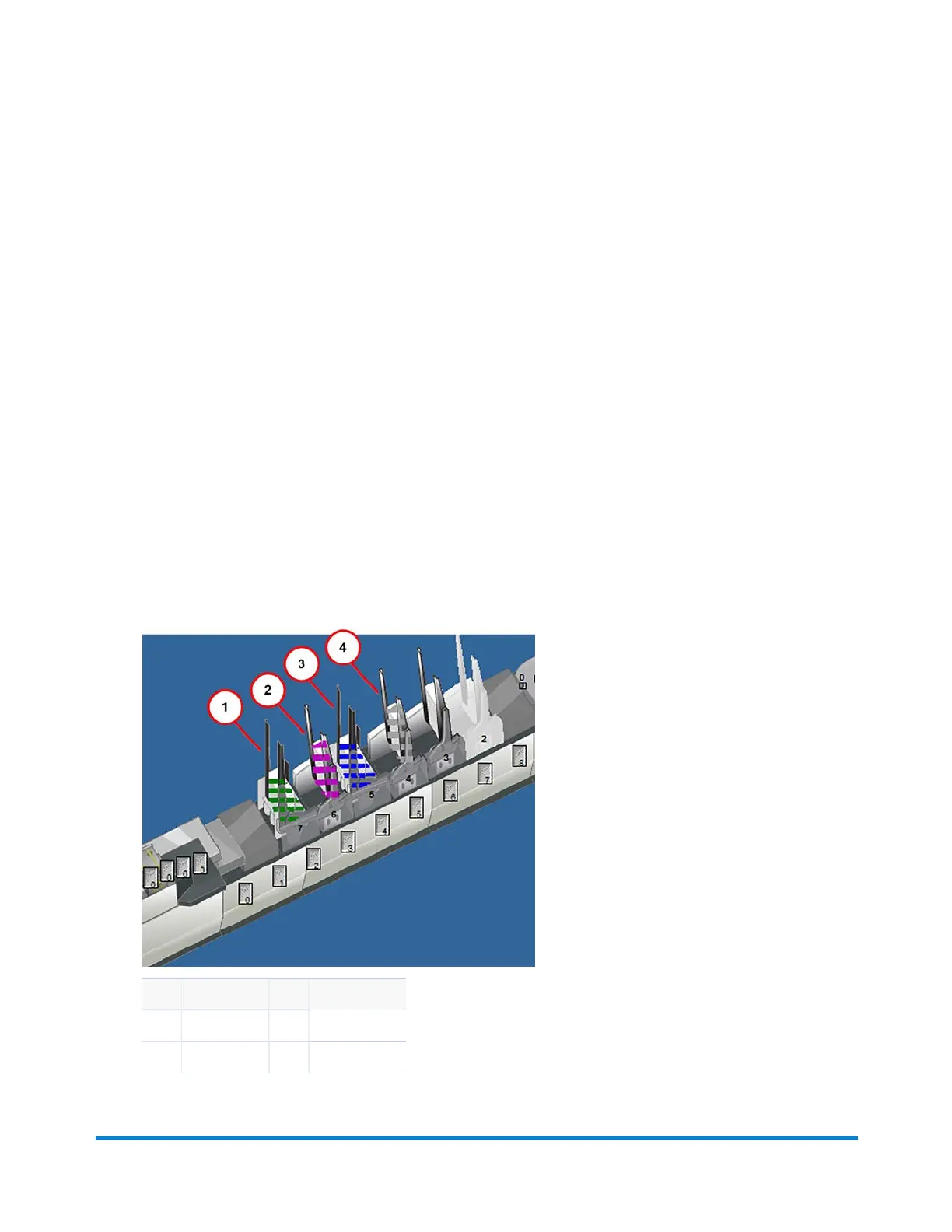
Setting Feeder Feed Modes
About Feeder Feed Modes
Feeders can be set for a variety of feed modes, they are usually predefined in the mode. The Feeder
objects on the main DC screen change color based on the selected feed mode.
l Always: the feeder provides an insert for every mailpiece; when this mode is selected the Feeder
object is white.
l Data Select: the feeder provides an insert based on a feed select code as dictated by scan data or
MRDF information; when this mode is selected the Feeder object is gray.
l Priority Select: the feeder provides an insert when a feed select code is present and the weight of
the insert does not cause the total weight of the mailpiece to exceed its current weight break; when
this mode is selected the Feeder object is blue.
l Priority Fill: the feeder provides an insert when all other feed modes (always, data select, and
priority select) have been processed and the weight of the insert does not exceed postal
regulations; when this mode is selected the Feeder object has purple stripes.
Item Description Item Description
1 Backup 3 Priority Select
2 Priority Fill 4 Data Select
Operator Adjustments
Pitney Bowes Epic v3.1 (ZVE0) Operator Guide May, 2018 Page 169 of 328



 To Next Page