Adjusting the Booklet Feeder Side Guides
The feeder side guides allow the material in the feeder to be stacked square and evenly. You can adjust
them to accommodate different insert material sizes.
To adjust the booklet feeder side guides:
1. Measure the width of the insert for the job using the scale on the chassis deck.
2. Open the booklet feeder top cover.
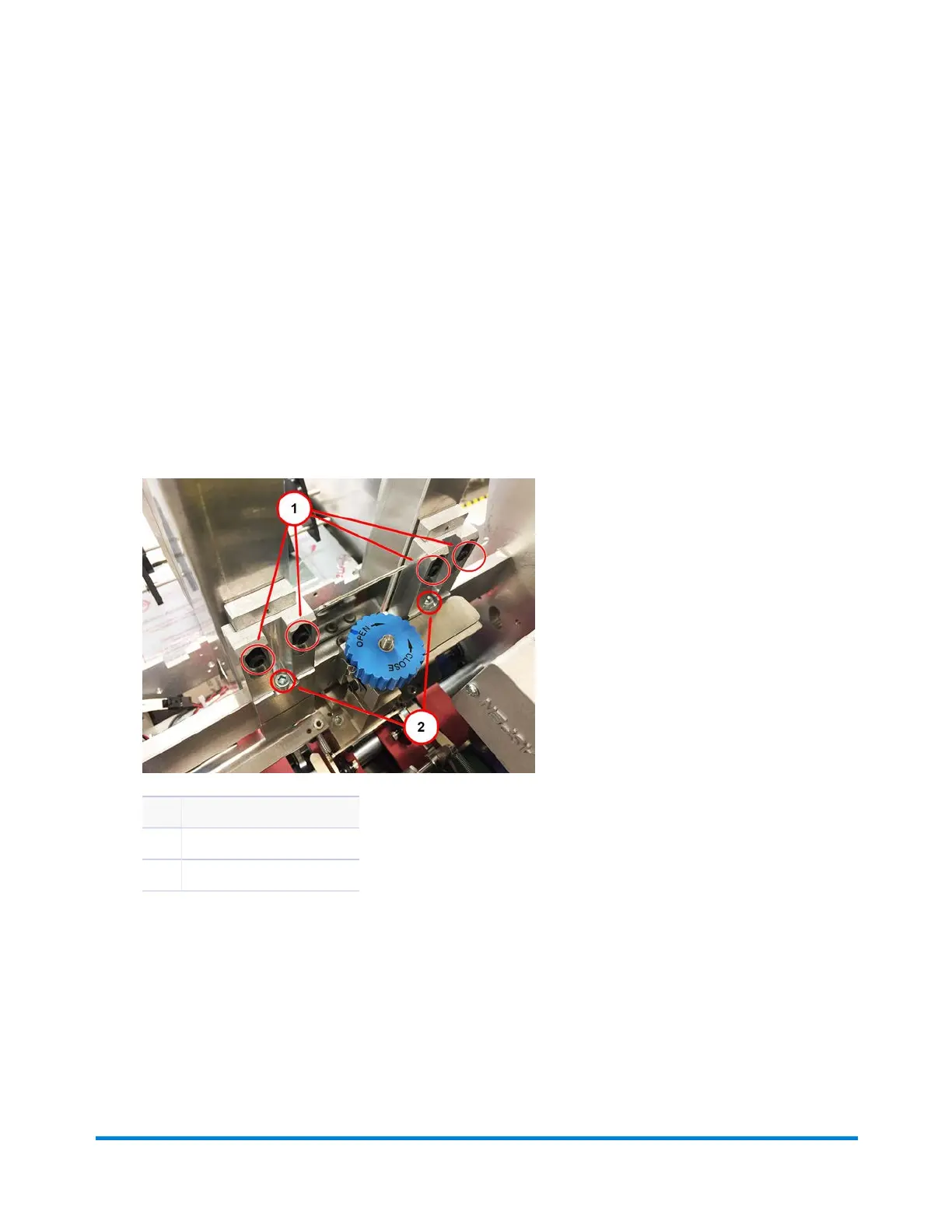
3. Using a setup tool, loosen the side guide position mounting and height adjustment screws for each
side guide.
Item Description
1 Height Adjustment Screws
2 Position Mounting Screws
Position Mounting and Height Adjustment Screws
4. Raise the side guide to its upper most position, and lightly tighten the two side guide height
adjustment screws for each side guide.
5. Using the scale provided, slide the side guide so the inner edge of the side guide aligns with the
width of the measured insert.
6. Using the scale provided, slide the other side guide to align with the width of the measured insert.
Operator Adjustments
Pitney Bowes Epic v3.1 (ZVE0) Operator Guide May, 2018 Page 148 of 328



 To Next Page