User’s Manual of GS-4210-16T2S_24T2S_16P2S_24P2S_48T4S
The page includes the following fields:
Object Description
• Class Name
Display the current class name.
• Match
Disaply the current match information.
• Action
Disaply the current action information.
4.8.4.3 Aggregate Police
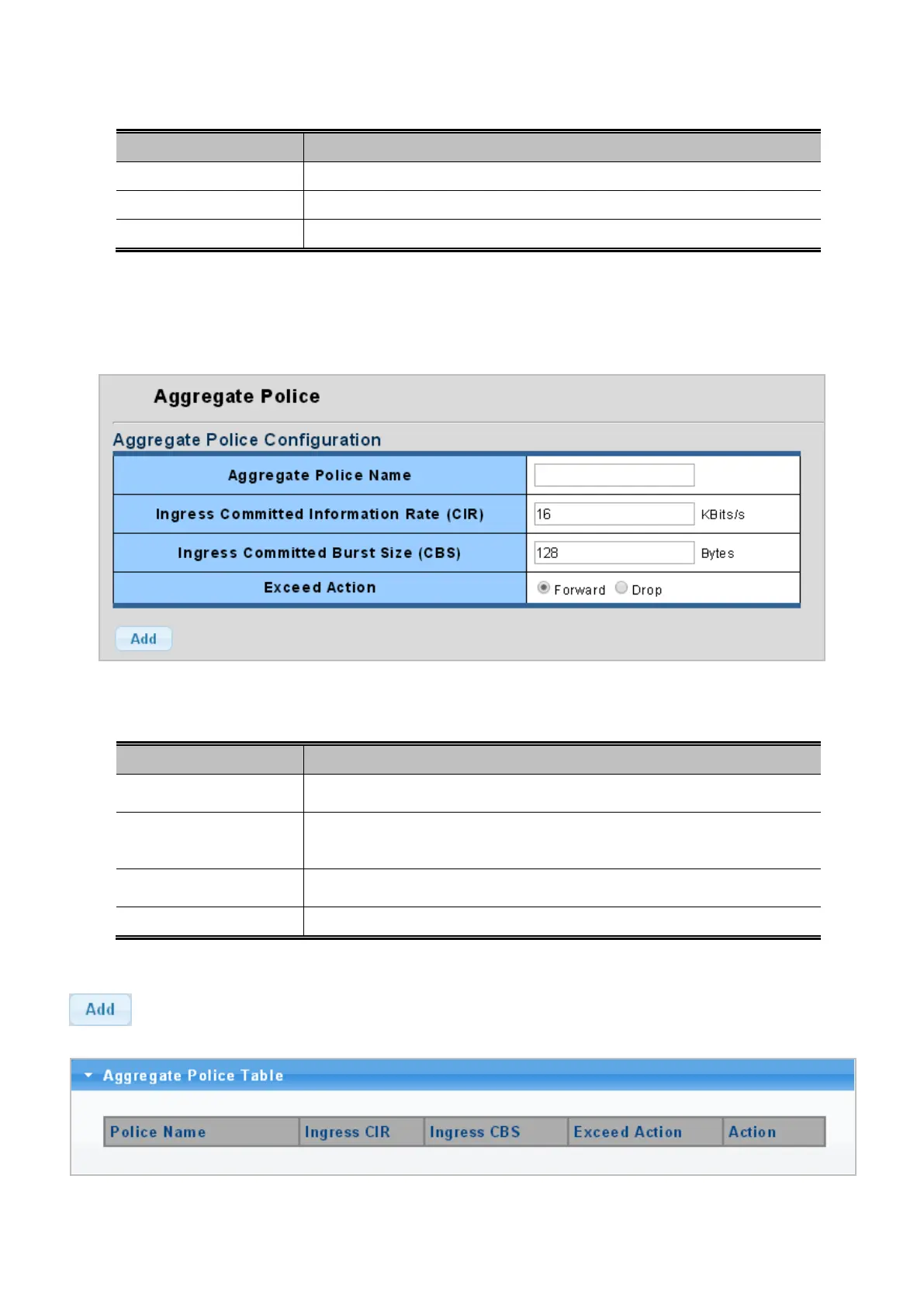
The QoS Aggregate Police and Aggregate Police status screens in Figure 4-8-21 and Figure 4-8-22 appear.
Figure 4-8-21: QoS Aggregate Police Page Screenshot
The page includes the following fields:
Object Description
Input the aggregate police name and 32 characters allowed.
• Ingress Committed
Information Rate
Allow input a number as ingress committed information rate.
• Ingress Committed
Burst Size (CBS)
Allow input a number as ingress committed burst size.
• Exceed Action
Choose “Forward” or “Drop” when the exceed action situation appears.
Button
: Click to add aggregate police profile entry.
Figure 4-8-22: QoS Aggregate Police Table Page Screenshot



 To Next Page
 Loading...










