COPIER (B156/B220) 10 February 2005
1-10
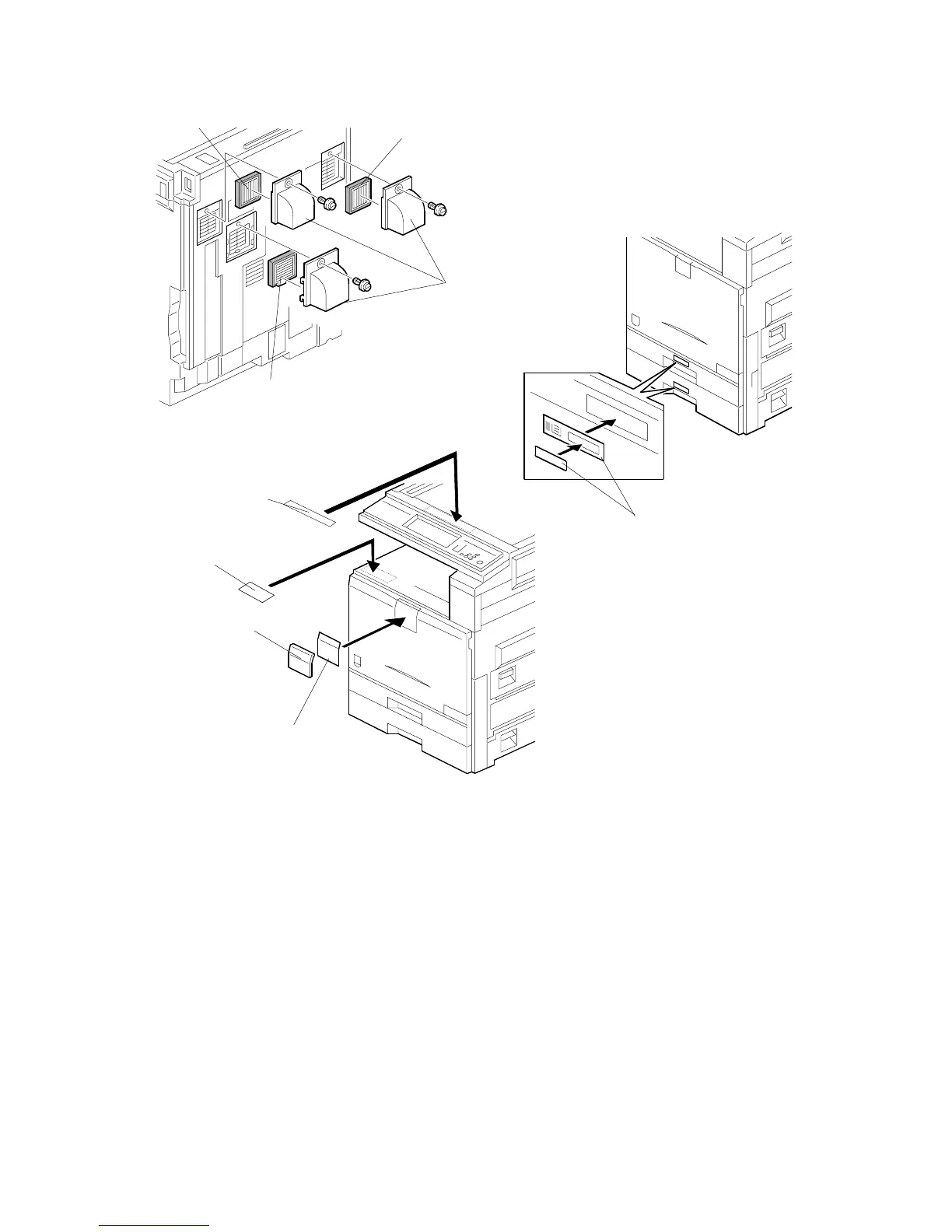
9. Install the filters [A] and ducts [B] as shown.
10. Attach the appropriate model name decal [C] with cover [D] to the front cover.
11. Attach the caution decal [E] to the tray. Attach the copy prohibition decal [F] to
the top.
12. Pull the paper tray out, and adjust the side guides and end guide to match the
paper size.
NOTE: To move the side guides, first pull out the tray fully, then push down the
green lock at the rear inside the tray.
13. Attach the appropriate paper tray number decals [J] to the paper trays.
NOTE: Paper tray number decals are also used for the optional paper tray or
the optional LCT. Keep any remaining decals for use with these
optional units.
B156I514.WMF
B156I516.WMF
B156I515.WMF
[A]
[B]
[A]
[A]
[J]
[C]
[D]
[E]
[F]



 To Next Page