COPIER (B156/B220) 10 February 2005
1-12
18. Plug in the machine and turn the main power switch on. The machine
automatically performs the initialization procedure. After this has finished, the
Start button LED turns green.
19. Make copies of image samples (text, photo, and text/photo modes).
20. Perform Automatic Color Calibration (ACC).
NOTE: Since this machine has been subject to color adjustment using
Automatic Color Calibration (ACC) at the factory, there is no need to
make automatic color calibration again if the customer is satisfied with
the image sample. If the customer is not satisfied, do the following.
1) Print the ACC test pattern (UP mode – Maintenance – ACC – Start).
2) Place the printout on the exposure glass.
3) Place 10 sheets of white paper on top of the test chart. Then, close
the ADF or platen cover.
4) Press “Start Scanning” on the LCD panel. The machine performs the
ACC.
21. If you want to enable the Ethernet NIB function, set SP5-985-001 to “1: enable”.
If you want to enable the USB function, set SP5-985-002 to “1: enable”.
NOTE: The defaults are “0: disabled”.
22. Make sure that the sample image has been copied normally.
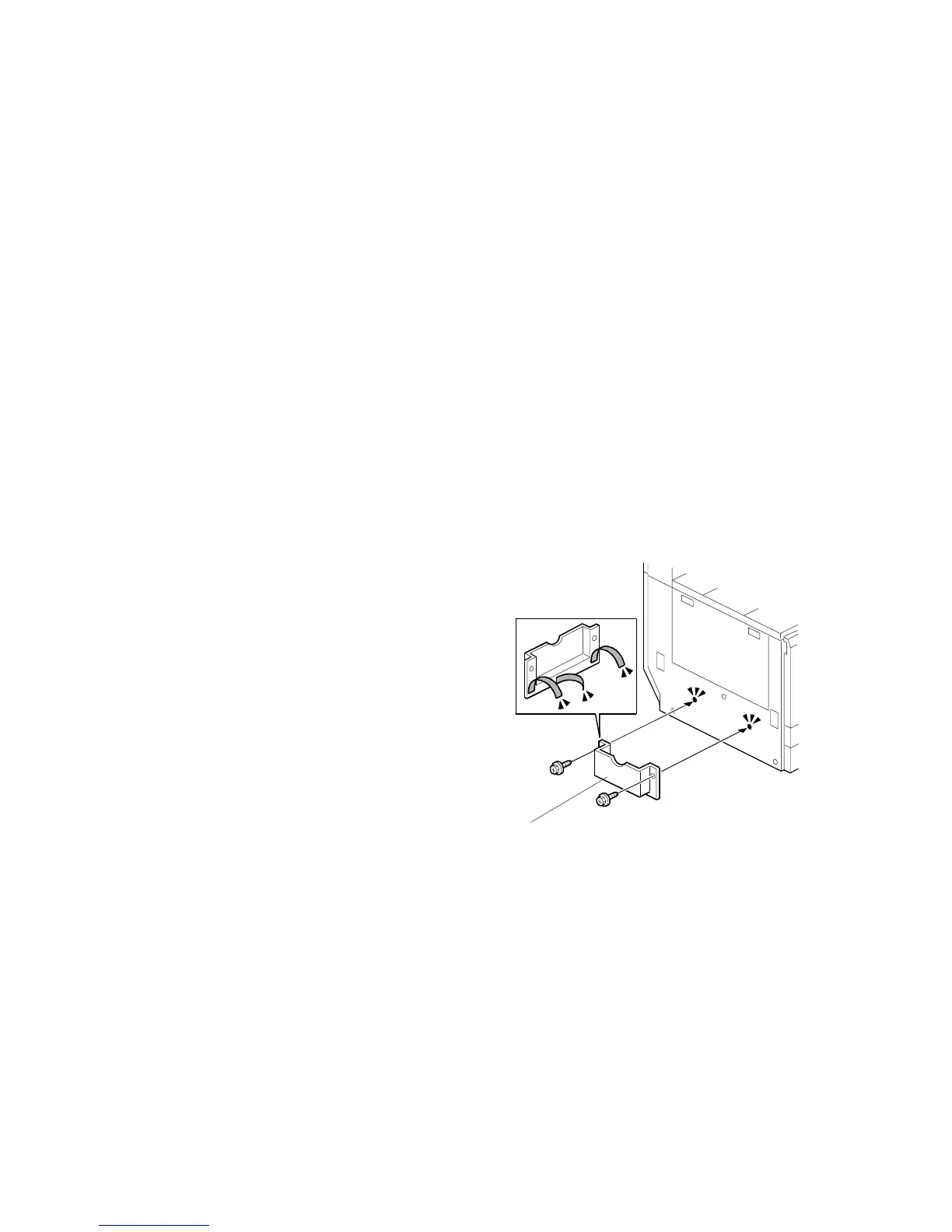
23. Remove the double-sided tape from
the manual holder. Then attach it [A] to
the left side of the copier (! x 2).
NOTE: When you install the 1,000-Sheet
Finisher (B408), attach the manual
holder a different location.
B156I532.WMF
[A]



 To Next Page