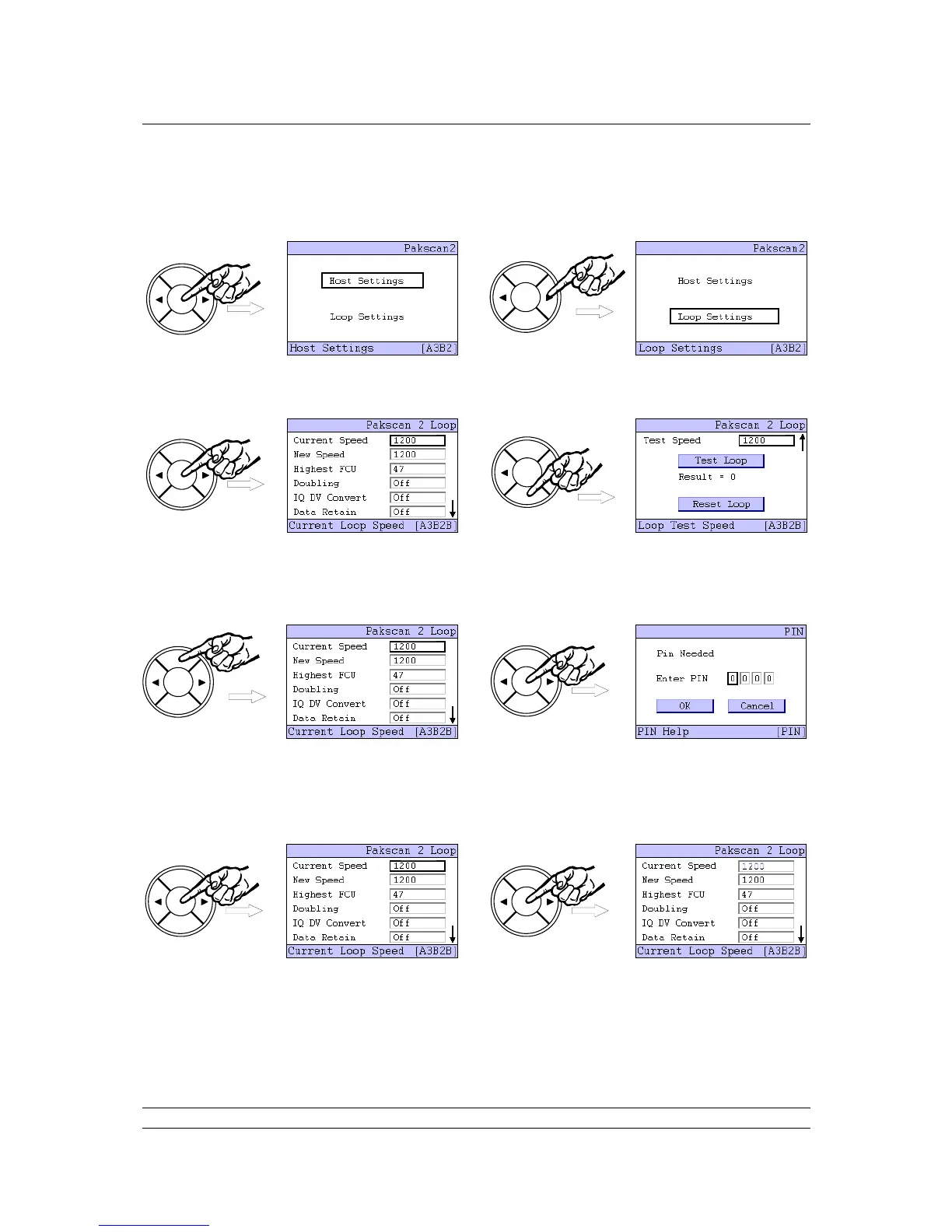
Pressing ENTER brings the next choice for the setting. This time select ‘Loop Settings’ by once more
using the right arrow key ().
The Loop Settings screen is split over two pages, as indicated by the small arrow () on the right side
of the screen, so the NEXT and BACK buttons are used to jump between the two.
Once a setting box is highlighted, by using the left () or right () arrow key, press the ENTER key to
make a change to the value. This will make the security screen appear for the PIN number entry. The
default value for the system security requires a PIN to be entered before any settings can be changed.
This setting can be altered from the Security Setting menu.
The default PIN number is 0000. To enter a PIN, or accept the number, press ENTER and the first
digit will flash. The value can be changed by using the left or right arrow keys ( or ). Once the
number is correct, press ENTER once more. When all 4 digits of the PIN are entered correctly, select
the OK button with the arrow keys ( or ).
Press ENTER and the screen will return to the settings screen and the Current Speed will be
highlighted. Press ENTER once more to select this parameter and the current value begins to flash.



 To Next Page