Home
Sam4s
Monitor
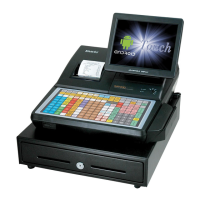
SAP-6600
Page 117
Sam4s SAP-6600 - Page 117
283 pages
Manual
Save Page as PDF
To Next Page
To Next Page
To Previous Page
To Previous Page
Loading...
Sam4POS Operators Ma
nual v2.33
Adv
anced Operations
•
113
2.
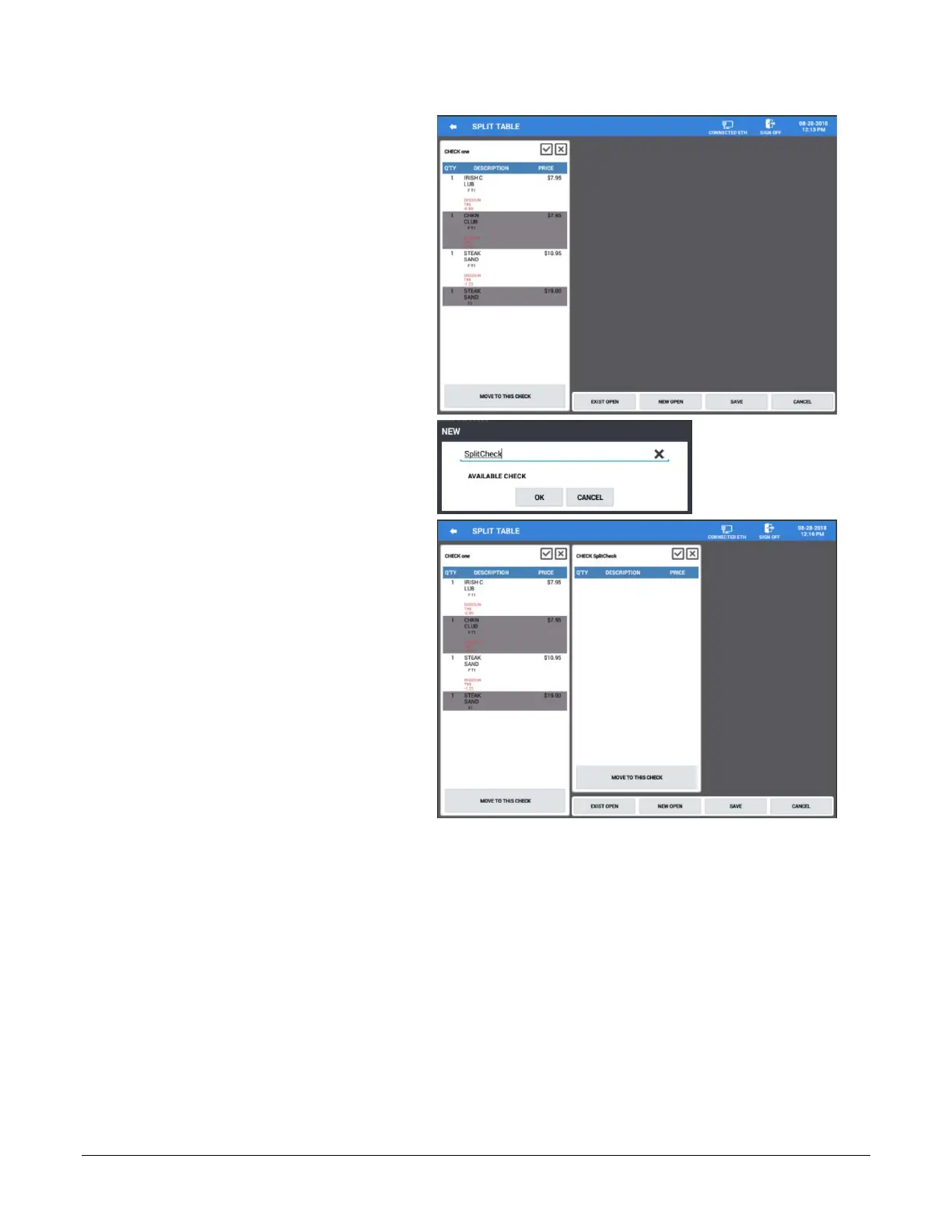
Select the items you w
ish to split off.
3.
Press the
NEW OPEN
button to
create a new check for
the items:
4.
Enter the number or name for the
new check
(up to 10 digits)
and press
OK
.
116
118
Table of Contents
Main Page
Table of Contents
5
Introduction
13
Sam4S Sam4Pos Overview
13
Hardware
13
Sap-6600(II)
14
Hm616
15
Software
15
Options
15
Sam4Pos Power Requirements
16
Safe Operation
16
About Power Conditioning Equipment
17
Surge Protectors and Power Conditioners
17
Ground Guard Conditioners
17
Uninterruptible Power Supplies (UPS)
17
Controls & Connections
18
Sap-6600
18
SAP-6600 Connection Panel
19
Sap-4800Ii
20
SAP-4800-II Connection Panel
21
Rear VFD Display (Optional)
22
Sap-630/Sap-530
23
Side Connections
24
Rear Customer Display
24
SD Memory Card Slot
25
Connection Panel
25
Control Lock
26
Control Keys
26
Getting Started
27
Default Screens
27
Main Sign on Screen
27
Main Sign on Screen Icons
27
Register Mode Screen Layout
28
Register Mode Screen Zones
29
Register Mode Title Bar
29
Title Bar Icon Details
30
Expanded Register Mode Title Bar
32
Utility Information Icons
32
End of Day
32
Memory Storage Management
32
Memo Icon
33
Team Viewer
34
Favorite Icon
34
Custom Screen Layouts
35
Sale Screen Size Edit
36
Report Mode Screen
37
End of Day Screen
38
Program Mode Screen
38
Screen Saver
39
Passwords
39
Password Notes
39
Initial Clear/Re-Boot
40
Initial Clear
40
Reboot
40
Navigation Tips
41
Common Icons
41
Function Key
43
Function Key Definitions
43
Tender Key Definitions
47
Displayed Error Messages
48
Basic Operations
51
Operation Notes
51
Signing On/Off
51
Sign on by Operating Code
51
Sign on by Employee Card
51
Sign on by Dallas
51
Sign off
52
Clerk Interrupt
52
Clocking In/Out
53
Clock in
53
Register Mode Time In/Out
53
Main Sign on Screen
54
Clock out for Break
55
Clock in from Break
55
Clock out for Day
55
Registering Plu's/Items
56
Preset Plu's
56
Open Plu's
56
Code Entry Preset Plu's
56
Code Entry Open Plu's
56
Age Restricted Plu's
56
PLU Price/Halo Override
57
Price Level Shift
57
Note # Operation
58
Receipt Sample with Note
59
Alpha Text
60
Use Alpha Text Descriptor - Is Checked
60
Use Alpha Text Descriptor - Unchecked
60
Pre-Defined Alpha Text
62
Sample Receipt with Alpha-Text
63
Price Check
64
Edit PLU
64
Print Label
65
Scale Operations
65
Scale PLU Program Notes
65
Scale Function Key Notes
65
Registering Scale Items
66
Direct Scale Entry
66
Manual Weight Entry
66
Auto Scale Entry
66
Tare Weight
66
Auto Tare Weight
66
Manual Tare Weight Entry
67
Open Tare Weight Entry
68
Promo
69
Split Pricing - Decimal
70
Split Pricing - Whole
71
Not Found PLU
72
Shifting or Exempting Tax
73
Tax Shift
73
Shifting Tax from a Taxable Item
73
Adding Tax to a Non-Taxable Item
73
Exempt Tax on an Entire Sale
73
Food Stamp Shift
73
Corrections & Voids
74
Clear
74
Void Item
74
Cancel
74
Transaction Void
74
Merchandise Return
75
Split Item (Consolidated Items)
75
Split Item (Single Item)
76
Change Quantity
77
Discounts/Coupons/Surcharges
78
Sale (Subtotal) Discounts
78
Open Percentage Sale Discount
78
Preset Percentage Sale Discount
78
Open Amount Sale Coupon
79
Preset Percentage Sale Coupon
79
Do It Discount
79
Item Discounts
80
Open Percentage Item Discount
80
Preset Percentage Item Discount
80
Open Amount Item Coupon
80
Preset Amount Item Coupon
80
Surcharges
81
Open Percentage Sale Surcharge
81
Preset Percentage Sale Surcharge
81
Open Amount Item Surcharge
81
Preset Amount Item Surcharge
81
Promotions
82
MIX & Match
82
Multi-Buy
82
Combo Discount
82
Sweet Deal
82
Promotion \ Coupon Search
83
Key Sequence
83
Totaling/Tendering
84
Cash
84
Check
84
Miscellaneous (Charge) Tender
84
Integrated Credit (EFT)
84
Split Tender
84
Check Cashing
85
Food Stamp Subtotal & Tender
85
Foreign Currency Subtotal & Tender
86
Integrated Payment Transactions
87
Sample Transaction - Credit
87
Sample Merchant and Customer Drafts (Without Tip)
88
Sample Merchant and Customer Drafts (with Tip)
89
Sample Transaction - Tip Entry at PIN-Pad
90
Sample Merchant and Customer Drafts
91
Sample Transaction - Debit
92
Sample Merchant and Customer Drafts (Without Tip)
93
Sample Merchant and Customer Drafts (with Tip)
94
Manual Card Entry
95
Gift Card Sale
96
Gift Card Notes
96
EBT (Food Stamp) Transaction
97
EBT Cash Benefit
97
EBT Refund\Returns
97
Merchandise Return
98
Sample Merchant and Customer Draft
99
Void Transaction
100
Sample Merchant and Customer Draft
101
Advanced Operations
102
Overview
102
Training Mode
102
Training Mode Program Notes
102
Modifier Keys
103
Using Modifiers
103
Quick Service Operations
105
Drive Thru Operations
105
Drive Thru Store
105
Drive Thru Recall
105
Multiple Tracking Files
106
Of Guests
106
Alpha Check Number
106
List Table
107
Soft Check Posting
108
Soft Check Tracking Program Notes
108
Beginning a Check
109
Adding to a Check - Method 1
110
Adding to a Check - Method 2
111
Repeat
112
Merge & Split Checks for Payment
113
Quick ADD Check
113
Split Check for Payment
116
TIP Entry
119
TIP Charge
119
Paying a Check
120
TIP (Gratuity) Entry
121
Tip Entry (List Paid Method)
121
TIP Entry (EFT Operation Method)
122
Seat # Assignment
123
Enforced Seat # Entry
123
Changing the Seat # on a Previously Entered Item
124
Optional Seat # Entry
124
Print Check by Seat Number
125
Payment by Seat Number
125
Hold/Print Hold
127
Hold an Item
128
Print All Held Items
128
Print an Individual Item
128
Transfer Table
129
Tip Declare
130
Outside of Sale Operations
132
Display Time & Date
132
Waste
132
Received on Account
132
Input Amount
133
Input Count
134
Paid out
135
Input Amount
135
Input Count
136
Post-Finalization Procedures
137
Receipt Issue
137
Gift Receipt
137
List Paid
138
List Paid Example
139
Print List Paid Example
142
TIP (Gratuity) Entry
143
Void Sales
144
Using the Table Map
145
Opening a Table
147
Entering Table Guest Counts
147
Storing the Table
147
Move Balance to Another Table (Combine Tables)
147
Merge & Split Tables
148
Combine \ Merge Checks
148
Split Check
148
Payment
151
Seat Payment
152
Print Check
153
Cancel
153
Dynamic Table Map
154
Using Dynamic Table Map
154
Customer Delivery
155
Overview
155
Customer Delivery Function Keys
156
Customer Operations
156
Delivery Operations
157
Entering a Delivery Transaction
157
Open Stored Delivery Order
158
Re-Order Previous Order
159
Park Order for Delivery at a Later Time
161
Report Mode
162
Report Mode Menu
162
Report Mode Icons
163
Summary Reports
164
Adding Reports to the Quick View
164
Edit the Summary Reports
166
Detailed Reports
167
Available Detailed Reports
168
Common Report Options
168
Financial Report
170
PLU Report
171
Group Report
172
Period Report
173
Open Check Report
174
Stock Report
175
Labor Report
176
Sales & Labor% Report
179
Sales and Labor% Report Definitions
180
Food Cost Report
180
Time in out Report
181
Time Clock Editing
183
Promotion Report
188
EJ Report
189
Product MIX Report
192
Inventory
193
Cash Declaration
194
Input Amount
195
Input Count
195
Calendar Report View
196
End of Day
197
End of Day Sub Menu Reports
200
End of Pay
201
End of Not Found PLU
202
Report Samples
203
Printed Reports
203
Financial Report
203
PLU Report
205
Group Report
206
Period Report
207
Open Check Report
208
Stock Report
209
Labor Report
210
Sales and Labor % Report
211
Sales & Labor % Report Definitions
213
Food Cost Report
214
Time in out Report
215
Promotion Report
216
EJ Report
217
Product MIX Report
217
Inventory Report
218
Reports Exported to CSV
220
Financial Report
220
PLU Report
222
Group Report
223
Period Report
223
Open Check Report
224
Stock Report
224
Labor Report
225
Food Cost Report
225
Time in out Report
226
Promotion Report
226
Balancing Formulas
227
Program Maintenance
228
HELP File
228
PLU Maintenance - Register Mode
230
PLU Info Key
230
PLU Price Change
230
Adding Plu's
231
PLU Maintenance - Program Mode
232
Adding New Plu's
233
PLU Sub Menu
234
Delete PLU
234
Inactivate / Activate PLU
234
Copy PLU
235
Copy to New Item
235
Copy to Existing Items
236
Copy to Items by Range
237
Copy the Price to Existing Items
237
Default Item
238
Remove Default Item
238
Menu Icon
239
Printing Labels from PLU
240
Quick PLU
242
Quick PLU - Edit Existing PLU
242
Quick PLU - Add New PLU
244
Employee File Maintenance
245
Add/Edit Employee's
245
Employee Option Definitions
246
Employee Authority Level
247
Employee Authority Level Definitions
247
Job Code & Pay Rate
250
Edit Job Codes
250
Edit Pay Rates
250
Station
251
Customer File Maintenance
252
Customer Database
253
Add New Customer
254
Customer Data Fields
255
Edit Customer Data
256
Customer Group
257
Add New Customer Group
257
Edit Customer Group
258
Appendix
259
Integrated Payment - EMV
259
Introduction
259
EFT Operation
260
EFT Operation Menu
260
Datacap Operation Definitions
261
EFT Operation Function Key
262
Performing EFT Operations
263
Initialize EFT
263
Close Batch
264
Void Sales by Record Number
265
Void Return by Record Number
265
Issue Local Transaction
266
Gratuity Entry
267
Post Authorization
268
Parameter Download
268
Get Gift Card Balance
269
EMV Voucher for EBT
269
Test Mode
269
Self-Initiated Load
270
Diagnostics
271
Clear EMV File
272
Zero Auth
272
Important Notes
274
Backup Program
275
Database Backup
275
Remote FTP Log Backup
276
If the FTP Backup Fails
278
Pin-Pad Errors
279
Timeout Returned from Pin-Pad
279
Operation Cancelled
279
No Response from Pin-Pad
280
Manual Revision Record
282
Other manuals for Sam4s SAP-6600
Manual
271 pages
Reference Manual
76 pages
Related product manuals
Sam4s SAM4POS
26 pages
Sam4s SAM4POS SAP-6600
350 pages
Sam4s SAP-6600II
233 pages
Sam4s SAP-630 Series
64 pages
Sam4s SPT-3000
91 pages
Sam4s SPT-7000 Series
136 pages
Sam4s Touch Screen Terminal
25 pages


 To Next Page