Sam4POS Operators Manual v2.33 Program Maintenance
•
253
Customer Group
Customer Groups are used to assign a Point Rate for customers, such as Loyalty Points.
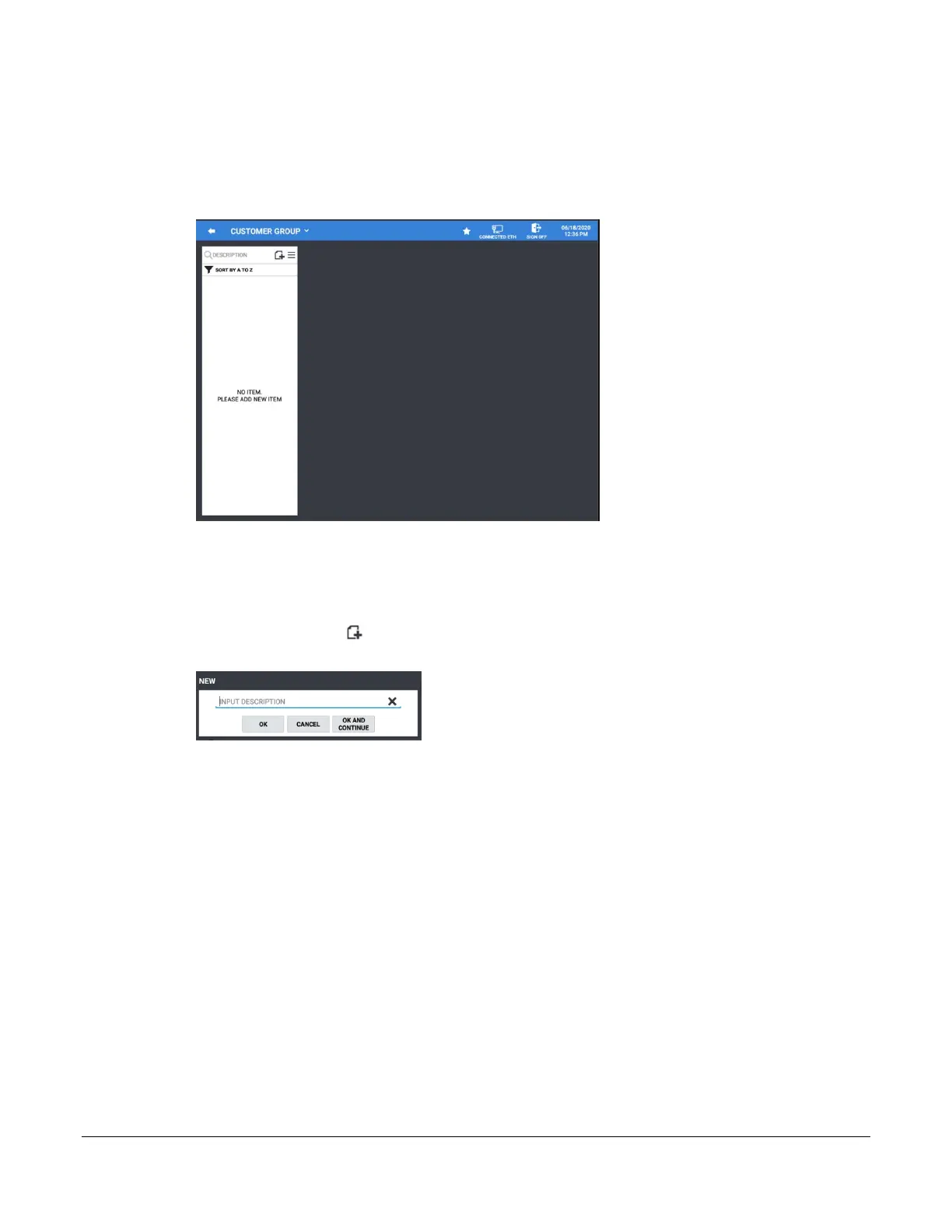
1. Select CUSTOMER GROUP from the CUSTOMER category menu screen to display the Customer
Group screen.
2. From this screen you can Add new Customer Group or edit existing Customer Groups as needed.
Add New Customer Group
1. Select CUSTOMER GROUP from the CUSTOMER category screen to display the Customer file.
2. Press the add record icon to add a customer to the database, the NEW customer group entry dialog
will display:
3. Type in a description for the new customer Group; Pressing the X at the end of entry field will clear the
description field.
4. Press OK to add the new recipe or press OK AND CONTINUE to add another customer group. Pressing
CANCEL will exit without adding the customer.
5. The new Customer Group will be added to the list:


 To Next Page