134
•
Advanced Operations Sam4POS Operators Manual v2.33
List Paid
Touch List Paid to view previously closed transactions for the current day or for a specified date range. The List
Paid key can only be used outside of a transaction. Transactions for all employees or transactions just for selected
employees can be previewed, reprinted or exported to a USB or E-Mail account. Transactions can be sorted further
by the Paid Type. When the Paid Type = TENDER, the Tender Category selections are also available.
Selected transactions can also be exported to a USB drive or Emailed as desired.
If integrated credit is utilized, Tips can be entered for credit transactions. See “TIP (Gratuity) Entry” operation on
page 139 for details.
Credit transactions may also be Voided from the List Paid screen; refer to the “Void Sales” section on page 140 for
details.
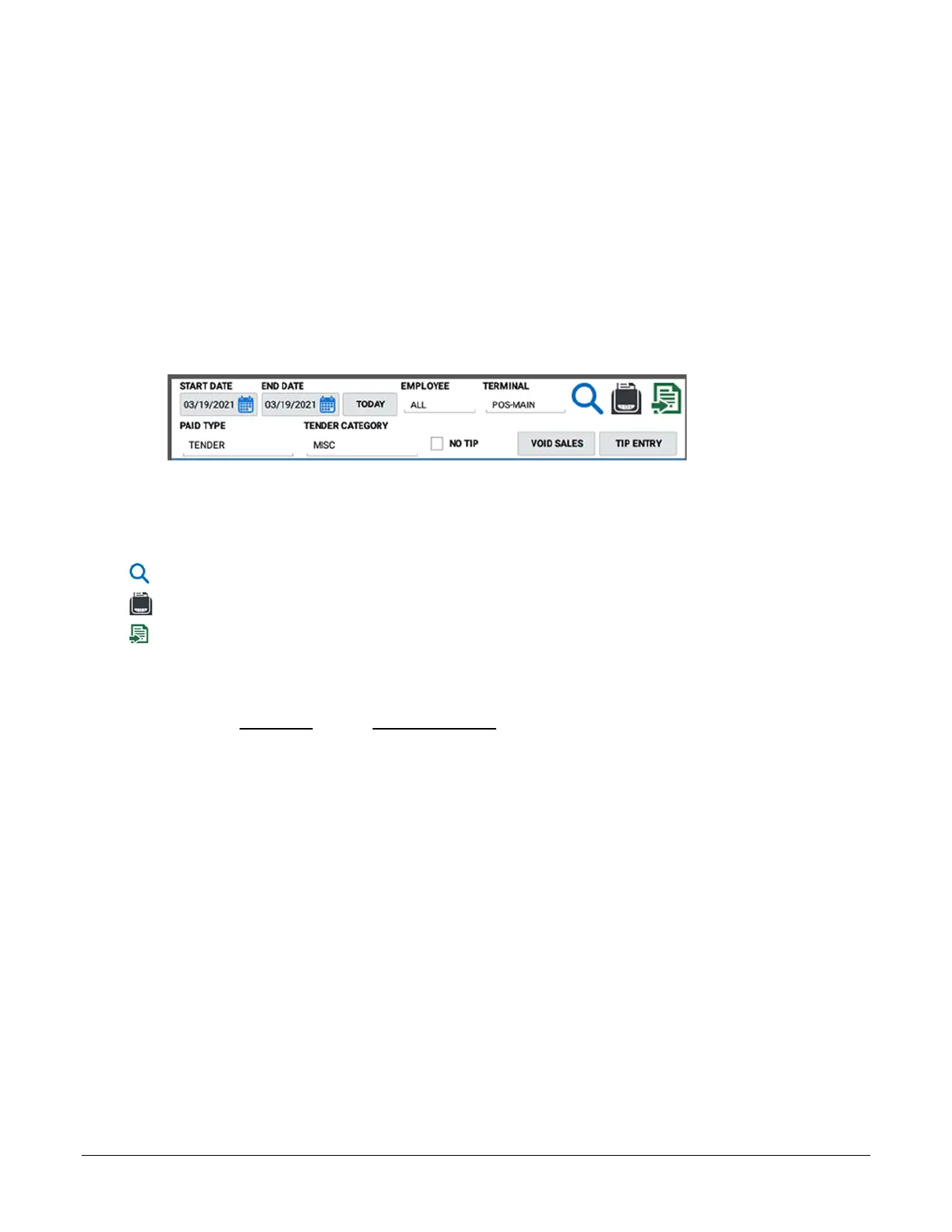
Use the filters to show just the specific transactions you want to view.
Start Date & End Date – You can select a specific day or date range to view.
Today – Select to view just paid transactions from current day.
Employee & Terminal – Choose all or specific employee(s) and/or terminals.
After setting or editing the filter selections, press the search icon to refresh the view the results.
Pressing the Print icon will print the currently displayed transactions summary list.
When a transaction is selected you can use this icon to export the transaction to USB or to an Email.
Exported data is sent in a spreadsheet format (.CSV file). Emailing data requires additional setup,
contact your dealer for details.
Paid Type Tender Category
• Not Used
N/A
• *Tender
Not Used, Cash, Check, Food Stamp Tender, *Misc
• No Sale
N/A
• Cancel
N/A
• Void Mode
N/A
• Void Item
N/A
• Return
N/A
• Waste
N/A
• Promo
N/A
• RA/PO
N/A
• * *PLU Info
N/A
* If the Paid Type is set for TENDER and the Tender Category is set for MISC, the NO TIP filter is added and
additional buttons for VOID SALES (Void Sales button is used only for EFT Transactions) and TIP ENTRY are
available.
* * PLU Info: when selected you can filter for an individual PLU or PLU Range. You would enter the PLU code or
descriptor to view paid transactions that contain the specified items.



 To Next Page