Sam4POS Operators Manual v2.33 Customer Delivery • 157
Park Order for Delivery at a Later Time
A customer may want to place a delivery order to be picked up or delivered at a later date and/or time. The
Sam4POS provides for this using the Order Park Time and the Order Service Time settings when a delivery order
is initiated.
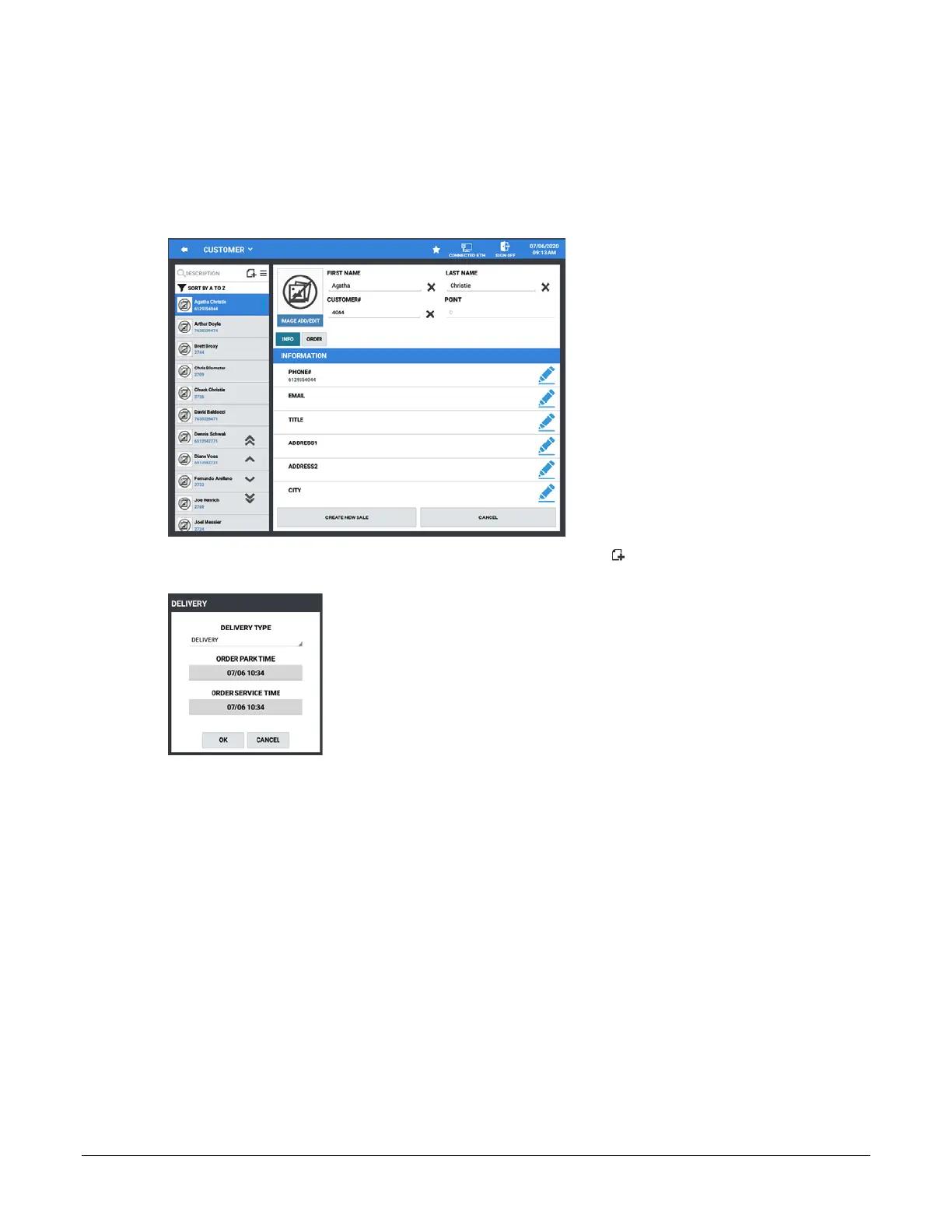
1. Touch the DELIVERY key to initiate a delivery order. The customer record screen displays:
2. Select a customer from the list or touch the Add New Record icon to add a new customer to the list.
Press the CREATE NEW SALE button to begin a new order. The DELIVERY dialog displays:
3. Select the parameters for the new order:
Delivery Type – Select Delivery or Pick-Up from the drop down menu.
Order Park Time – Press to select date & time for the pre-order pick-up/delivery order.
Order Service Time – Press to select date & time to releases parked order for preparation.
4. Touch OK to initiate the order. Pressing CANCEL will exit without creating the delivery order.
5. Enter the requested items; Press the STORE DELIVERY key to save the delivery order.
6. Parked orders can be recalled and edited as necessary.
a. Press the DELIVERY key
b. Select the CUSTOMER from the list
c. Press the OPEN LAST STORED SALE button; Add or edit as necessary
d. Press the STORE DELIVERY when finished.
7. When the set Date & Time for the Order Service Time arrives, the order will be sent to the KP (if used) to
begin preparation. Deliver the order when compete.



 To Next Page