Sam4POS Operators Manual v2.33 Customer Delivery • 155
Re-Order Previous Order
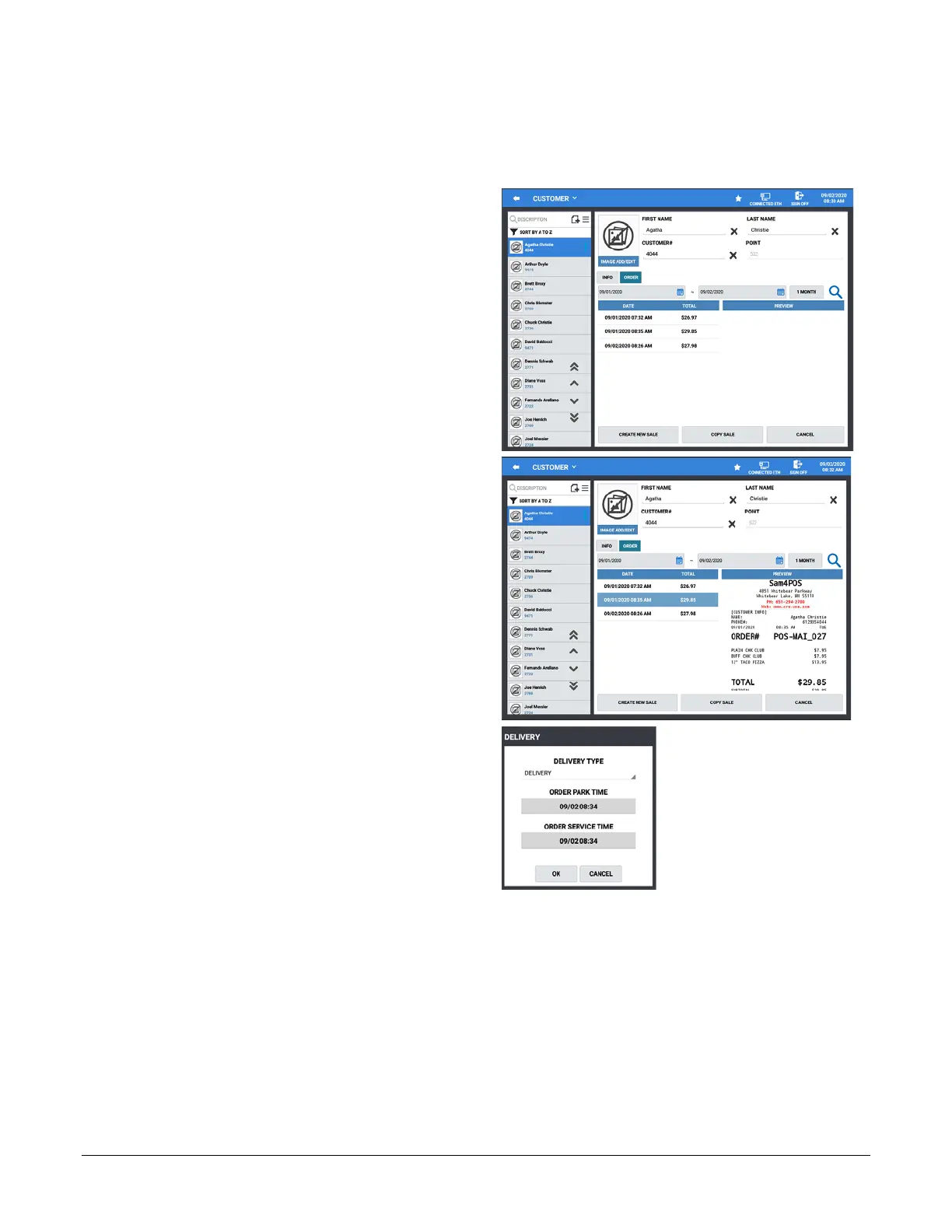
At times a customer may want to reorder the same items as their previous order. With the Sam4pos, previous
orders can easily be recalled and ordered again in a new sale.
1. Touch the DELIVERY key to display the
customer record screen and select a customer
from the list to begin a new delivery order.
2. After selecting the customer from the list, press
the ORDER button to display the previous
orders list for the selected customer:
3. Choose the order from the list you want to
reorder.
4. Press the COPY SALE button at the bottom of
the screen; The DELIVERY dialog is
displayed:
5. Select the parameters for the new order:
Delivery Type – Select Delivery or Pick-Up
from the drop down menu.
Order Park Time – Press to select date &
time; allows you to accept orders and hold
them for preparation and delivery at a later
time.
Order Service Time – Press to select date &
time; releases parked orders for preparation.



 To Next Page