32 • Getting Started Sam4POS Operators Manual v2.33
Sale Screen Size Edit
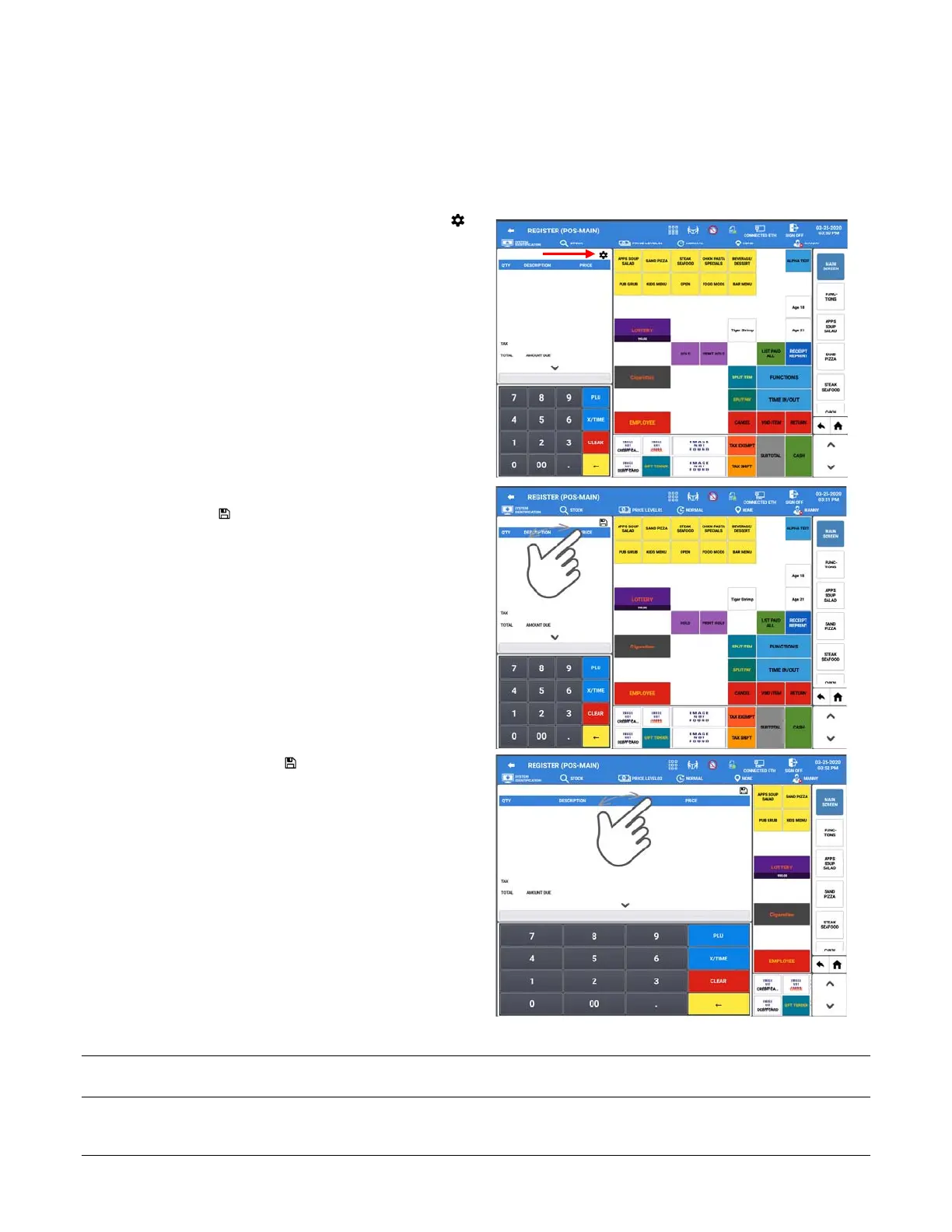
If the option in the Program Mode\Options\Options\General Option: ALLOW SALE SCREEN EDIT is enabled,
you can adjust the size of the sales screen in the register mode.
1. If the screen edit option is ON, the gear icon
will display above the transaction detail area
(Sale List) in REGISTER MODE allowing for
the screen size to be edited.
2. Press the Gear icon to change the size of the
sale display:
3. Press and drag in the white area next to the
save icon to expand the sale display area.
4. Press the Save icon to save the new screen
configuration.
5. The Sale List Font Size can be edited to be
larger or smaller as desired. Refer to the
Program Mode \ Options \ Options \ General
Option for this setting
Note: All register mode display areas are adjusted, any hidden MLU/FLU keys will no longer be accessible when
registering sales.



 To Next Page