Sam4POS Operators Manual v2.33 Report Mode
•
177
OPTIONS
Training Data, Current Data, Waste, Promo
NOTE: Option selections limit the report to display just the specified option selection data.
FILTERS
Group #1, Group #2, Group #3 – Select specific Groups assigned on PLU group assignment #1, #2, #3
Employee – Choose ALL or selected Employees
From PLU \ To PLU – Select a PLU or PLU range for the report if desired
TOP – Choose to display the Top 5, 10, 20, 30, 50, 100 or ALL PLU’s
Additionally, the Food Cost Report data can be displayed as a List report or in a Graph format.
GENERATE
Refresh, Zoom, Report View, Export
REPORT DATA
Recipe – Total Food Cost – Total Sales Count – Net Sale Total – Total Food Cost %
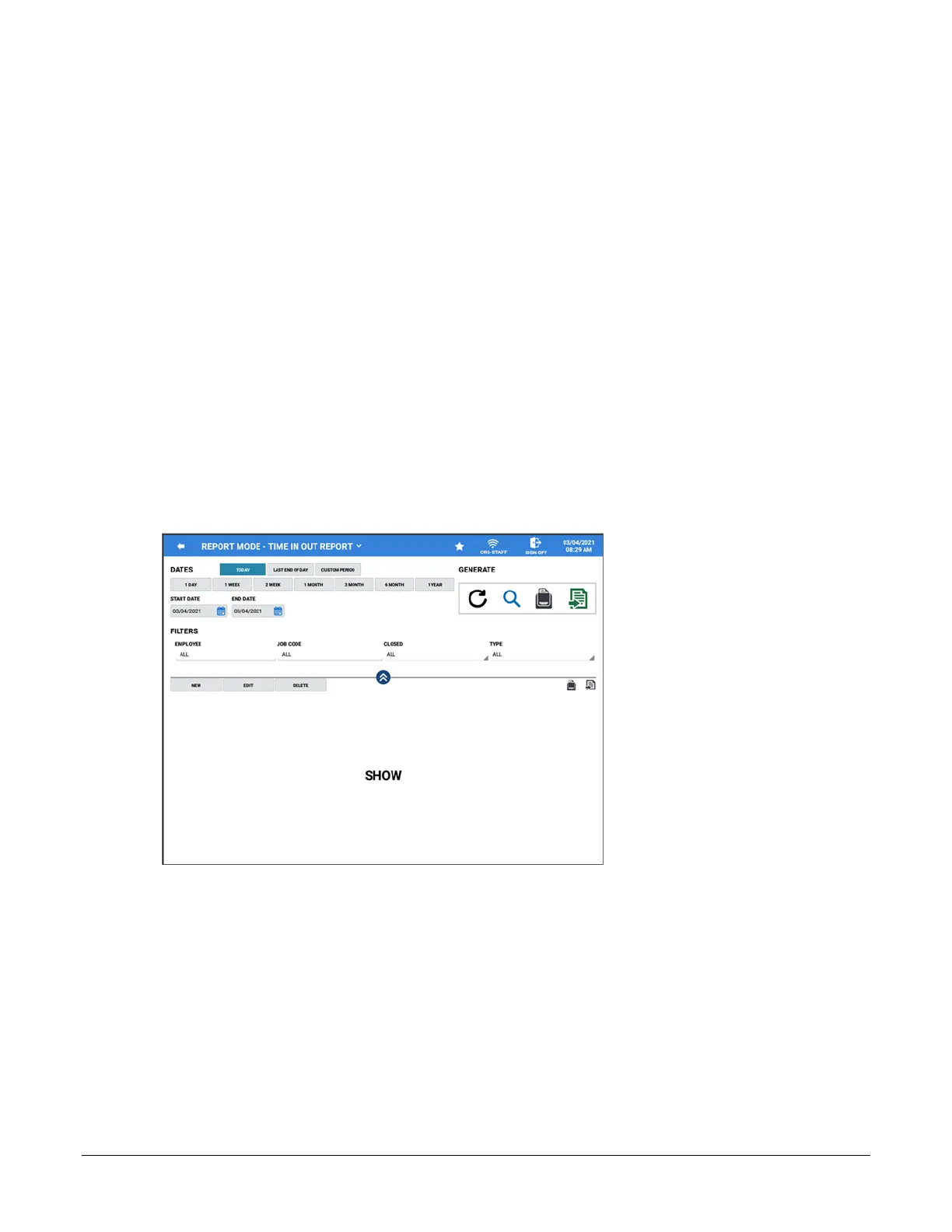
Time In Out Report
DATES
Date selections include: Today, Last End of Day, Custom Period
1 DAY, 1 WEEK, 2 WEEK, 1 MONTH, 3 MONTH, 6 MONTH, 1 YEAR
START DATE & END DATE
FILTERS
EMPLOYEE – ALL or selected Employees
JOB CODE – Select All or specific job code from the list
CLOSED – choose ALL, Not Closed, or Closed
TYPE – ALL, In, Out, Break Time



 To Next Page