142 • Using the Table Map Sam4POS Operators Manual v2.33
Table Map Operations
• If table management is “Manual”:
o touch the Table Map icon on the Register Mode title bar.
• If table management is “Automatic”:
o sign on an employee to display the Table Map screen.
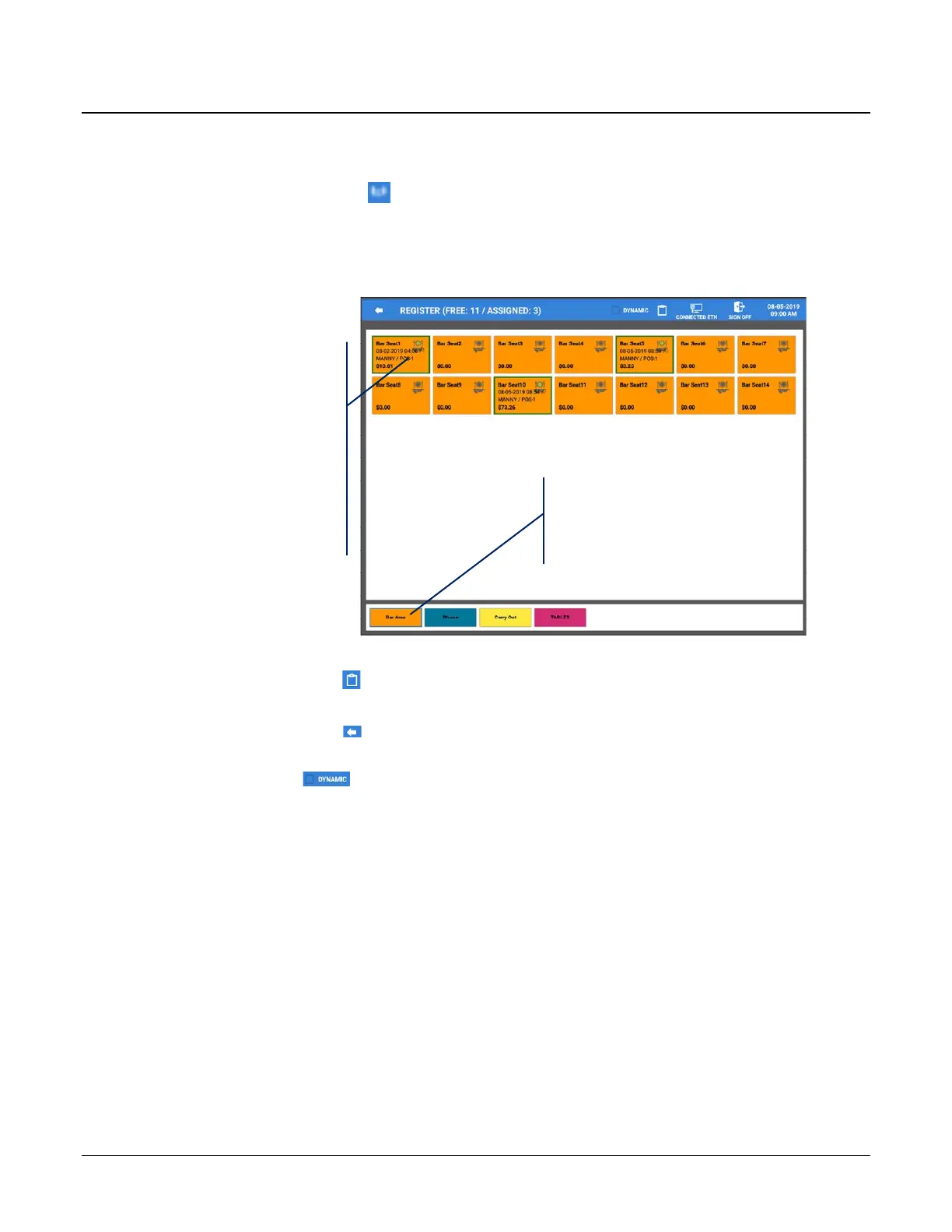
Active tables are displayed
with a Bold outline.
Each table displays with
basic table information:
• Table name/number
• Date/Time table was
opened
• Table balance
Touch the desired Zone
to display the appropriate
Seating Zone
• Pressing the Clip-Board icon on the Table Map Title Bar will exit the table map screen and return you
to the Register Mode.
• Pressing the back-arrow icon on the Table Map Title Bar will also exit the table map and return you to
the Register Mode.
• The Dynamic selection ; When the option DYNAMIC is selected in the table map, additional
configuration settings are provided for the Table Edit to allow customizing table positions, size and
adding a background image.


 To Next Page