Confidential 3. Installing the Product
English 8/2019. Rev 0.0 125
3.10.13 Communication Check
After installation, wiring, and configuration are completed, check the communication status by connecting
the TCP/IP cable and run the MODBUS program to see whether the System BMS shows the data of the Rack
BMS correctly.
3.10.13.1 PC’s IP Setting for Communication with the System BMS
The following guide for PC’s IP setting is made with Microsoft
®
Windows
®
7. Other versions of
Windows may be different.
1. Checking the Data of the System BMS requires changing the IP settings in the notebook PC to be used.
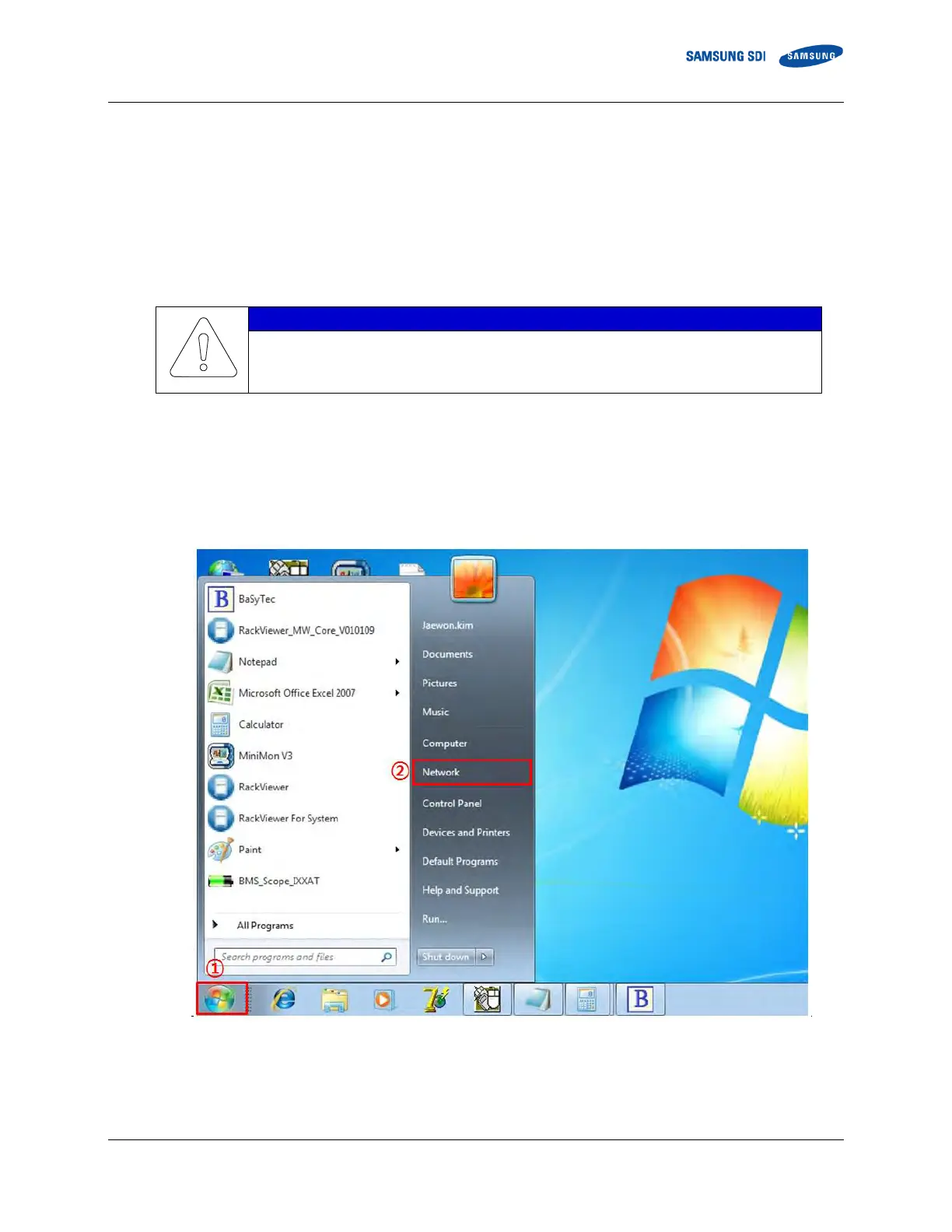
2. Click the “START” button in the desktop’s status bar (①) to open the Start menu.
3. Click “Network” (②). If “Network” menu is not available, click “Control Panel”
Figure 3-153: Open “Network”
4. When the Network window appears, click “Network and Sharing Center” (③).















 To Next Page