85
Internet Configuration
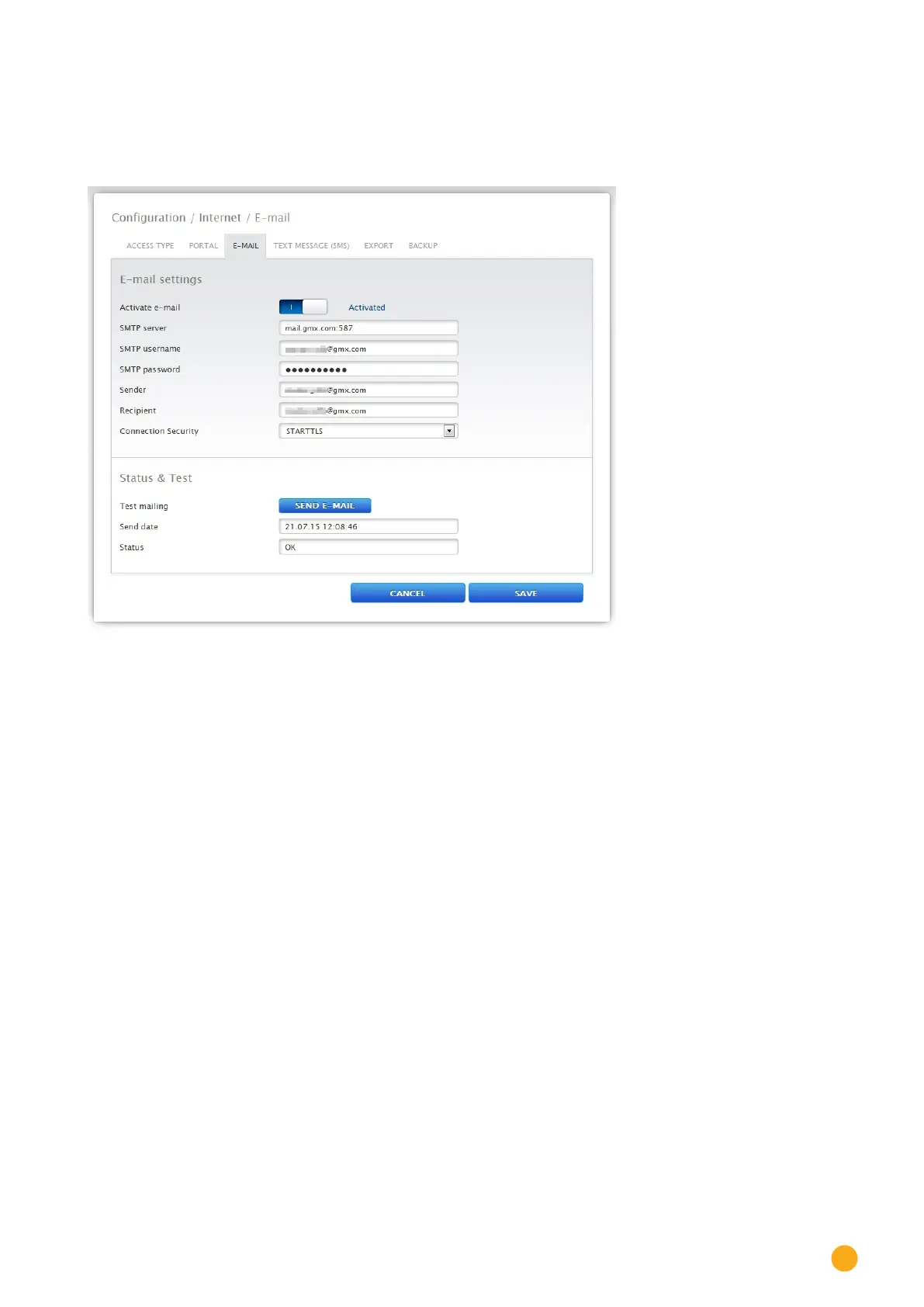
Connection security
The security method from the particular e-mail provider has to be selected next to the point Connection
security. The port for the secure connection is to be entered after the SMPT server.
Fig.: Example conguration STATTLS to send e-mail with GMX
Status & Test e-mail section
In this section, the e-mail settings can be tested and the information from the last sent e-mail displayed.
17.4 Text message (SMS)
The Solar-Log™ text message (SMS) program sends customized messages with any of the following con-
tent:
•
Daily yield overview
•
Inverter faults
•
Inverter failure
•
Deviation from target power
There are two options to send text messages (SMS):
•
Text messages (SMS) direct via GSM modem
This option is only available with GPRS models.
•
Text messages (SMS) via e-mail forwarding
Text messages (SMS) are sent in two stages: First, an e-mail message is sent to an e-mail service
provider who provides the text message (SMS) service. From a keyword in the Subject line, this
provider detects that the message is to be forwarded as a text message (SMS) to a certain number.
For the incoming e-mails, some e-mail providers forward a text message (SMS) free of charge with
the Subject line for information.



 To Next Page