6-18
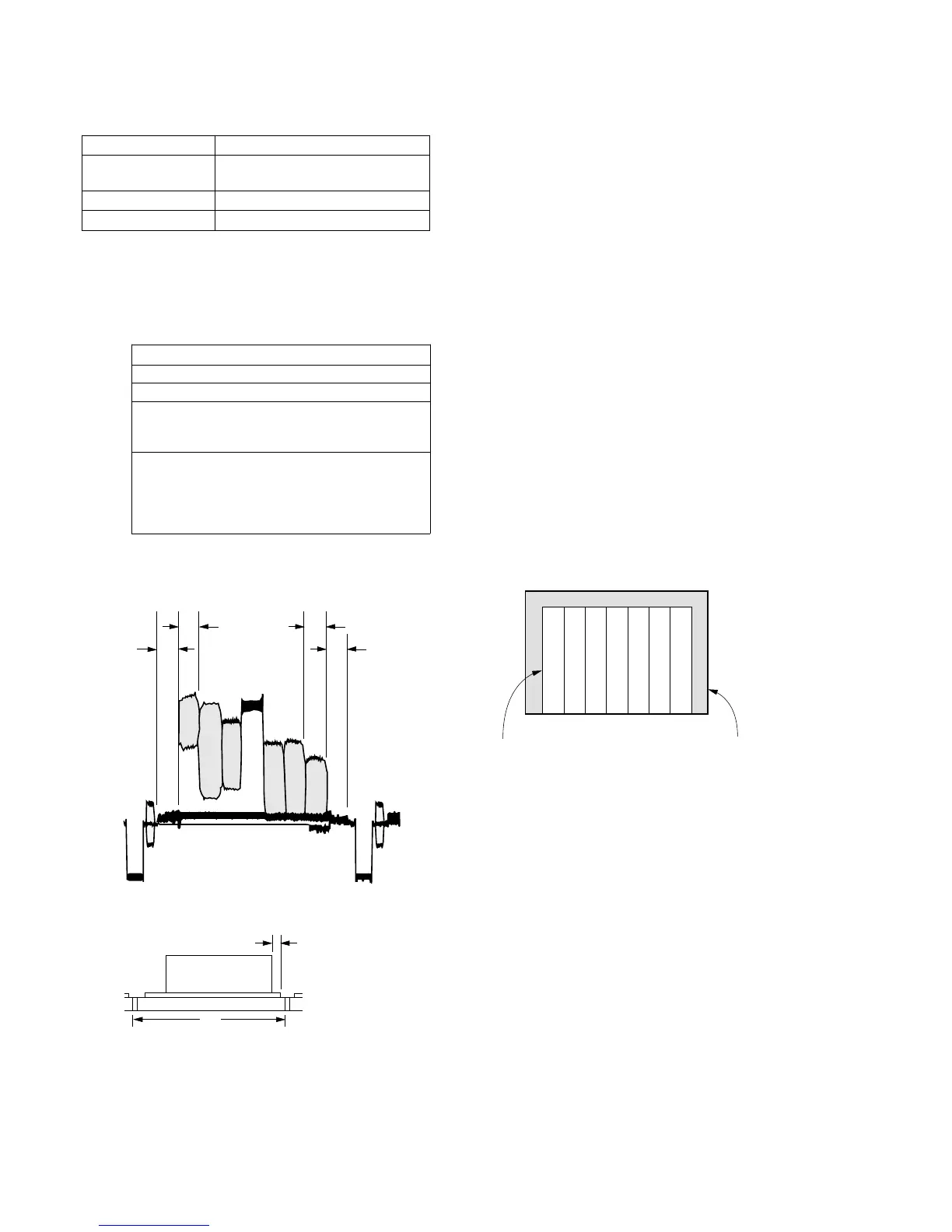
10. Picture frame setting
Subject Color bar chart standard picture frame
Measurement Point VIDEO output terminal
(Terminated in 75Ω)
Measuring Instrument Oscilloscope and monitor TV
Specification Value A=B, C=D, t=0 ± 0.1msec
Note 1 : Confirm that the “Camera-shaking” correction to OFF.
(EXCEPT TRV14E MODEL)
Note 2 : Confirm that the “Digital Zoom” is turned OFF.
(EXCEPT TRV14E MODEL)
Setting procedure:
Order Procedure
1 Turn OFF the auto focus.
2 Adjust the focus using the focus knob.
3 Adjust direction and zoom of camera so that the
picture frame is adjusted as specified by Fig. 6-1-8
and Fig. 6-1-9.
4 Write down markings on the picture frame on
the monitor screen. If the “color bar chart standard
picture frame” or “white pattern standard picture
frame” is specified in the following adjustment items,
obtain this picture frame.
Confirm with an oscilloscope
1. Horizontal rate
2. Vertical rate
Fig. 6-1-8
A=B C=D
B
A
C
D
V
t=0 ±0.1msec
Confirm on TV monitor (underscanned display)
Fig. 6-1-9
Color bar chart picture frame TV monitor picture frame













 To Next Page