6-19
11. Color reproduction adjustment
Purpose : Adjust the three primary color matrix
coefficients for correct color reproduction.
Adjustment error : Poor color reproduction.
Subject Color bar chart standard picture frame
Measurement Point VIDEO output terminal
(Terminated in 75Ω)
Measuring Instrument Vectorscope
Adjustment Page F
Adjustment Address 43, 44, 45, 46
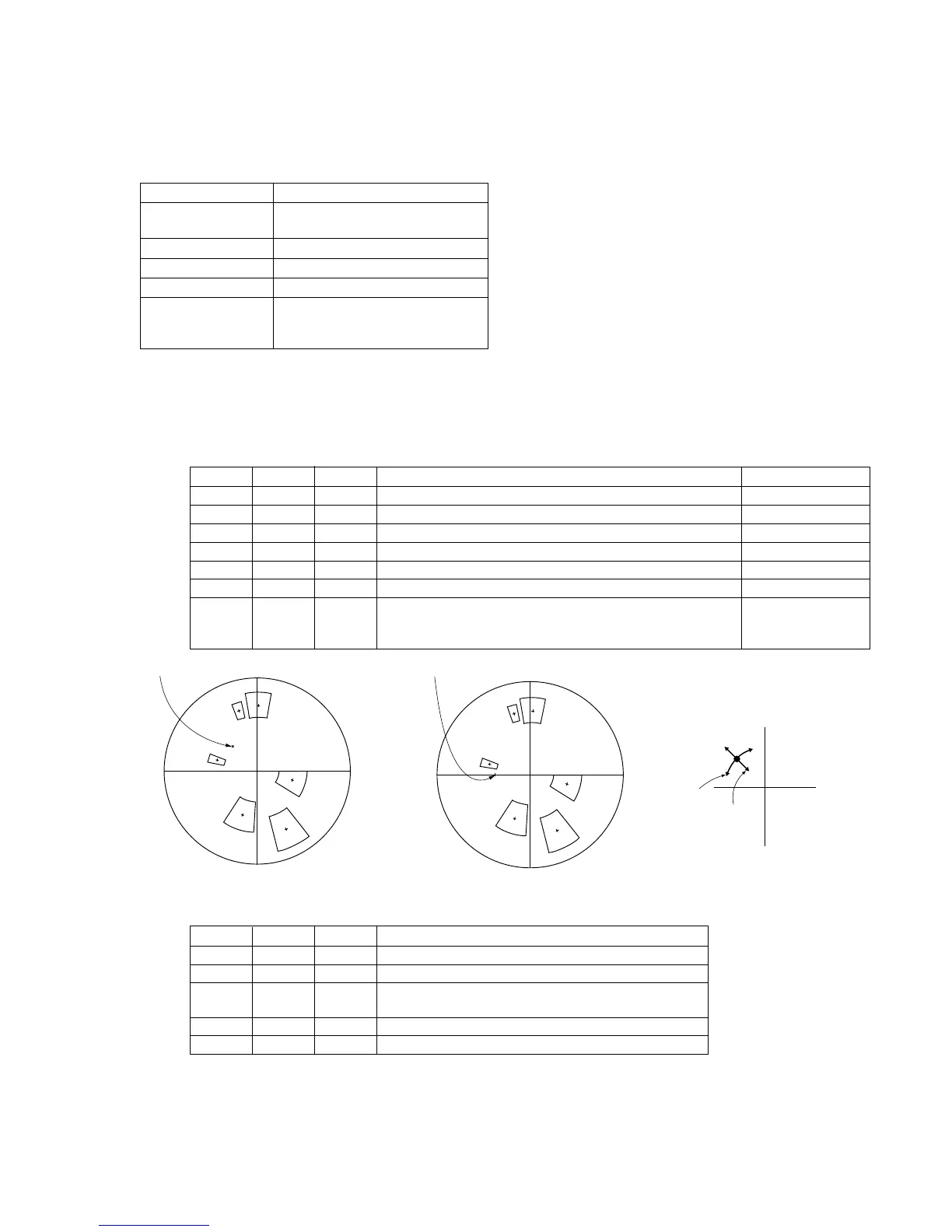
Specification Value Each spot must be located within the
specified color reproduction zone on a
vectorscope display.
Note 1 : Confirm that the “Camera-shaking” correction to OFF.
(EXCEPT TRV14E MODEL)
Note 2 : Confirm that the “Digital Zoom” is turned OFF.
(EXCEPT TRV14E MODEL)
Adjustment procedure:
Processing after Adjustments:
Related Adjustments:
“Auto white balance reference data input”
“Auto white balance adjustment”
R-Y
MG
Y
L
G
CY
B
B-Y
R
R-Y
MG
Y
L
G
CY
B
B-Y
R
Burst position
Burst position
44, 46
B-Y
R-Y
43, 45
43, 44 : red
45, 46 : yellow
Order Page Address Data Procedure Condition
1 6 00 01 After setting the data, press the PAUSE button. (Preparation)
2 6 42 02 After setting the data, press the PAUSE button.
3 6 03 00 After setting the data, press the PAUSE button. (Setting)
4 F 80 Take note of the data.
5 F 80 00 After setting the data, press the PAUSE button.
6 6 01 37 After setting the data, press the PAUSE button.
43, 44
Change the data so that red, yellow, magenta, green, cyan and blue
7F
45, 46
spot must be located within the specified color reproduction zone Weighting OFF mode.
on a vectorscope display. Press the PAUSE button for each address.
Order Page Address Data Procedure
1 6 42 00 After setting the data, press the PAUSE button.
2 6 01 00 After setting the data, press the PAUSE button.
3 F 80 Set the data which is noted in step 4, then press the PAUSE
button.
4 6 03 10 After setting the data, press the PAUSE button. (Setting)
5 6 00 00 After setting the data, press the PAUSE button. (End)
PAL (510H/760H) MODEL NTSC (510H) MODEL













 To Next Page