6-36
20-4. CONTRAST adjustment
Purpose : Adjusts contrast of LCD picture
Adjustment Error :Details of black will be lost, or white
saturated/black compressed picture.
Mode Playback
Signal Color bar signal with chroma and
burst signals turned OFF.
Measurement point CN804 〈CN1804〉 pin 2 (VG)
Measuring equipment Oscilloscope
[External trigger : CN804 〈CN1804〉
pin 4 (HDB) 〈HSY〉]
Adjustment page F
Adjustment address DD
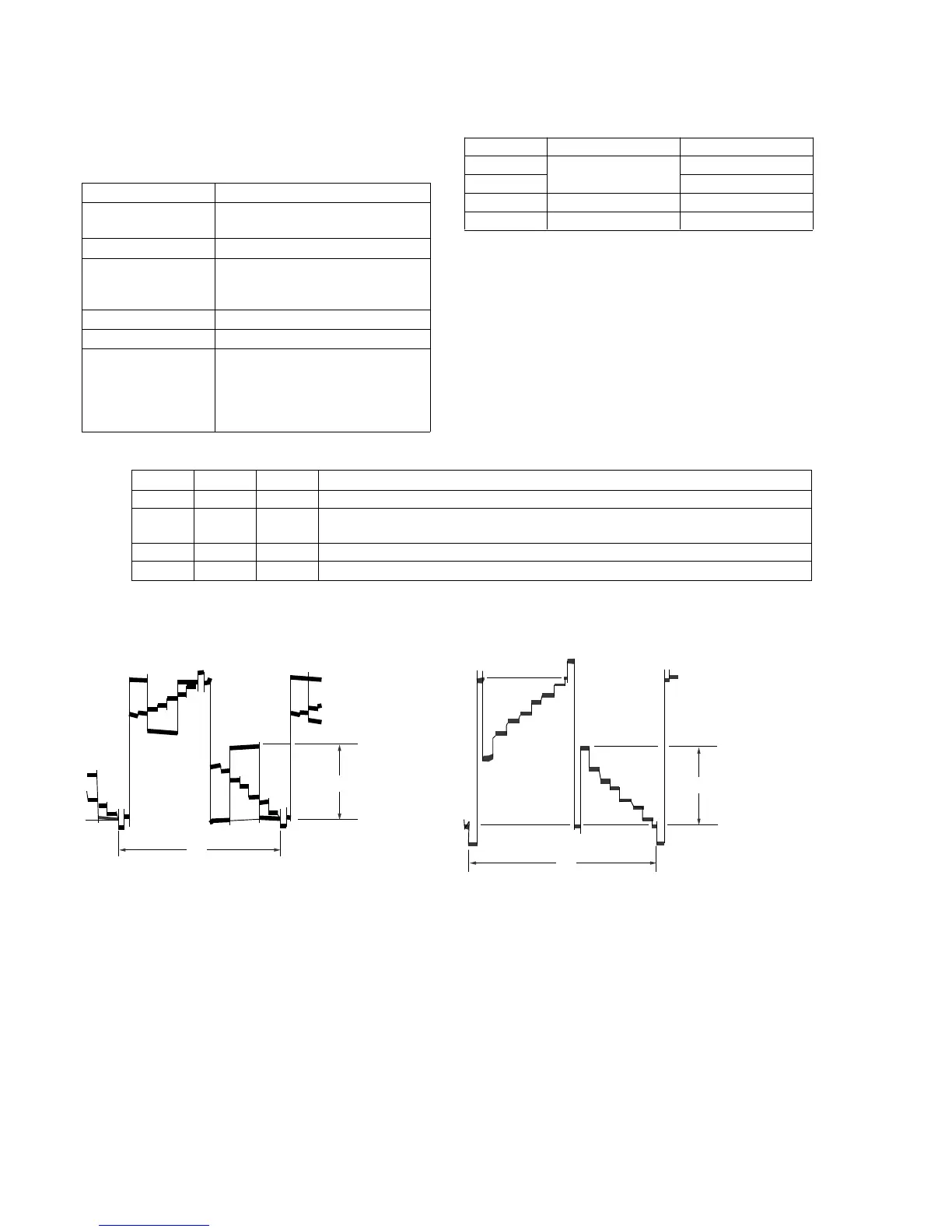
Specification Type 1 : A=2.00 ± 0.05Vp-p (PAL)
Type 2 : A=3.30 ± 0.05Vp-p (PAL)
Type 3 : A=3.45 ± 0.05Vp-p (NTSC)
Type 4 : A=2.87 ± 0.05Vp-p
(NTSC/PAL)
Adjustment procedure:
Related Adjustment:
BRIGHT adjustment
Order Page Address Data Procedure
1 6 00 01 After setting the data, press the PAUSE button. (Preparation)
2 F DD Change data using the PLAY and STOP buttons until the amplitude (A) has the
specification value.
3 Press the PAUSE button.
4 6 00 00 After setting the data, press the PAUSE button. (End)
NTSC MODEL PAL MODEL
2H
White (100%)
Pedestal level
A
2H
White (100%)
Pedestal level
A
Note 1 : Set the BRIGHT control volume to their mechanical
center during adjustment.
(Center is the 17 clicks from the BRI MIN.)
Note 2 : This adjustment must be performed together with the
BRIGHT adjustment as the pair adjustment.
(Re-adjust them when they are out of specifications.)
Type 1
Type 2
Type 3
Type 4
LCD size
2.5 inch (PAL only)
3.0 inch (NTSC)
3.5 inch (NTSC/PAL)
LCD board
PD-74/SD-24
PD-75/SD-25
PD-77
PD-76
No mark : Type 1, Type 4
〈 〉 : Type 2, Type 3













 To Next Page