Chapter 5 Wipes
323
Wipe Settings for Independent Key Transitions
• When Magnitude is selected
a) See page 309.
Setting the wipe pattern aspect ratio (Aspect ratio)
1
Press [Aspect] in the Key1 Wipe Adjust menu, turning it on.
2
Set the following parameter.
a) See page 310.
Replicating the wipe pattern (Multi)
1
Press [Multi] in the Key1 Wipe Adjust menu, turning it on.
2
Set the following parameters.
a) See page 311.
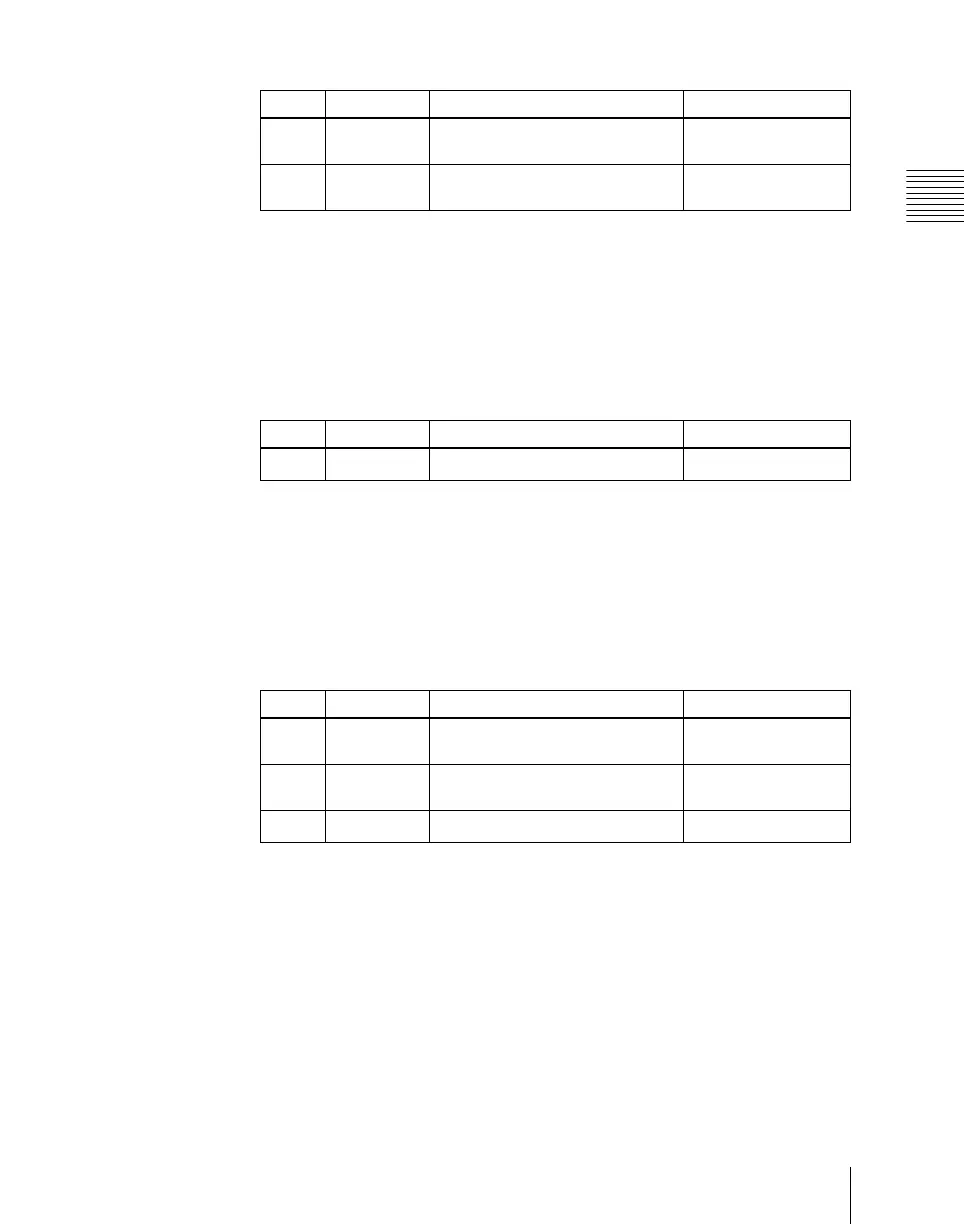
Knob Parameter Adjustment Setting values
1 Angle Angle of pattern rotation at start of
transition
–100.00 to +100.00
a)
2 Magnitude Angle of rotation through course
of transition
–200.00 to +200.00
a)
Knob Parameter Adjustment Setting values
1 Aspect Aspect ratio
–100.00 to +100.00
a)
Knob Parameter Adjustment Setting values
1 H Multi Number of repetitions of pattern
horizontally
1 to 63
2 V Multi Number of repetitions of pattern
vertically
1 to 63
3 Invert Type Replication layout
1 to 4
a)



 To Next Page