Chapter 6 DME Wipes
362
DME Wipe Settings for Independent Key Transitions
1
In the <Position> group of the Key1 DME Wipe Adjust menu, press
[Position], turning it on.
2
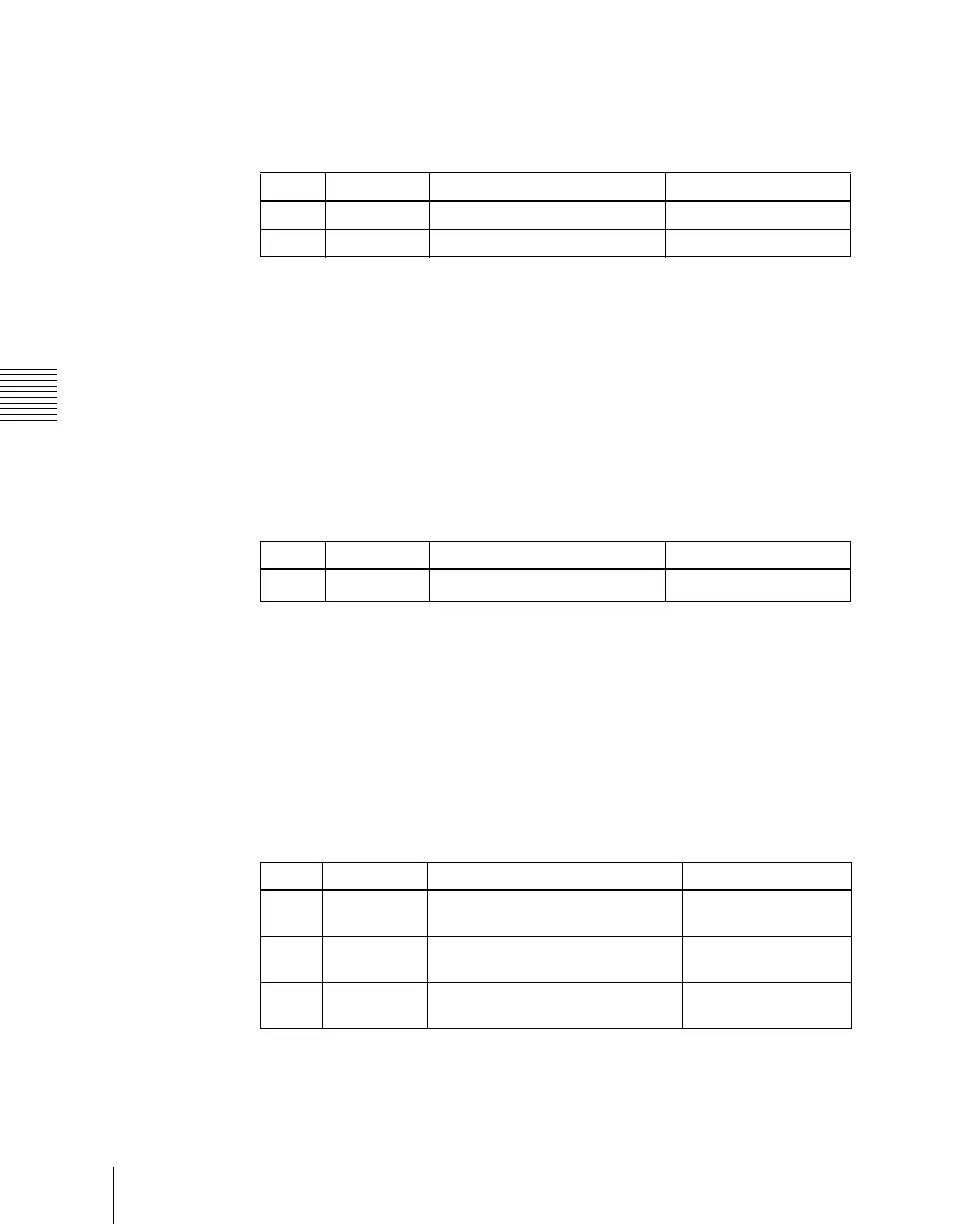
Set the following parameters.
To return the DME wipe pattern position to the center of the screen
In the <Position> group, press [Center].
Setting the DME wipe pattern size (Size)
For applicable pattern numbers, see page 347.
1
In the Key 1 DME Wipe Adjust menu, press [Size], turning it on.
2
Set the following parameter.
a) The effect size when [Size] is off is taken as 100.00%.
Cropping a key DME wipe
1
In the <Crop Mode> group of the Key1 DME Wipe Adjust menu, press
[Crop], turning it on.
2
Set the following parameters.
Knob Parameter Adjustment Setting values
1 H Horizontal position –200.00 to +200.00
2 V Vertical position –200.00 to +200.00
Knob Parameter Adjustment Setting values
1 Size Set size of effect
0.00 to 200.00
a)
Parameter group [1/2]
Knob Parameter Adjustment Setting values
1 H Cropt the left and right of the
image
Left value shown
2 V Crop the top and bottom of the
image
Top value shown
3 All Crop the top, bottom, left, and
right of the image
Left value shown



 To Next Page