1.
Navigate to MANAGEMENT > NETWORK: SNMP Setup.
2.
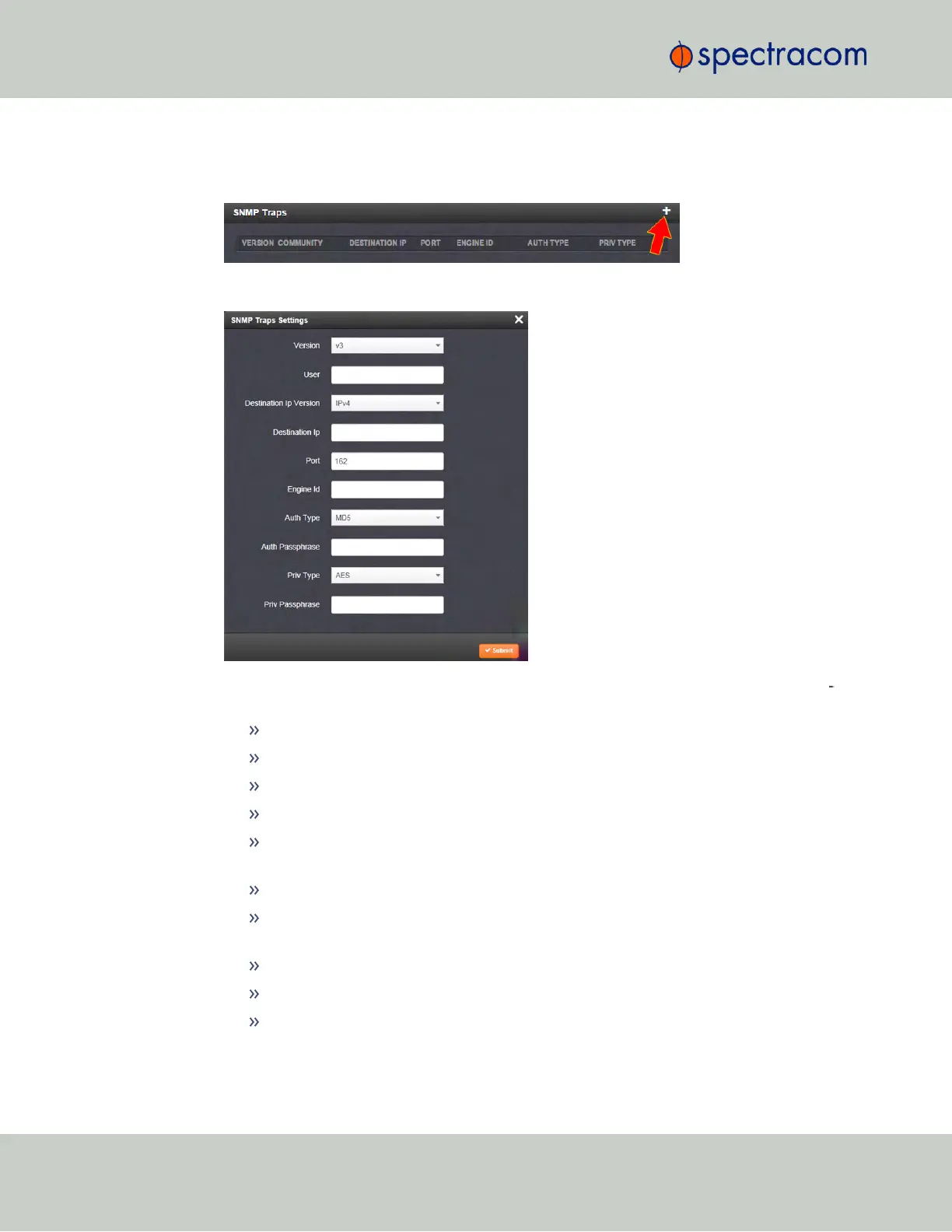
In the SNMP Traps panel, click the PLUS icon in the top-right corner.
3.
The SNMP Traps Settings window will display:
4.
Enter the required information in the fields provided. (Note that the options will vary con
textually according to your Version.)
5.
The Version field provides a choice between v1, v2c, and v3 [= default]
The Community field for the SNMP Community string. [v1, v2c]
SNMP User names should be between 4 and 32 characters in length. [v3]
Destination IP Version is a choice between IPv4 and IPv6. [v1, v2c, v3]
Destination IP is destination address for the notification and password key to be
sent. The default port is 162. [v1, v2c, v3]
The UDP Port number used by SNMP Traps [default = 162]. [v1, v2c]
Engine Id must be a hexadecimal number (such as 0x1234). The Id originates
from the MIB Browser/SNMP Manager. [v3]
Auth Type provides a choice between MD5 (the default) and SHA. [v3]
The Auth Password must be between 8 and 32 characters in length. [v3]
The Priv Type field provides a choice between AES and DES. [v3]
86
CHAPTER 2 • SecureSync User Reference Guide Rev. 23
2.14 Configuring Network Settings



 To Next Page