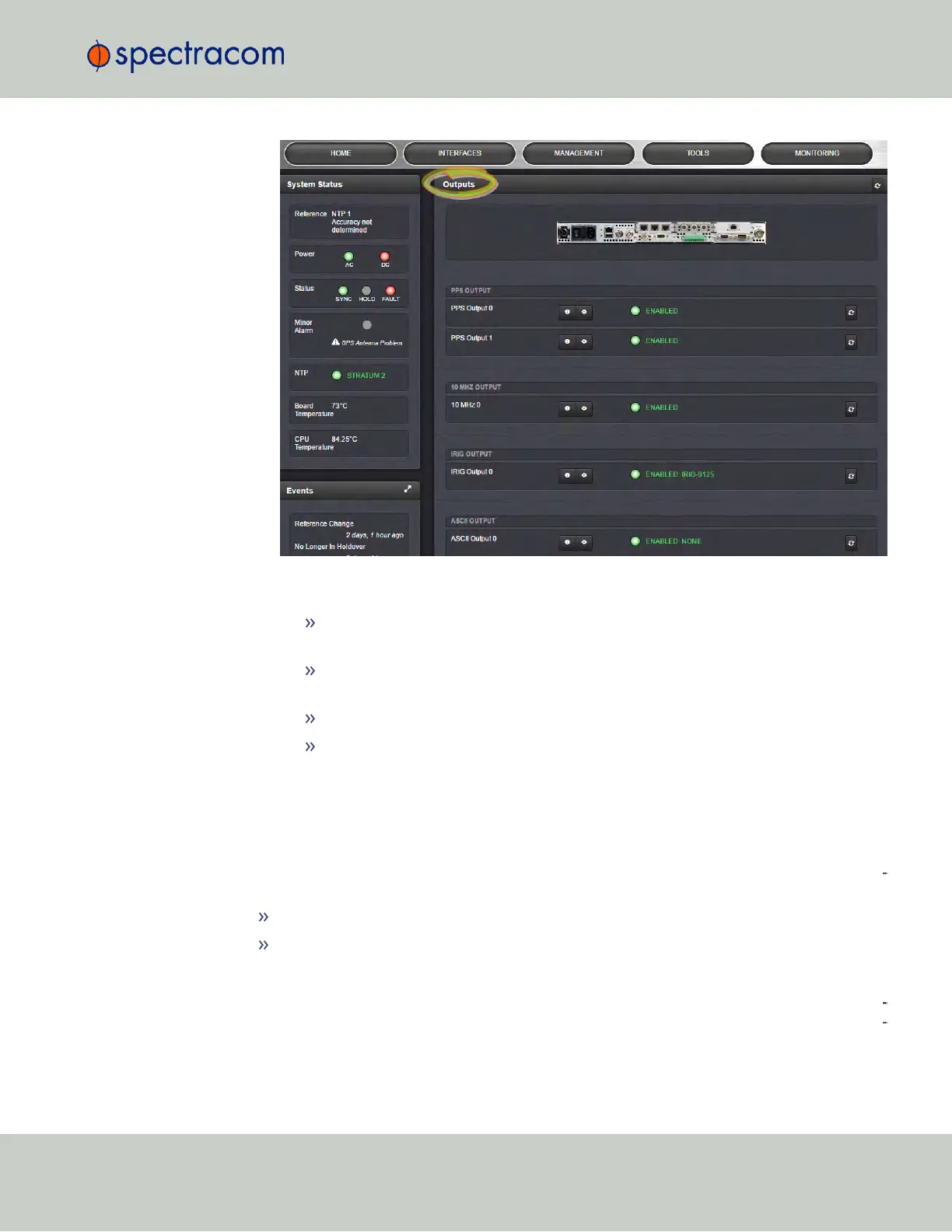
While System Status and logged Events are displayed on the left, the Outputs panel on
the right lists all the outputs detected.
If you hover with your mouse pointer over any of the connectors shown in the
rear panel illustration, a tooltip will be displayed, indicating the type of output..
If you have only one output of any type, SecureSync will number that output 0.
Additional outputs will be numbered 1 or above.
If you click the INFO button next to an output, a Status window will open.
If you click the GEAR button next to an output, the Configuration window will
open.
2.17.2 The 1PPS and 10MHz Outputs
The SecureSync base model includes one 1PPS output and one 10MHz output. Additional
1PPS and frequency outputs are available with option cards. To configure these outputs, nav
igate to:
INTERFACES > OUTPUTS, or
INTERFACES > OPTIONCARDS
and select the 1PPS Output or 10 MHz Output you would like to see, or configure.
The 10MHz signal is provided by the internal oscillator. External 1PPS sources ("ref
erences")—if present and valid—are utilized to discipline the oscillator, in other words to cor
rect for oscillator drift (the oscillator cannot discipline to either NTP input, or a User set time,
2.17 Configuring Outputs
CHAPTER 2 • SecureSync User Reference Guide Rev. 23
133



 To Next Page