4.3.6 TACACS+ Authentication
Terminal Access Controller Access-Control System Plus (TACACS+) is a protocol that handles
authentication, authorization, and accounting (AAA) services. SecureSync supports pam_
tacplus, allowing users to validate their username/password when logging into SecureSync via
a TACACS+ server. Currently, http/https/ssh/pure-ftpd are supported.
In order to enable TACACS+ for ssh/pure-ftpd, a matching user account needs to be created
locally on the SecureSync unit that matches the account on the TACACS+ server:
For example, a user with the username “user3” and password “pass3” on the TACACS+ server
also has to create a “user3” account on the SecureSync unit before logging in (the password
can be different).
Reference information:
https://en.wikipedia.org/wiki/TACACS
http://www.cisco.com/c/en/us/support/docs/security-vpn/remote-
authentication-dial-user-service-radius/13838-10.html
https://github.com/jeroennijhof/pam_tacplus
For additional help, see also "RADIUS Authentication" on page242
4.3.6.1 Adding/Deleting a TACACS+ Server
1.
Navigate to MANAGEMENT > OTHER: Authentication.
2.
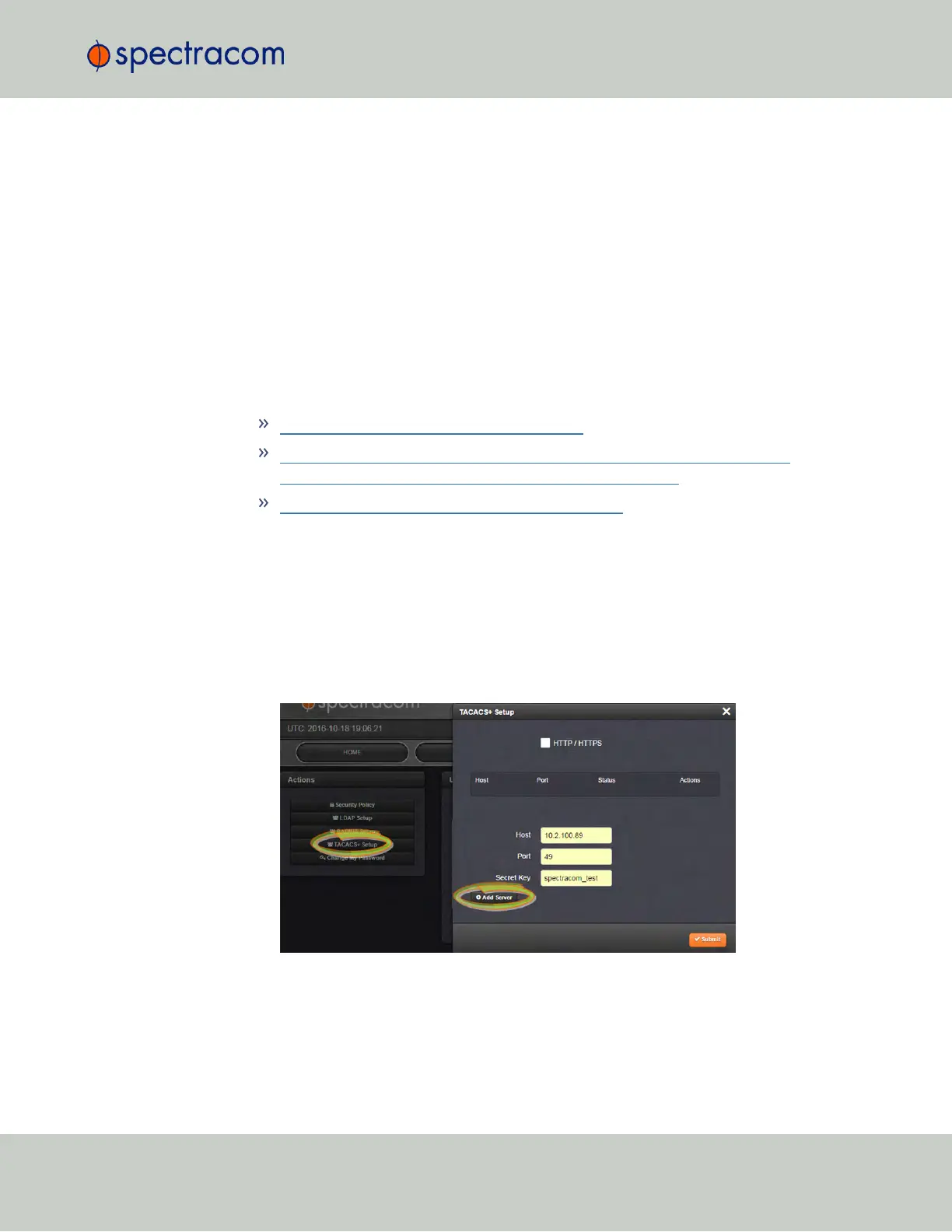
In the Actions panel on the left, click TACACS+. The TACACS+ Setup window will be
displayed:
3.
Fill out the fields:
4.3 Managing Users and Security
CHAPTER 4 • SecureSync User Reference Guide Rev. 23
247



 To Next Page