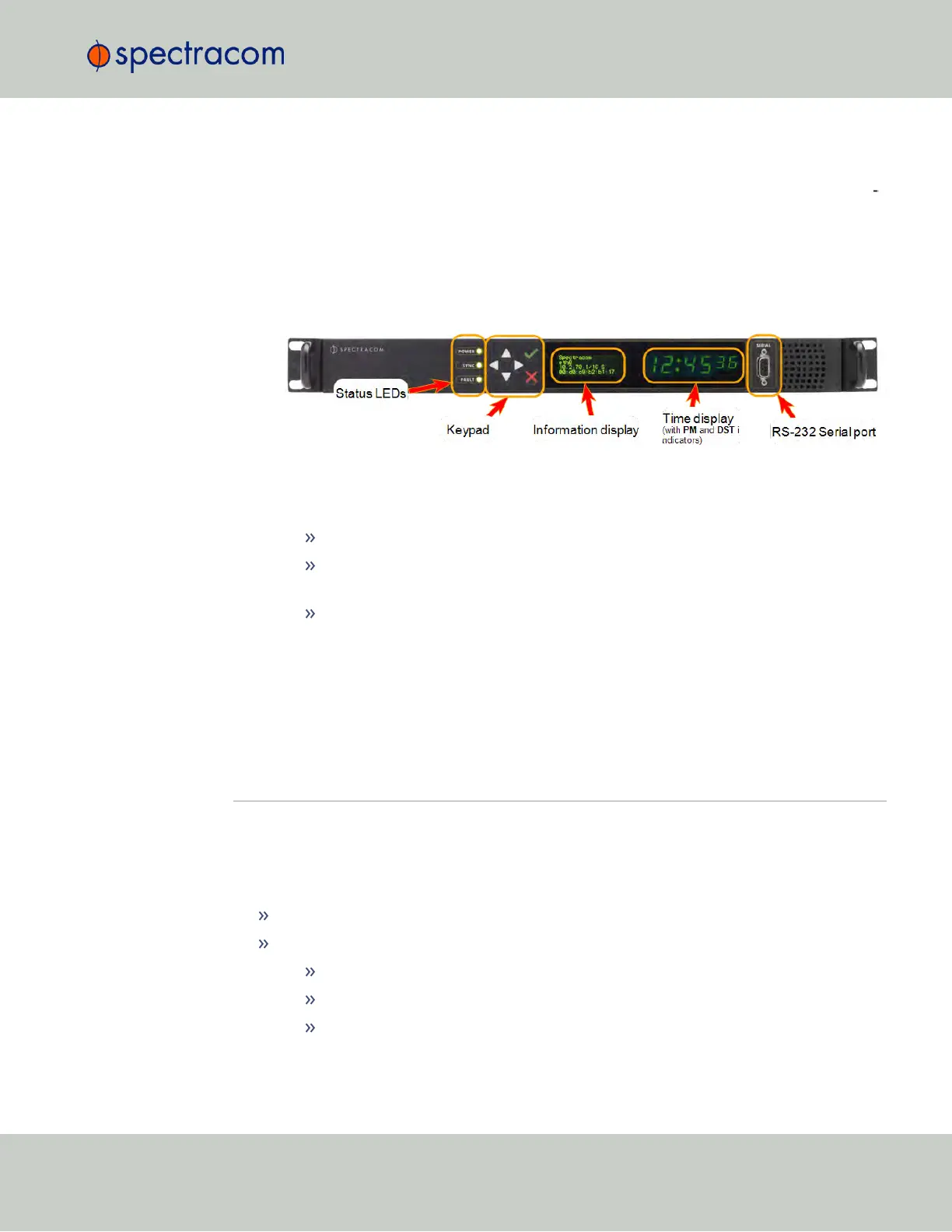
The time display will reset and then start incrementing the time. About 10 seconds after
power-up, “Starting up SecureSync” will be displayed in the information display. After
approximately 2minutes, the information display will then show the current network set
tings.
By default, the 4-line information display shows the unit’s hostname, IPv4 address, mask,
and gateway.
The time display shows the current time: UTC (default), TAI, GPS or local timescale, as
configured.
Figure 2-1: SecureSync front panel
3.
Check the front panel status LED indicators:
The Power lamp should be solid green.
The Sync lamp will probably be red, since synchronization has not yet been
achieved.
The Fault lamp will be OFF, or solid orange, indicating a minor alarm, or solid
red, asserting a power-up frequency error alarm (until the disciplining state is
reached.)
For additional information, see "Status LEDs" on page6 and "Status Monitoring via Front
Panel" on page259.
2.12 Setting up an IP Address
In order for SecureSync to be accessible via your network, you need to assign an IP address to
SecureSync, as well as a subnet mask and gateway, unless you are using an address assigned
by a DHCP server.
There are several ways to setup an IP address, described below:
via the front panel keypad and information display
remotely …
…via serial cable
… via dedicated network cable
… via a DHCP network.
2.12 Setting up an IP Address
CHAPTER 2 • SecureSync User Reference Guide Rev. 23
43



 To Next Page