II.
Output Enabled in Holdover—The output is present unless SecureSync is not syn
chronized to its references (SecureSync is in Holdover mode).
III.
Output Disabled in Holdover—The 1PPS output is present unless the SecureSync ref
erences are considered not qualified and invalid (the output is NOT present while
SecureSync is in Holdover mode.)
IV.
Output Always Disabled—The output is never present, even if SecureSync references are
present and valid.
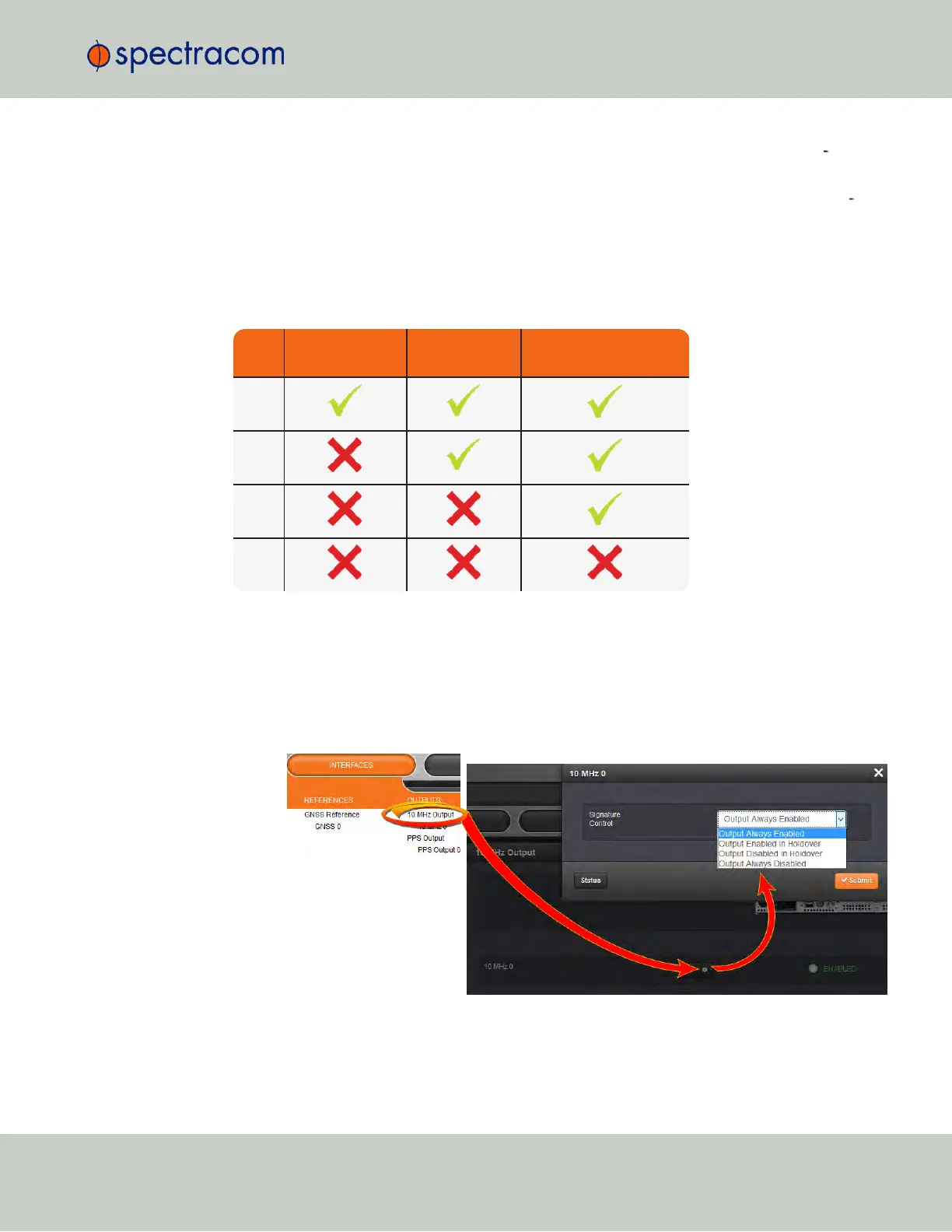
Table 2-6:
Signature control output-presence states
Ref.
Out-of-sync,
no holdover
In holdover
In-sync with
external reference
I.
II.
III.
IV.
2.17.5.1 Configuring Signature Control for an Output
To review or configure the Signature Control setting for any Output:
1.
Navigate to INTERFACES > OUTPUTS and click the Output you want to configure or
review.
2.
In the Output panel, click the GEAR button for the desired Output. A window will open
with the current Signature Control setting, and a drop-down list to change it.
2.17 Configuring Outputs
CHAPTER 2 • SecureSync User Reference Guide Rev. 23
137



 To Next Page