Caution: If you select a setting that does NOT resurvey, and subsequently relocate
your unit (antenna) by more than 100m, u-blox M8T and Trimble Res-T receivers
will NOT detect the new position, and hence provide an incorrect time.
For more information about the GNSS Survey, see "Deleting the GNSS Receiver Position" on
page180.
For more information on Receiver Modes , see "Selecting a GNSS Receiver Mode" on
page172.
Available GNSS Receiver Dynamics Settings
The following Receiver Dynamics settings are available:
Land (Resurvey): [default]
When used with the Mobile Receiver Mode, the receiver is adjusted for typical dynamic
land-based applications.
When used with the Standard Receiver Mode, this setting also will automatically initiate
a resurvey after SecureSync reboots, in order to account for a possible relocation.
Sea: The receiver dynamics will be optimized for mobile motion patterns typical with
marine applications, resulting in greater timing accuracy, and avoiding premature loss
of synchronization.
Air: The receiver dynamics will be optimized for acceleration forces typically exper
ienced in civil aviation applications.
Stationary (No Resurvey): In Standard Mode, the receiver is set to a non-dynamic value
for stationary applications.
There will be no automatic resurvey after a reboot. Should a unit be relocated, you
need to delete its position, thus initiating a new survey.
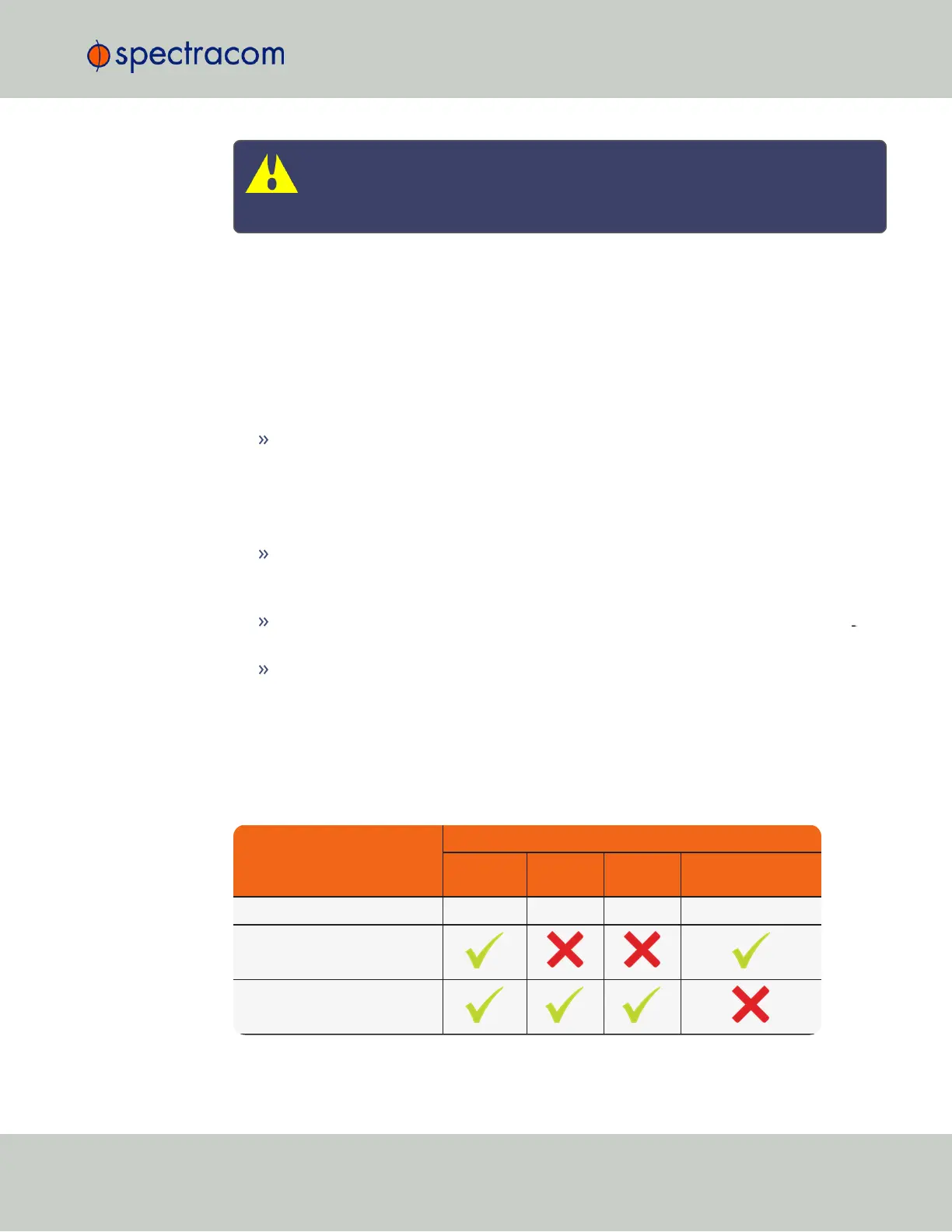
The following table illustrates the interdependence between Receiver Dynamics, Receiver Mode
(see "Selecting a GNSS Receiver Mode" on page172) and receiver type:
Table 3-2:
Receiver dynamics, ~modes, ~ dynamics, ~ types
Receiver Mode
Receiver Dynamics
Land
(Resurvey)
Sea Air
Stationary
(No Resurvey)
Single Satellite irrelevant irrelevant irrelevant irrelevant
Standard
Mobile (with u-blox receivers)
3.3 Managing References
CHAPTER 3 • SecureSync User Reference Guide Rev. 23
175



 To Next Page