USER: User provided time
LOCL: Local reference (synced to itself)
INIT: NTP on server/peer is initializing
STEP: NTP on server/peer is performing initial synchronization step and restart-
ing
AUTH STATUS: Indicates if the selected reference is using MD5 authentication. “None”
indicates authentication not being used.
LAST: The number of seconds that have expired since this reference was last polled for its
time.
POLL: The polling interval, i.e. how often VersaSync is polling this NTP reference for its
time.
DELAY (ms): The measured one-way delay between VersaSync and its selected reference.
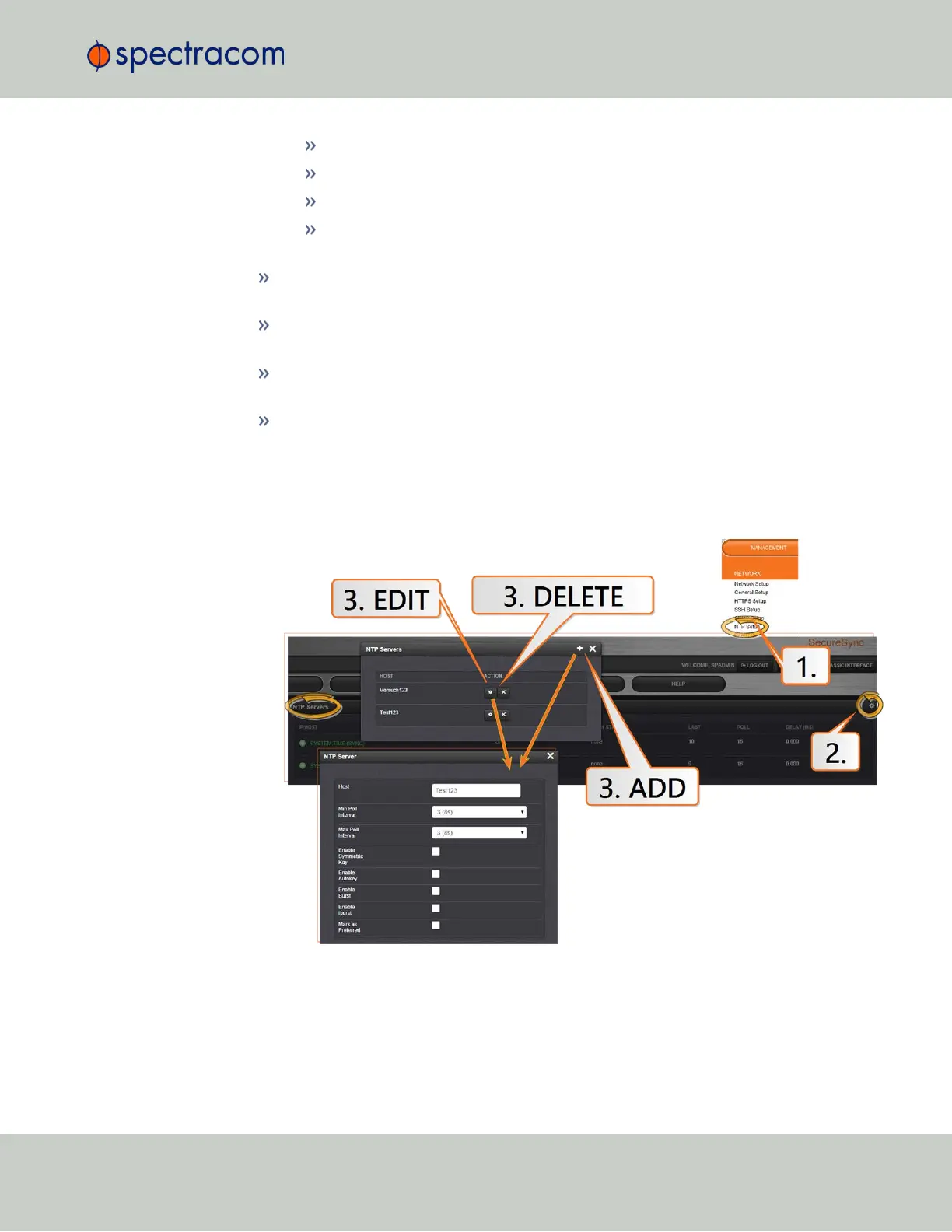
NTP Servers: Adding, Configuring, Removing
To add, configure, or remove an NTP Server:
1.
Navigate to MANAGEMENT > NETWORK: NTP Setup.
2.
The NTP Setup screen appears. The NTP Servers panel displays a list of recognized NTP
servers. Click the GEAR icon in the upper right-hand corner of the NTP Servers panel.
3.
The NTP Servers window opens. Should the list be empty, no servers have been added
yet. In the event that added servers are not displayed in the NTP Setup screen/NTP
2.7 Configuring Network Settings
CHAPTER 2 • VersaSync User Manual Rev. 6.0
89



 To Next Page