Local Clocks panel
You can create multiple different Local Clocks, as needed. The names of all Local Clocks that
have already been created are displayed in the Local Clocks panel.
See also "Local Clock(s), DST" on page126.
3.2 System Time
The time that VersaSync maintains is referred to as the System Time. The SystemTime is used to
supply time to all of the available time-of-day outputs (such as NTP time stamps, time stamps in
the log entries, ASCII data outputs, etc.).
By default, the SystemTime is synchronized to VersaSync’s input references (such as GNSS,
IRIG, ASCII data, NTP, PTP, etc.).
If a UTC-based time is not required, however, it is also possible to manually set the System Time
to a desired time/date, or to use the unit's battery backed time (Real Time Clock) as System
Time (with an external 1PPS reference).
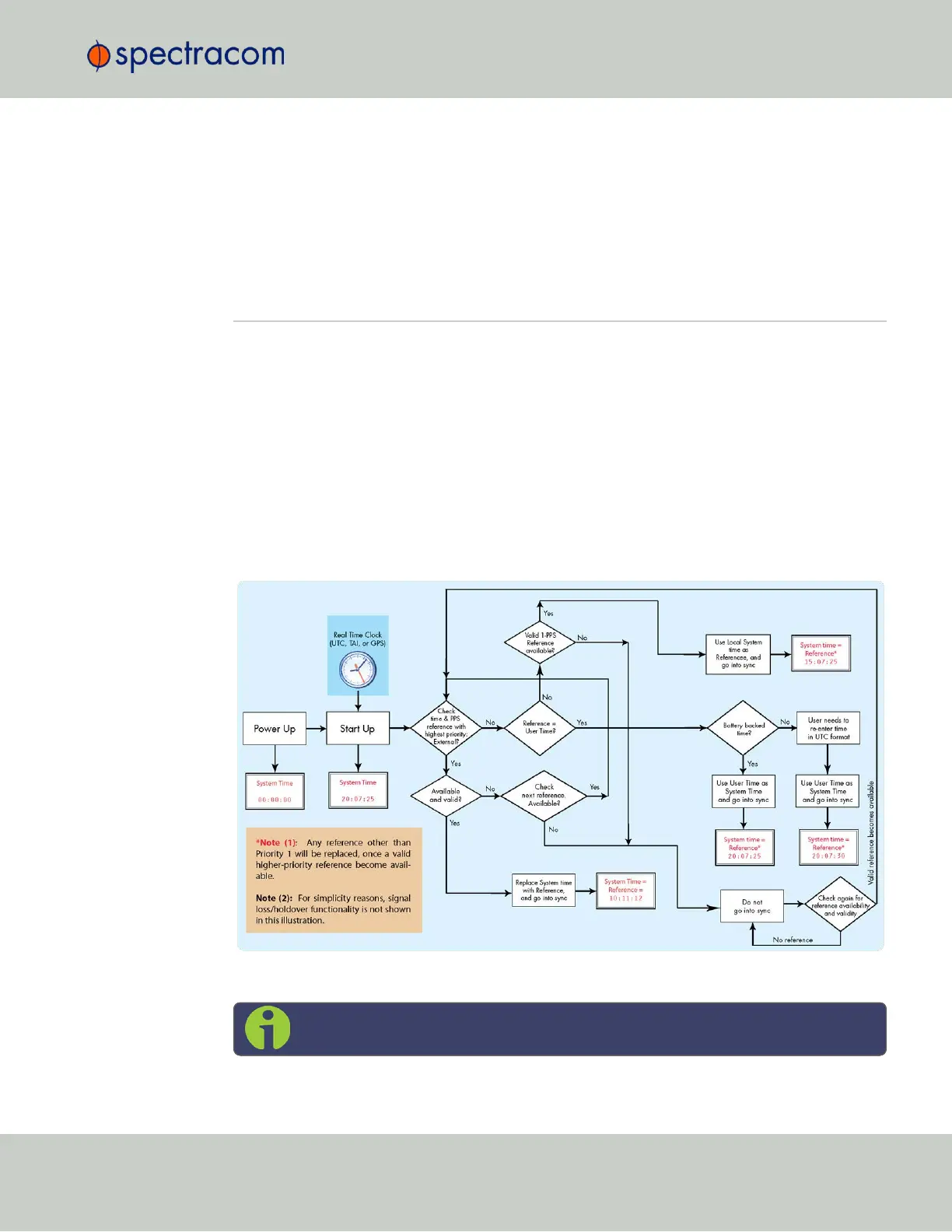
The flow chart below illustrates how VersaSync obtains the highest available and valid ref-
erence, depending on whether an external source is chosen as reference, or an internal (User
[x], or Local System).
Figure 3-1: How the System Time is derived
Note: User hand-set times can only be set in UTC (not Local time).
3.2 System Time
CHAPTER 3 • VersaSync User Manual Rev. 6.0
115



 To Next Page