2.
Does your NTP Service use the right Timescale?
See "NTP Output Timescale" on page82.
3.
If required, have you setup other NTP Servers and Peers for fallback purposes?
See "NTP Peers: Adding, Configuring, Removing" on page91.
2.7.8.2 The NTP Setup Screen
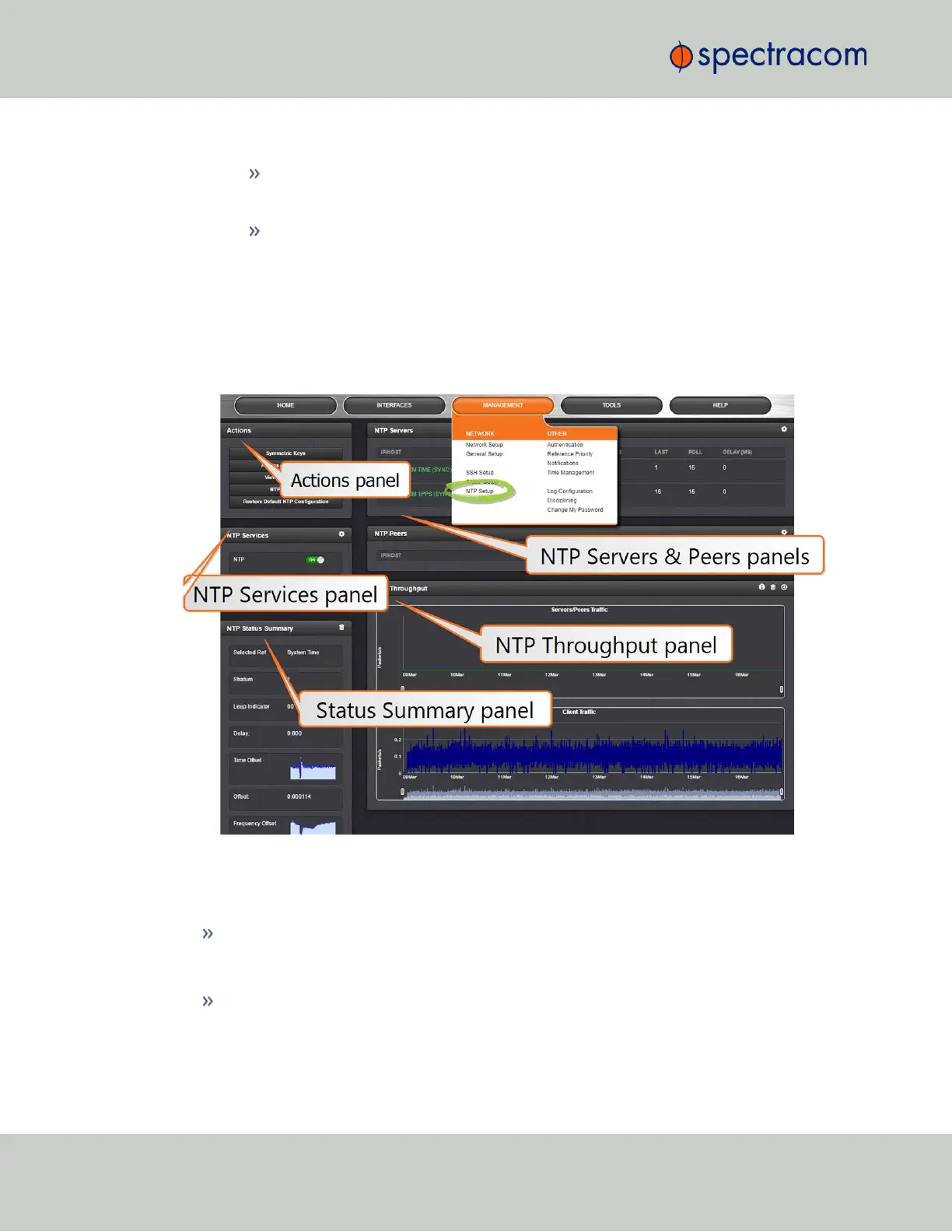
The NTP Setup screen provides access to all NTP configuration settings.
To open the NTP Setup screen, navigate to MANAGEMENT > NTP Setup. The NTP Setup screen
is divided into 5 panels:
The NTP Servers and Peers panels
… are located on the right-hand side of the NTP screen:
NTP Servers: In this display you can view the NTP Servers that VersaSync detects in your
network. It is through this display that you configure external NTP references. See "NTP
Servers: Adding, Configuring, Removing" on page89.
NTP Peers: In this display you can view the NTP Peers that VersaSync detects in your net-
work. It is through this display that you configure NTP Peer reference inputs. See "NTP
Peers: Adding, Configuring, Removing" on page91.
78
CHAPTER 2 • VersaSync User Manual Rev. 6.0
2.7 Configuring Network Settings



 To Next Page