Note: By default, techsupport@spectracom.com is the address in the
sysContact field of the SNMP Status panel of the SNMP Setup page.
2.7.6.1 SNMP V1/V2c
SNMP V1 is the first version of the SNMP protocol, as defined in the IETF (Internet Engineering
Task Force) RFCs (Request for Comments) number 1155 and 1157. SNMP V2c is the revised
protocol, but it also uses the V1 community based administration model.
Creating Communities
1.
Navigate to MANAGEMENT > NETWORK: SNMP Setup.
2.
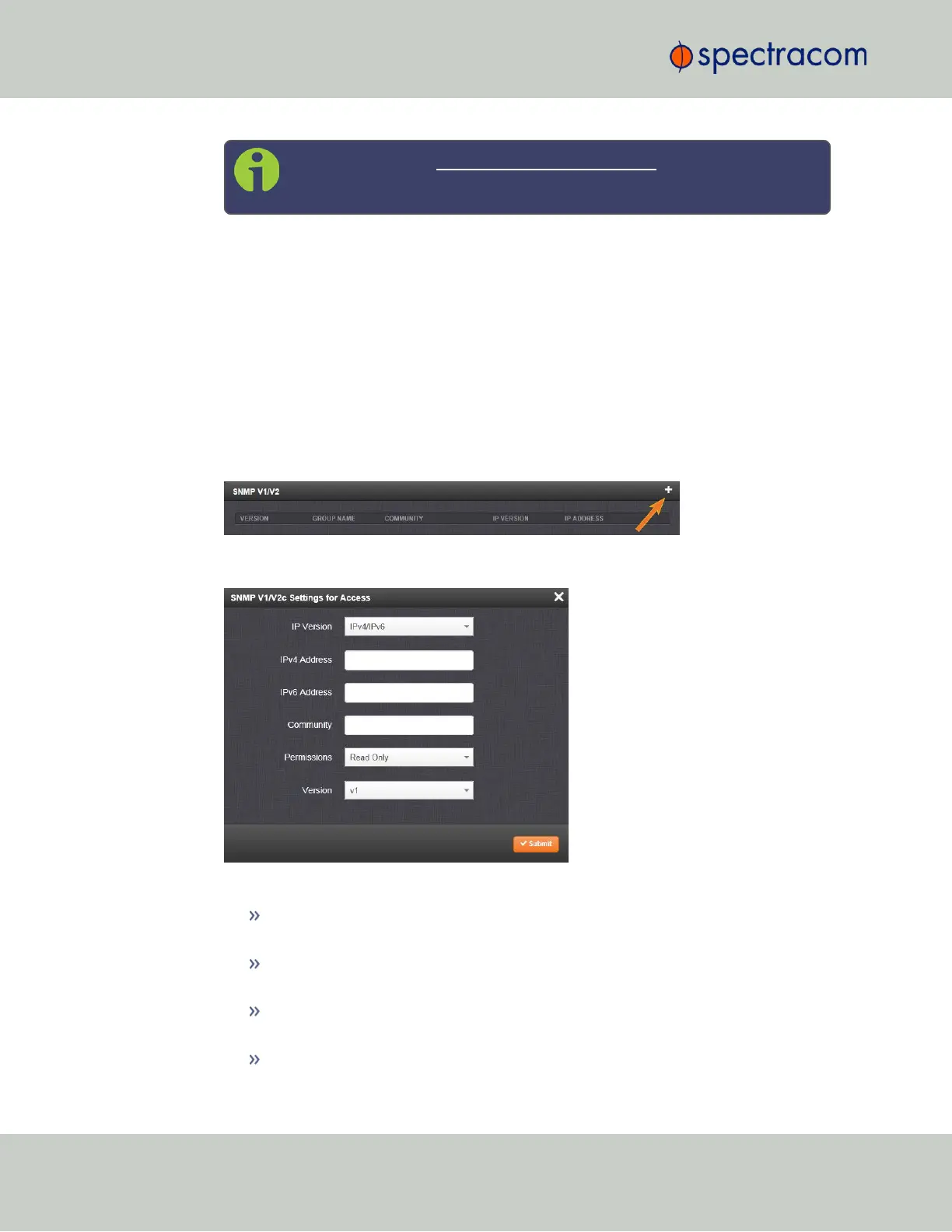
In the SNMP V1/V2 panel click the PLUS icon in the top-right corner.
3.
The SNMP V1/V2c Settings for Access window will display:
4.
Enter the required information in the fields provided:
The IP Version field provides a choice of IPv4, IPV6 or both IPv4 and IPv6 (=
default).
The choices offered below will change in context with the choice made in the IP
Version field.
If no value is entered in the IPv4 and/or IPv6 field, VersaSync uses the system
default address.
SNMP Community names should be between 4 and 32 characters in length.
70
CHAPTER 2 • VersaSync User Manual Rev. 6.0
2.7 Configuring Network Settings



 To Next Page