3.
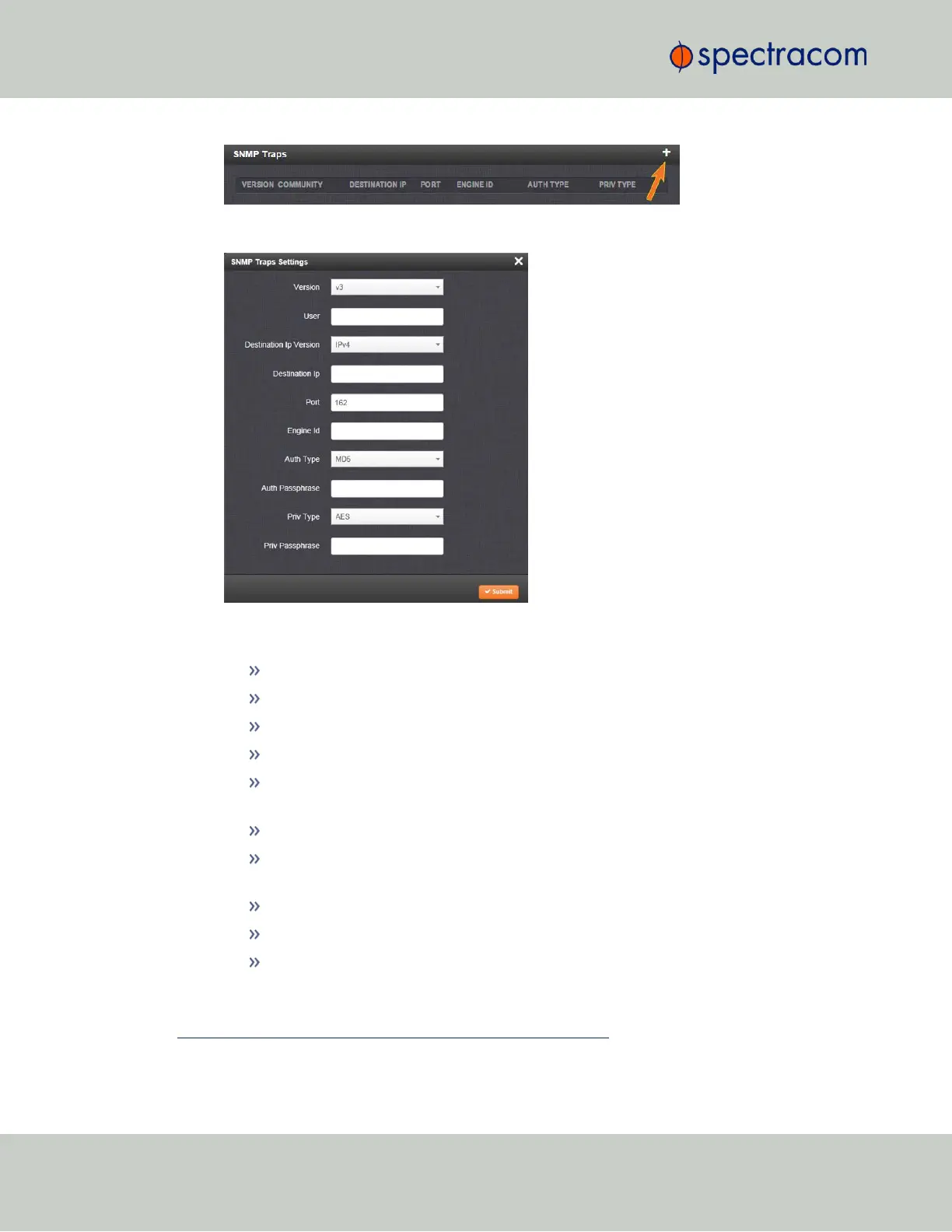
The SNMP Traps Settings window will display:
4.
Enter the required information in the fields provided. (Note that the options will vary con-
textually according to your Version.)
5.
The Version field provides a choice between v1, v2c, and v3 [= default]
The Community field for the SNMP Community string. [v1, v2c]
SNMP User names should be between 4 and 32 characters in length. [v3]
Destination IP Version is a choice between IPv4 and IPv6. [v1, v2c, v3]
Destination IP is destination address for the notification and password key to be
sent. The default port is 162. [v1, v2c, v3]
The UDP Port number used by SNMP Traps [default = 162]. [v1, v2c]
Engine Id must be a hexadecimal number (such as 0x1234). The Id originates
from the MIB Browser/SNMP Manager. [v3]
1
Auth Type provides a choice between MD5 (the default) and SHA. [v3]
The Auth Password must be between 8 and 32 characters in length. [v3]
The Priv Type field provides a choice between AES and DES. [v3]
1
Should you require the Engine IDof your unit in order to decode traps sent to an NNMI, you can use an SNMPv3
"get" value of .1.3.6.1.3.10.2.1.1 to poll your Engine ID.
74
CHAPTER 2 • VersaSync User Manual Rev. 6.0
2.7 Configuring Network Settings



 To Next Page