Customer Replaceable Units Top Cover Interlock Sensor and Actuator
Page 191
© Copyright 2020 Stratasys. All rights reserved.
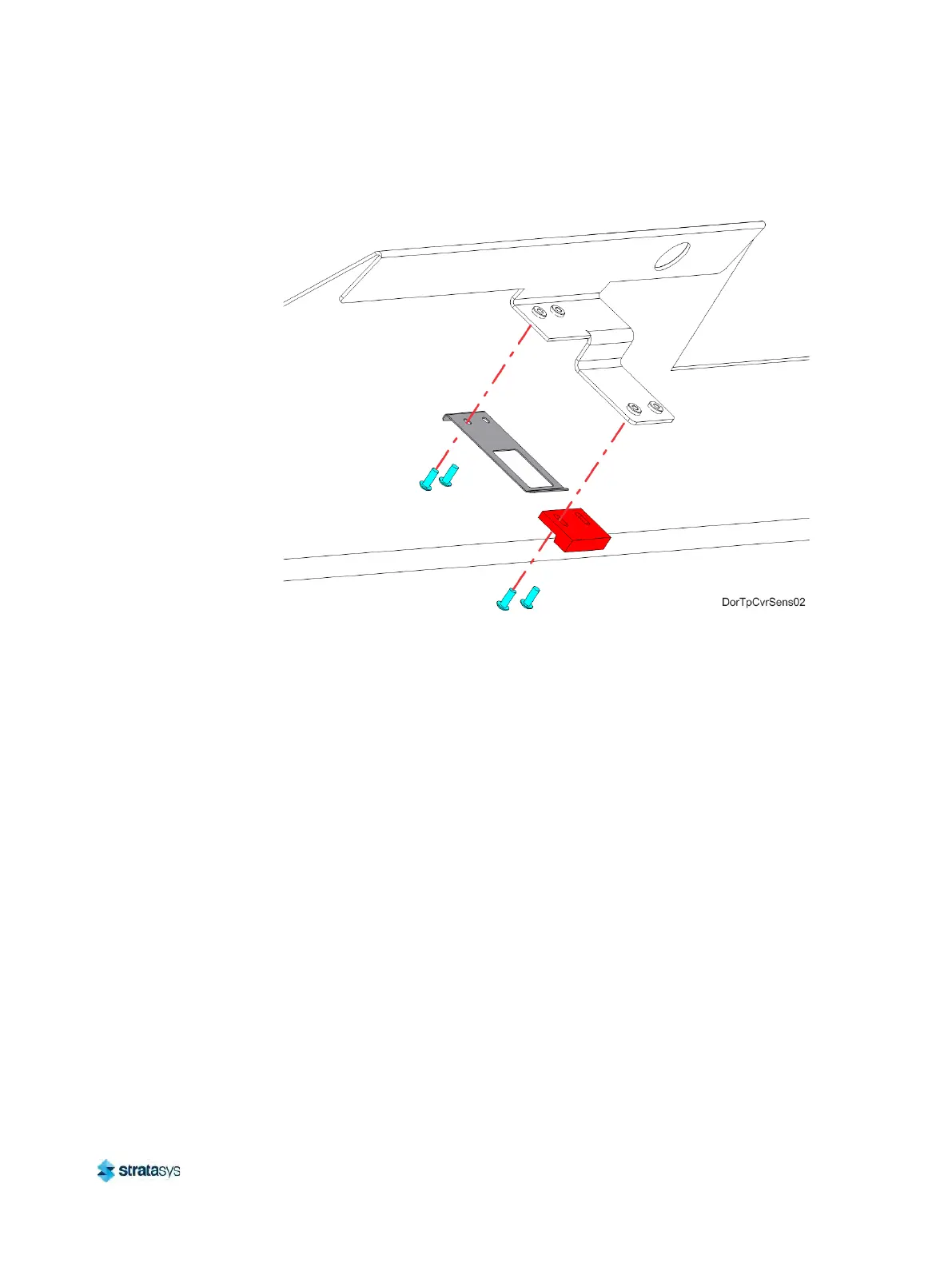
8. Remove the top cover actuator.
Figure 45: Top Cover Actuator Mounting Screw Locations
Installing the Top Cover Interlock Sensor
1. Use a 2 mm hex wrench to reinstall the mounting screws (2) that secure the interlock
sensor to the mounting bracket. See Figure 44 (page 190).
2. Reconnect the top cover sensor cable at the quick disconnect connector.
3
. Install three cable ties to secure the sensor cable to the mounting bracket.
4
. Use a 2.5 mm hex wrench to reinstall the mounting screws (2) that secure the interlock
a
ctuator to the top cover. See Figure 45.
5. Close the top cover.
6
. Power ON the printer.
7
. Verify operation by opening and closing the top cover.
8
. If the touchscreen displays errors indicating that the cover is not closed, adjust the position
o
f the actuator.






 To Next Page