Gantry Print Heads
Page 28
© Copyright 2020 Stratasys. All rights reserved.
Gantry
To access the gantry or the heads, you must first open the top cover. The top cover utilizes a
mechanical locking mechanism. The top cover remains locked while the printer is building and
automatically unlocks when the oven door is opened. The printer cannot resume building if the
top cover and/or oven door are open.
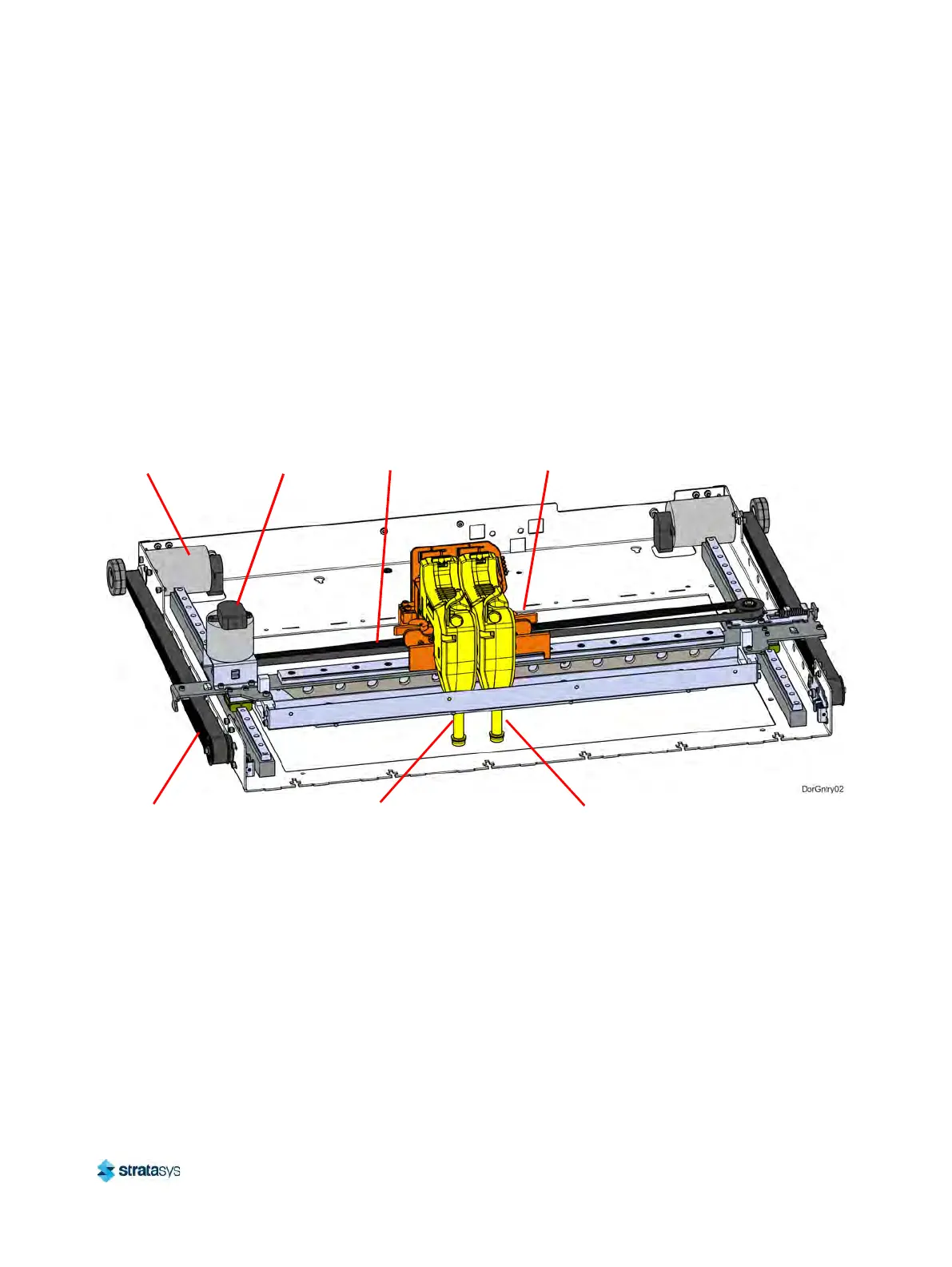
The gantry moves the head in the X and Y directions when building a part. The gantry
as
sembly is located under the top cover. The entire gantry is outside of the oven; only the
bottom of the head protrudes into the oven. The gantry and its drive motors are thermally
shielded from the oven via flexible heat shields. To move the head, the gantry utilizes one X
and two Y servo motors attached to timing belts.
Figure 12: Gantry Assembly
Print Heads
The F120 printer utilizes one print head assembly for model and support material. The model
and support heads are black. Once a head has been used for model or support, it can only be
used for that designated material (model or support) thereafter. The heads are designed for
use with a range of modeling materials. The heads extrude model material and support
material with two identical liquefiers. A single blower fan, mounted above the tip liquefier
entrances, cools the incoming material at the liquefier entrances.
Head life is directly related to the amount of build time for the head. Heads are a replaceable
co
nsumable item and should be changed once the head’s odometer reaches 1500 build hours
(see “Viewing Head Details” (page 57) for information on head odometers). You will receive a
warning when the head’s odometer reaches 1350 build hours, reminding you to order a
Y Servo
Motor (2x)
X Drive
Belt
Model Head
Assembly
Y Drive
Belt (2x)
X Servo
Motor
Toggle Plate
Assembly
Support Head
Assembly













 To Next Page