S CLASS™ 2 cutter User’s Manual
Basic Operation 2-16
Cutting through
2.5.1 Procedure
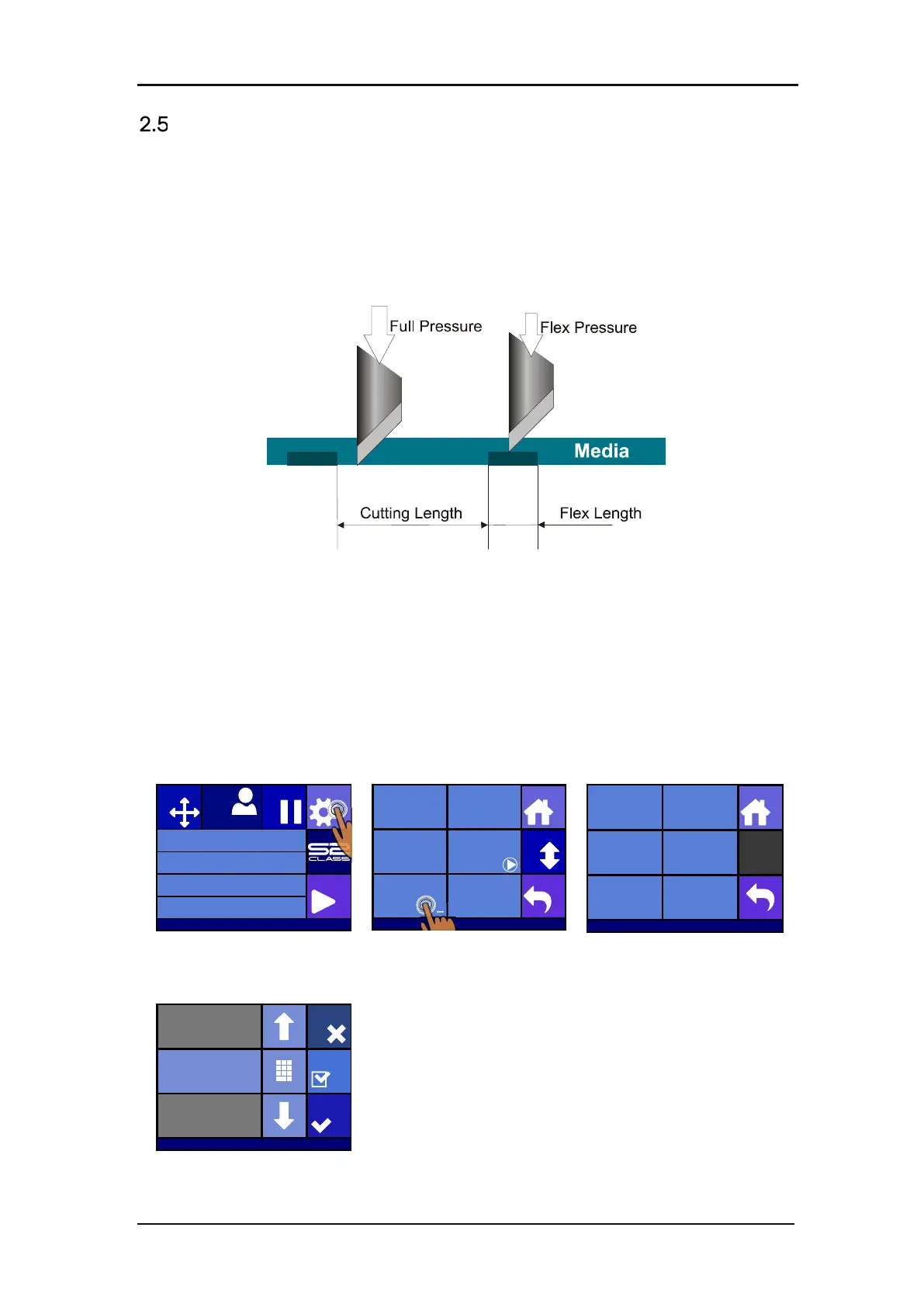
The cutting through functionality is focussed to cut simple shapes (e.g. rectangles). It is most
used in combination with contour cutting.
An interrupted cutting line makes sure that the material remains together thanks to the small
media ‘bridges’. When the job is finished the cut pieces can be torn loose.
FIG 2-8
2-8 FLEXCUT PRINCIPLE
Some cutting software can recognize the difference between a contour line and a cut-through
line. The software first sends the data of the contour lines to the cutter and then activates
FlexCut, paneling mode and vector sorting and sends the cut-through data to the cutter.
If the cutting software cannot do this, the user needs to send the data of the contour lines
separately, set the cutter in FlexCut mode manually and then send the cut-through data
Setting the parameters for cutting through the media:
Press Settings.
Press FlexCut.
Select the
change.
Press the arrows or use
Numpad to change the Full
pressure and press Apply to
confirm.
Knife pressure 95 gr
Velocity 800 mm/s
Tool Tangential knife
Media size 50000 x 718 mm
Actions
Settings
Configuration 1
Pause
Origin
USB port 1
Settings
Back
More
Home
Tool
Tangential knife
Velocity
800 mm/s
Knife pressure
95 gr
Calibrate Knife
FlexCut
...
Advanced cutting
...
Settings | FlexCut
Home
Flex pressure cut
length
Off
FlexCut mode
200 mm/s
FlexCut Velocity
1.00 mm
Full pressure
On
Full pressure cut
length
10.00 mm
Flex pressure
85 gr
Old value: 180gr
New value: 185gr
Range: 0 ... 600gr
Cancel
Apply
Test
Settings|FlexCut








 To Next Page