S CLASS™ 2 cutter User’s Manual
Setup 1-5
S CLASS 2 Cutter Components
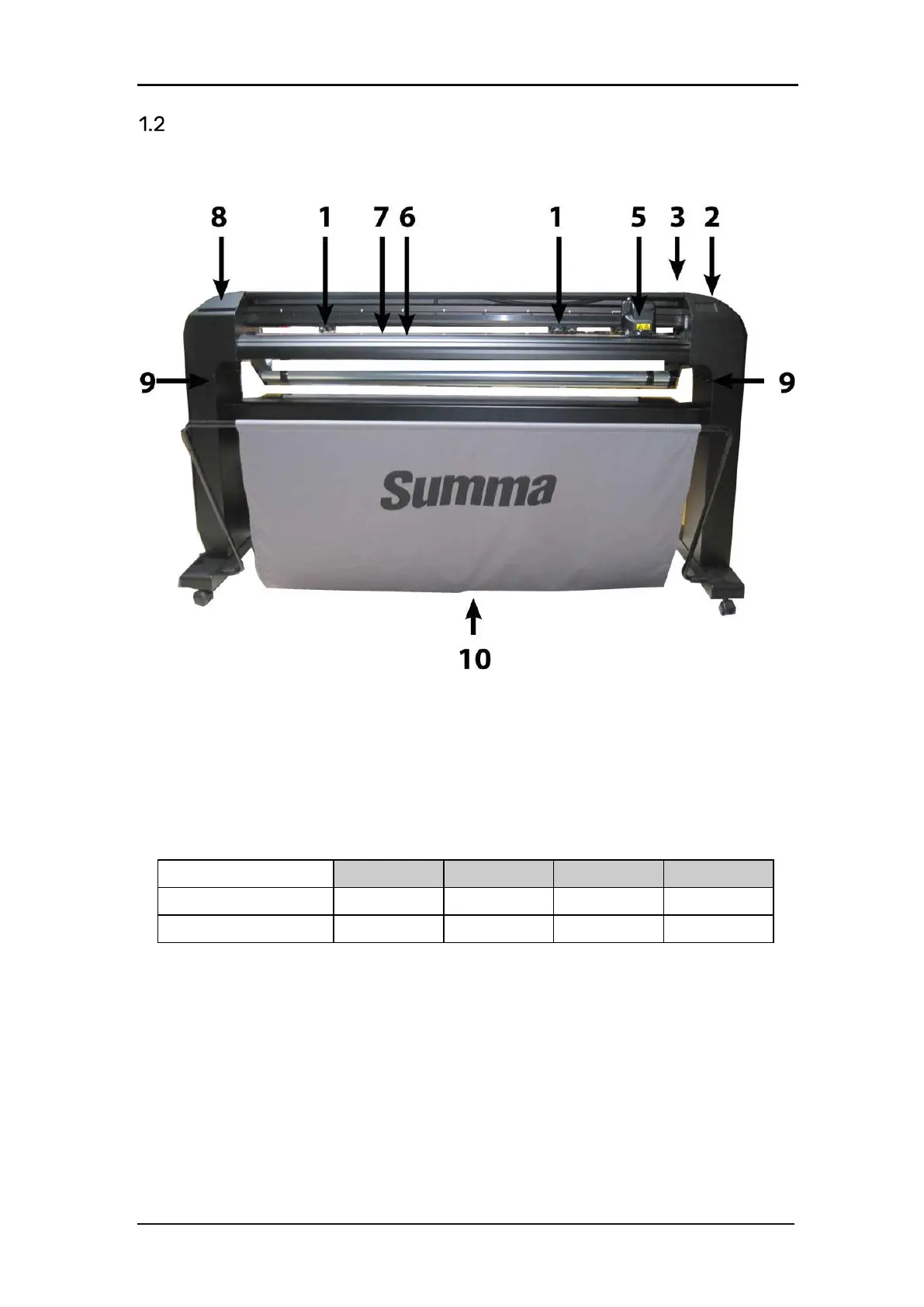
1.2.1 The Cutter as viewed from the front
FIG 1-10
1-10 S CLASS 2 CUTTER, FRONT VIEW
1. Pinch rollers: The pinch rollers clamp the media to the drive system to ensure accurate
tracking. The S120(T) has one and the S160(T) and S 140(T) have two extra pinch rollers
to ensure that wide media stays flat in the middle. The outer drive pinch rollers have a
selectable pressure; the extra rollers in the middle can be enabled or disabled. Extra pinch
rollers can be added.
Number of pinch rollers S75 S120 S140 S160
Dual pressure 2 2 2 2
Low pressure 0 1 2 2
2. Touch panel: All cutter activity can be initiated from the 320x240 dot touch panel. The
panel displays information about the cutter’s current status and/or actions that need to
be taken.
3. Pinch roller lever: This lever is used to raise and lower the pinch rollers for media loading.








 To Next Page