S CLASS™ 2 cutter User’s Manual
OPOS 3-14
3.4.2 Media calibration
Media calibration ensures that the sensor can recognize the marks. OPOS is calibrated at the
factory to work on a wide range of media. However, certain media -- such as those with a high
gloss -- may not work with the default settings. Before working with such materials, perform a
media calibration test. This test will alter OPOS’s sensitivity so that it will read the marks with
greater reliability. Print a square measuring at least 4x4 cm on the used media. Make sure to
use the same ink than the one when creating the registration marks.
NOTE: If the media calibration is done and results didn’t improve, set the media
calibration value again to default.
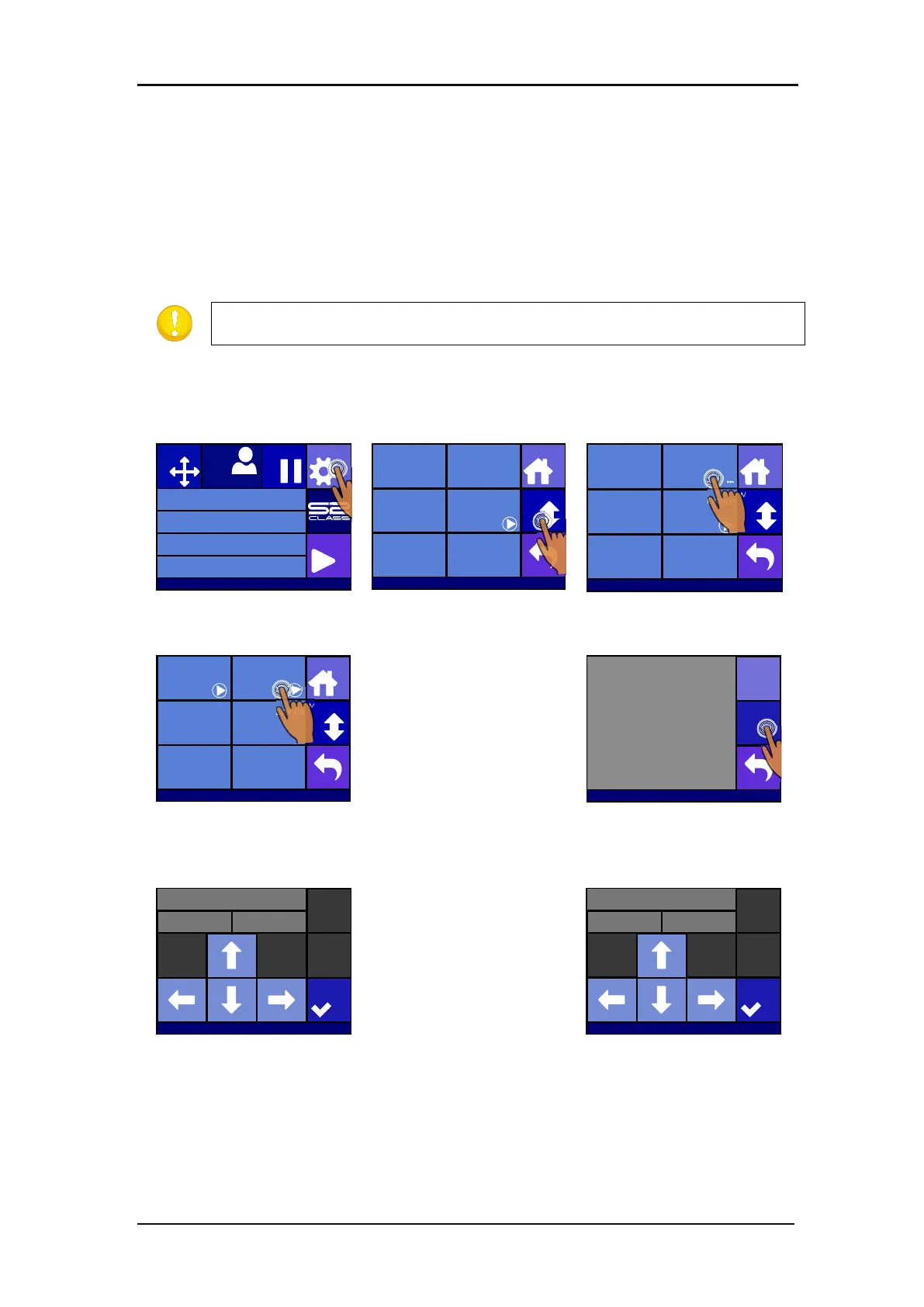
Perform the media calibration:
1. Turn on the cutter and load the vinyl with the printed square.
Press Settings
Press More
Press OPOS.
The cutter allows the user to
choose to either measure
the media or to fill in a
previously recorded value.
5. Press Calibrate media
(OPOS)
The cutter will make a
circular movement while it
measures the reflection of
the media. It will briefly
display the measured values
and display the message
“put knife on printed area.”
Use the
arrows to
maneuver the knife in the
middle of the white area,
press apply.
Use arrows to maneuver
the knife in the middle of the
printed area. Press apply.
Knife pressure 95 gr
Velocity 800 mm/s
Tool Tangential knife
Media size 50000 x 718 mm
Actions
Settings
Configuration 1
Pause
Origin
USB port 1
Settings
More
Home
Tool
Tangential knife
Velocity
800 mm/s
Knife pressure
95 gr
Calibrate Knife
FlexCut
...
Advanced cutting
...
Settings
More
Home
General OPOS
Communication
Length Calibration
Coil setup
...
Factory defaults
...
... ...
...
Settings | OPOS
More
Home
Calibrate OPOS Calibrate media
(OPOS)
Alignment mode
OPOS X
OPOS sheet mode
Off
OPOS panelling
Mark
OPOS origin
Off
Calibrate media (OPOS)
Measure
Set
S31212-10088
Y: 7 17X: 0
Set knife above white area
Apply
S31212-10088
Y: 657X: 0
Set knife above printed area
Apply
S31212-10088








 To Next Page