S CLASS™ 2 cutter User’s Manual
OPOS 2-13
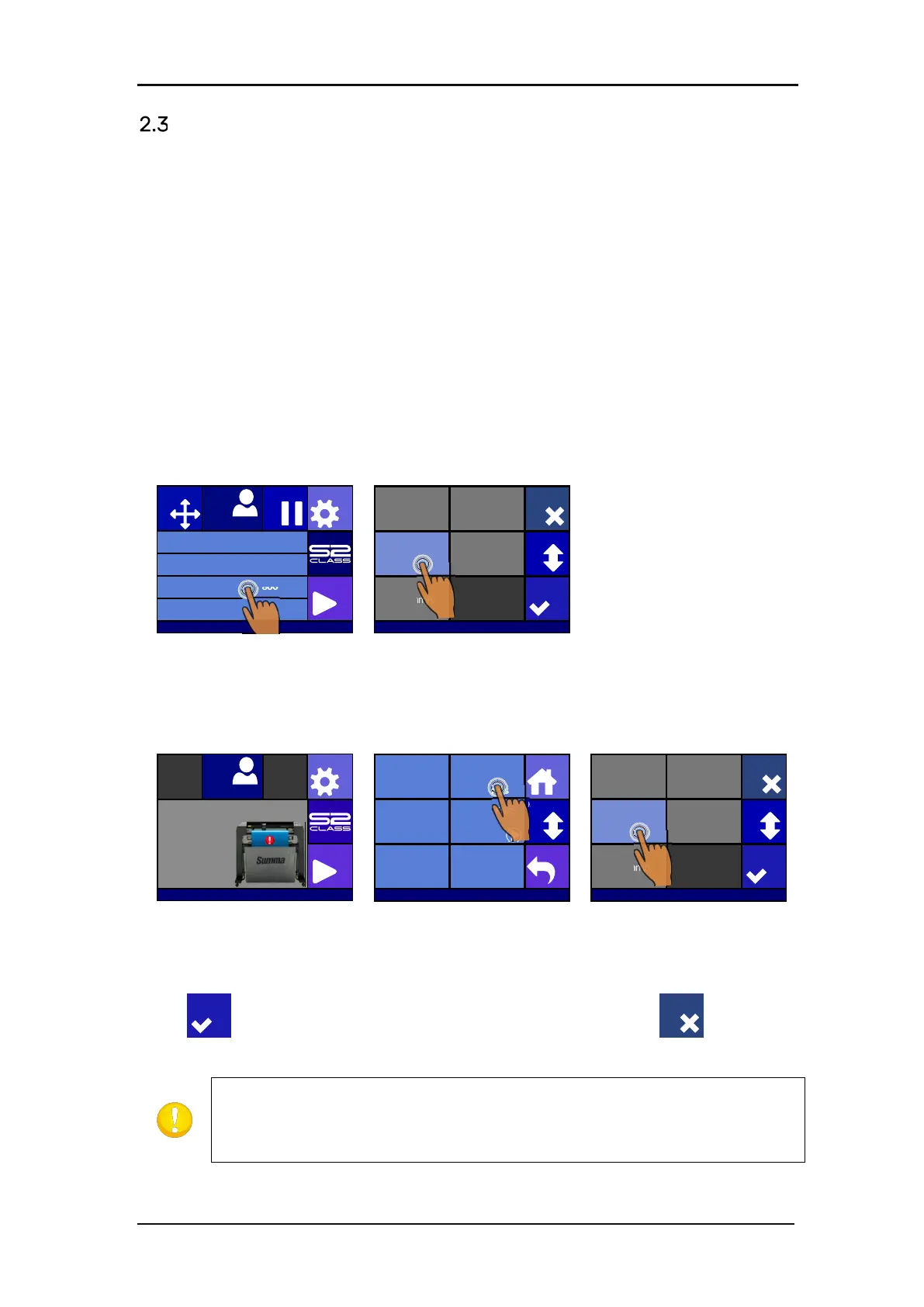
How to set the cutting speed
The actual speed at which the tool moves is determined by 4 different parameters. Speed (and
acceleration) while the tool is down; speed (and acceleration) while tool is up.
These 4 parameters have been bundled in one parameter to change the speed fast and easily.
This overall parameter is called “velocity” and is the speed the cutter uses when the tool is
down. If velocity is raised or lowered, then the other parameters are also raised or lowered
accordingly.
There is one fixed speed: the speed at which the cutter pulls the media from the roll. This speed
is fixed at 200mm/s (8ips).
Setting the cutting speed:
1. Power on the cutter.
In case the media is loaded:
Press Velocity
Select new velocity,
scroll with More, if
In case media not loaded:
Press Settings
Press Velocity
Select the new velocity,
scroll with More, if
necessary.
Press to confirm the chosen knife offset and exit the menu, press to leave the
knife offset unchanged.
Sometimes the cutter feeds the material too fast and the media has no time
to settle and fold into the basket. A fifth speed parameter is designed for such
cases. The speed of long X-axis vectors is reduced automatically so that the media
does not bulge (see section 4.3.1.8 Long Vectors:).
Knife pressure 95 gr
Velocity 800 mm/s
Tool Tangential knife
Media size 50000 x 718 mm
Actions
Settings
Configuration 1
Pause
Origin
USB port 1
USB port 1
More
600 mm/s 700 mm/s
800 mm/s 900 mm/s
1000 mm/s
Cancel
Apply
Actions
Settings
Configuration 1
Insert media and lower the pinchrollers.
Settings
Back
More
Home
Tool
Tangential knife
Velocity
800 mm/s
Knife pressure
95 gr
Calibrate Knife
FlexCut
...
Advanced cutting
...
Settings
More
600 mm/s 700 mm/s
800 mm/s 900 mm/s
1000 mm/s
Cancel
Apply








 To Next Page