Chapter 3
31
UM10372_PCNC440_Manual_0221A
iNSTAllATiON
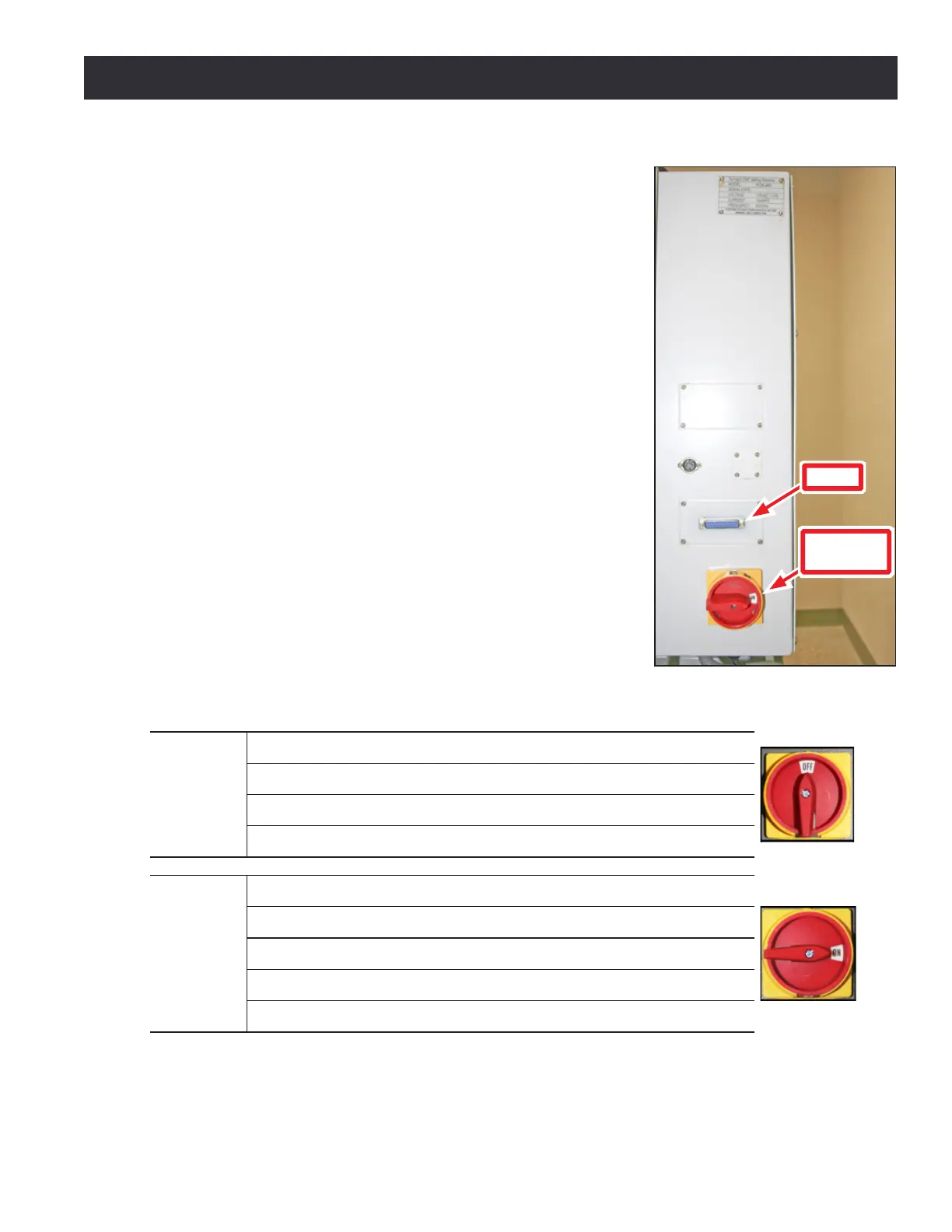
Main Disconnect
The Main Disconnect switch, located on the right side of the
electrical cabinet, is used to power the mill on and o (see Figure
3.15). When the Main Disconnect is switched to power O, this
disconnects the primary supply power to the mill.
3.5 Power Off/Power On Procedure
IMPORTANT! Do not power on motors and drives via the green Start
buon before powering on the controller that oversees their operaon.
Make sure that the controller is on and the PathPilot interface is loaded
before powering on the mill. Likewise, make sure to depress the red
E-stop before powering o the controller using the Exit buon on the
PathPilot interface (see Figure 3.16). Conrm mill powers o and on
correctly per the Power O/On Procedure below.
Power Off/On Procedure
Power O
1. Push in red E-stop buon
2. Click Exit on screen; when prompted click OK to power o
3. Turn PathPilot Controller power strip o
4. Turn Main Disconnect O (see image at right)
Power On
1. Turn PathPilot Controller power strip on
2. Aer soware loads, turn Main Disconnect On (see image at right)
3. T
urn red E-stop buon clockwise to release
4. Press green Start buon
5. Click Reset on screen
Figure 3.15
DB-25
Main
Disconnect



 To Next Page