Chapter 6
75
UM10372_PCNC440_Manual_0221A
PATHPilOT iNTERFACE
Generang Automac Tool Descripons
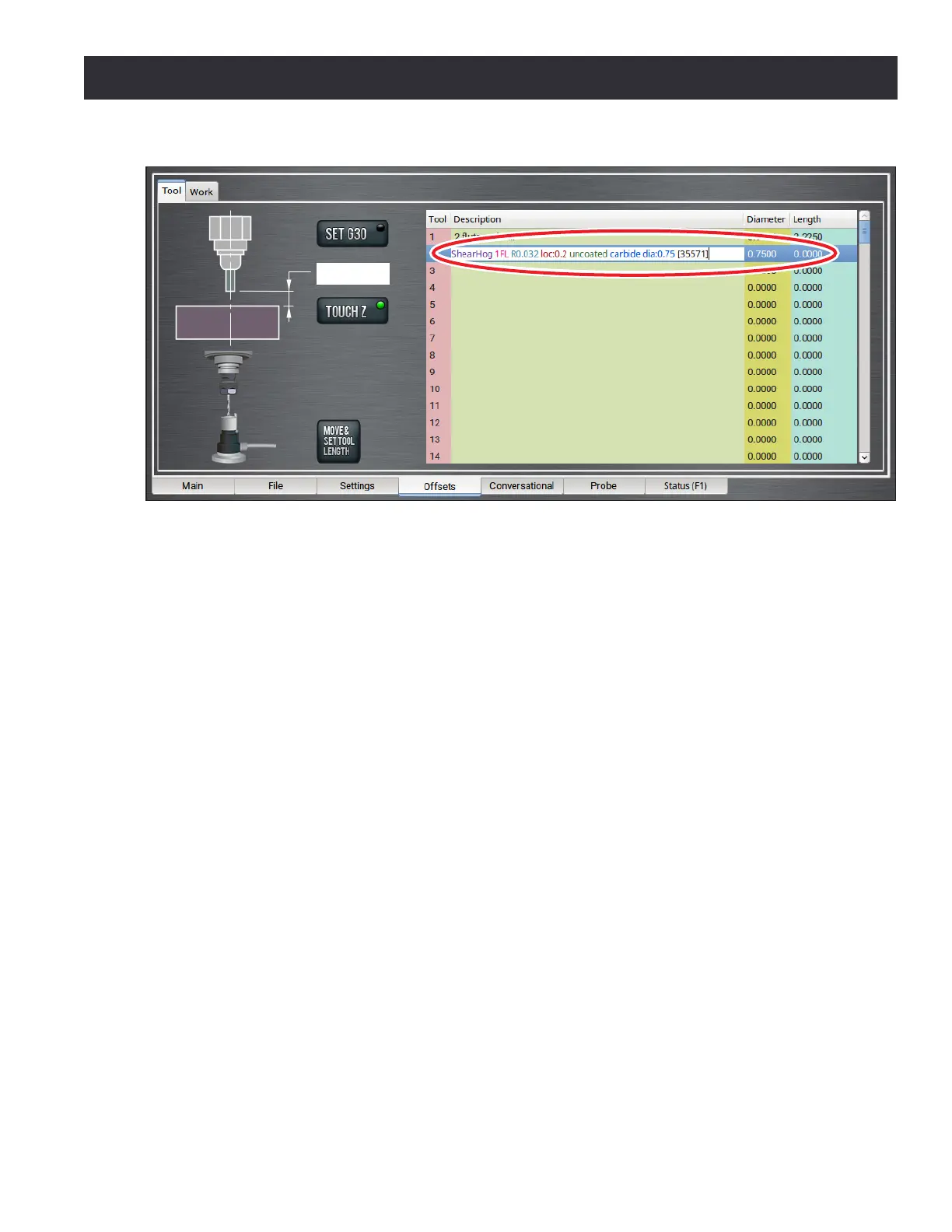
If you are using a Tormach tool, you can enter the part number to automacally generate tool
descripons in the Tool Table window (see Figure 6.22).
NOTE: If you're unsure of the part number, you can search for the tool at tormach.com.
1. From the PathPilot interface, on the Osets tab, in the Tool Table window, select a blank line.
2. Type the part number for the tool.
Example: 35571
The full descripon and tool diameter for a ShearHog (PN 35571) displays.
3. You must enter the value for the Length.
6.7.2 Offsets Table
The osets table on the Osets screen (see Figure 6.19) displays an editable table of tool osets
(both geometry osets and wear osets) as well as a read-only table of work osets. To alter a value
in the tool osets table, double-click on the eld. Aer entering the desired new value, click Enter to
accept the value. The mill must be powered on and not in reset mode to edit these elds.
6.7.3 Tool Offset and Fixture Information Backup
Make a periodic backup of the tool oset and xture informaon and machine sengs to store
externally should the controller get replaced or need to be restored to factory sengs.
Create a tool oset and xture informaon backup on a PathPilot controller as follows:
1. Insert a USB drive into any open USB slot on the controller.
Figure 6.22



 To Next Page