Chapter 3
35
UM10372_PCNC440_Manual_0221A
iNSTAllATiON
3.8 Controller Customization
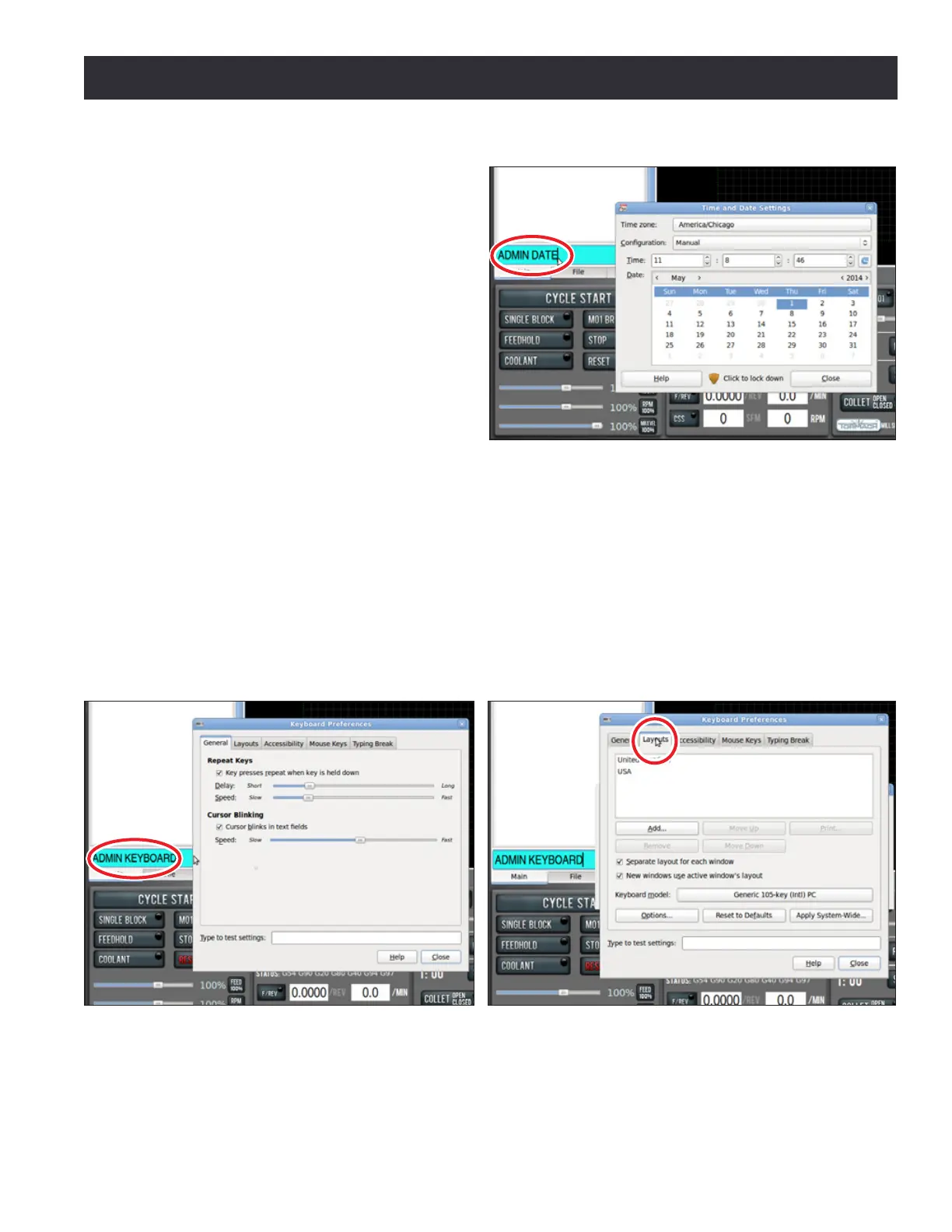
Date and Time
To set or edit controller’s date and me,
type ADMIN DATE in the MDI eld and
click Enter on keyboard (see Figure 3.21).
This opens a dialog box to enter or edit
date, me, and me zone. Click Close
when nished.
Keyboard Language
If you do not have a USA keyboard
(QWERTY) layout, type ADMIN KEYBOARD
in the MDI eld and click Enter on the
keyboard (see Figure 3.22).
Next, click on the Layouts tab to change the layout of the keyboard to a dierent language (see
Figure 3.23). Select a layout and click Close when nished.
Touch Screen (oponal)
Refer to documentaon that ships with 17” Touch Screen Kit (PN 35575) for informaon on setup
and calibraon.
Figure 3.23
Figure 3.22
Figure 3.21



 To Next Page