Chapter 6
53
UM10372_PCNC440_Manual_0221A
PATHPilOT iNTERFACE
6. PATHPilOT iNTERFACE
6.1 Overall Layout
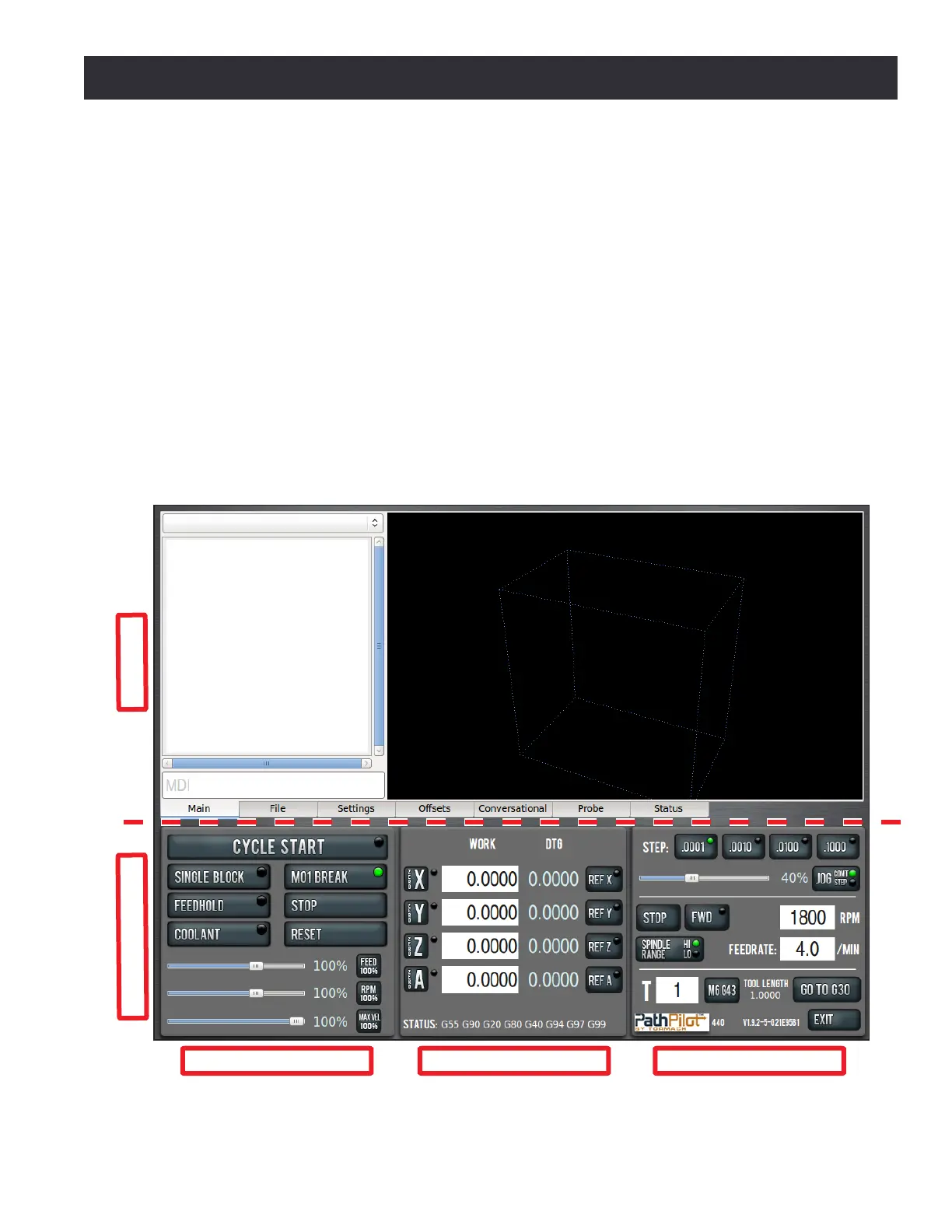
The PathPilot® interface is divided into two secons: Notebook and Persistent Controls (see Figure
6.1). Persistent Controls make up the boom half of the screen with three control groups: Program
Control Group, Posion Status Group, and Manual Control Group. The top half of the screen is
the Notebook, which includes seven tabs: Main, File, Sengs, Osets, Conversaonal, Probe, and
Status. Depending on the mill accessories, there may also be oponal tabs including ATC (automac
tool changer), Injecon Molder, and Scanner. These tabs are used to select dierent Notebook
pages, each of which displays various buons, digital readouts (DROs), and informaon pernent to
the funconing of the PathPilot interface.
Notebook
Persistent Controls
Figure 6.1
Program Control Group Position Status Group Manual Control Group
PathPilot Interface



 To Next Page