Chapter 5
49
UM10372_PCNC440_Manual_0221A
iNTRO TO PATHPilOT
5.1.8.1 Operation 1
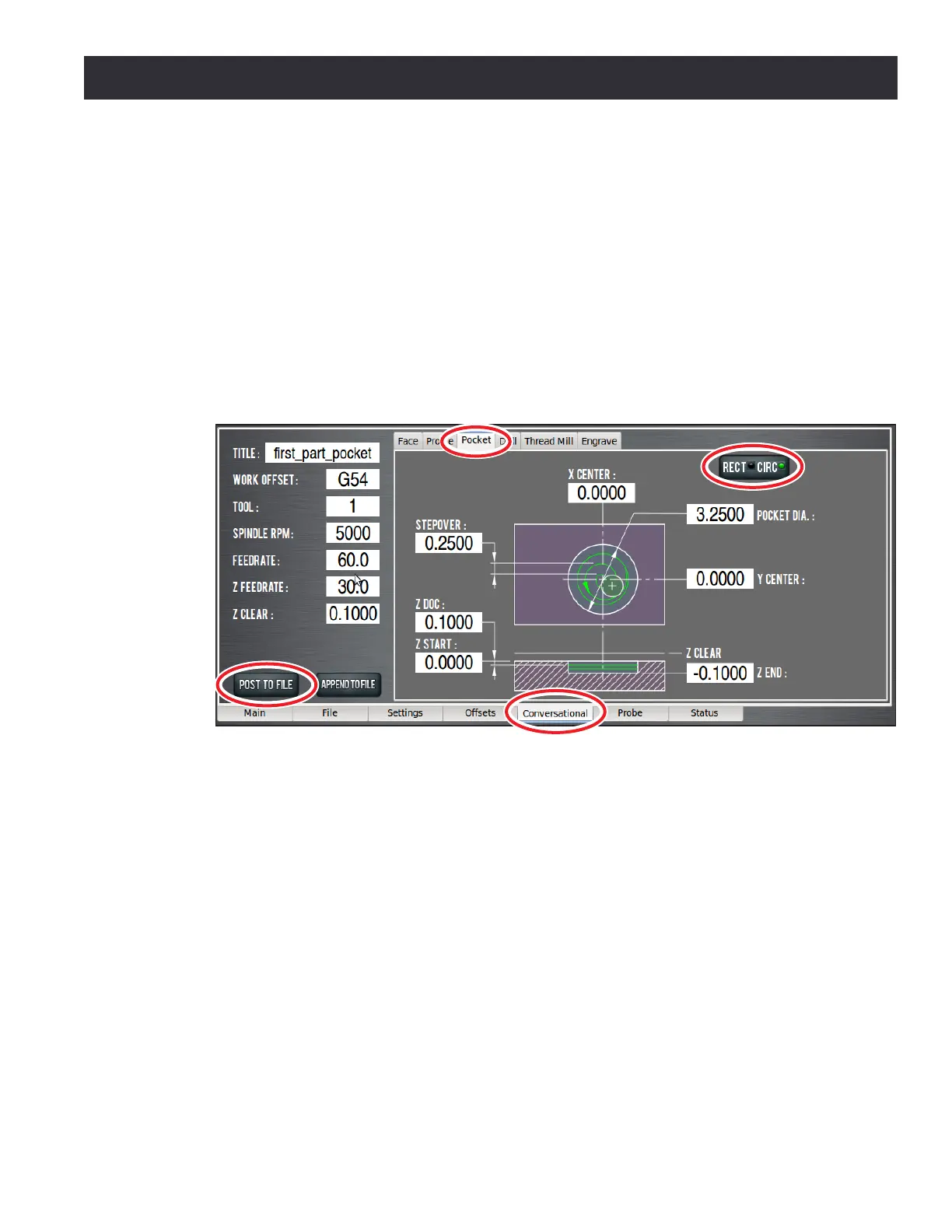
To write the code for the rst operaon, click the Conversaonal tab (see Figure 5.10). The
Conversaonal screen is divided into two secons: parameters common to most operaons are
displayed on the le and parameters (including part geometry) that are operaon specic are
displayed on the right.
Click the Pocket tab to bring up the pockeng screen. Click the Rect/CircI buon to bring up the
circular pocket screen (see Figure 5.10). Use this screen to generate code to create a shallow pocket
(0.1000” deep and 3.250” in diameter). The conversaonal DRO elds should be self-explanatory
and are covered in detail in chapter 6, PathPilot Interface, but for the rst part tutorial, enter the
values seen in Figure 5.10.
Make note of a few things:
• Units are expressed according to the current G20/21 seng. If you are in G21 (metric), the
feed rates will be in mm/min and the coordinates in mm. For the purposes of this tutorial,
use imperial units (G20). You can check the current G20/21 seng by inspecng the string of
acve G-codes next to the word Status at the boom middle of the screen (see Figure 5.12).
• To enter values in a DRO, simply click the mouse inside the DRO and type a number, then
click Enter on the keyboard. Pressing Enter in the conversaonal DROs is not required, but
is recommended as the control will automacally move your cursor to the next DRO in the
sequence and will perform validaon to make sure you have not entered an illegal value.
• Aer the values from Figure 5.10 are entered, click the Post to File buon to save the G-code.
• When you click Save (see Figure 5.11), it also automacally loads into the control and displays
the tool path (see Figure 5.12).
To run the program:
Figure 5.10



 To Next Page