Chapter 6
93
UM10372_PCNC440_Manual_0221A
PATHPilOT iNTERFACE
Tool 99 (the probe tool) must be the current tool in the spindle before using any of the probing
funcons. All probing moves occur at a feed rate specied by the current F command. This can be
viewed and modied in the feed rate DRO. For more informaon, refer to Feed Rate DRO secon
earlier in this chapter.
NOTE: Check that probe polarity is set correctly on Sengs screen before using the probing buons by
pressing probe p while looking at probe indicator LED on Probe screen.
6.9.1 XYZ Probe Tab
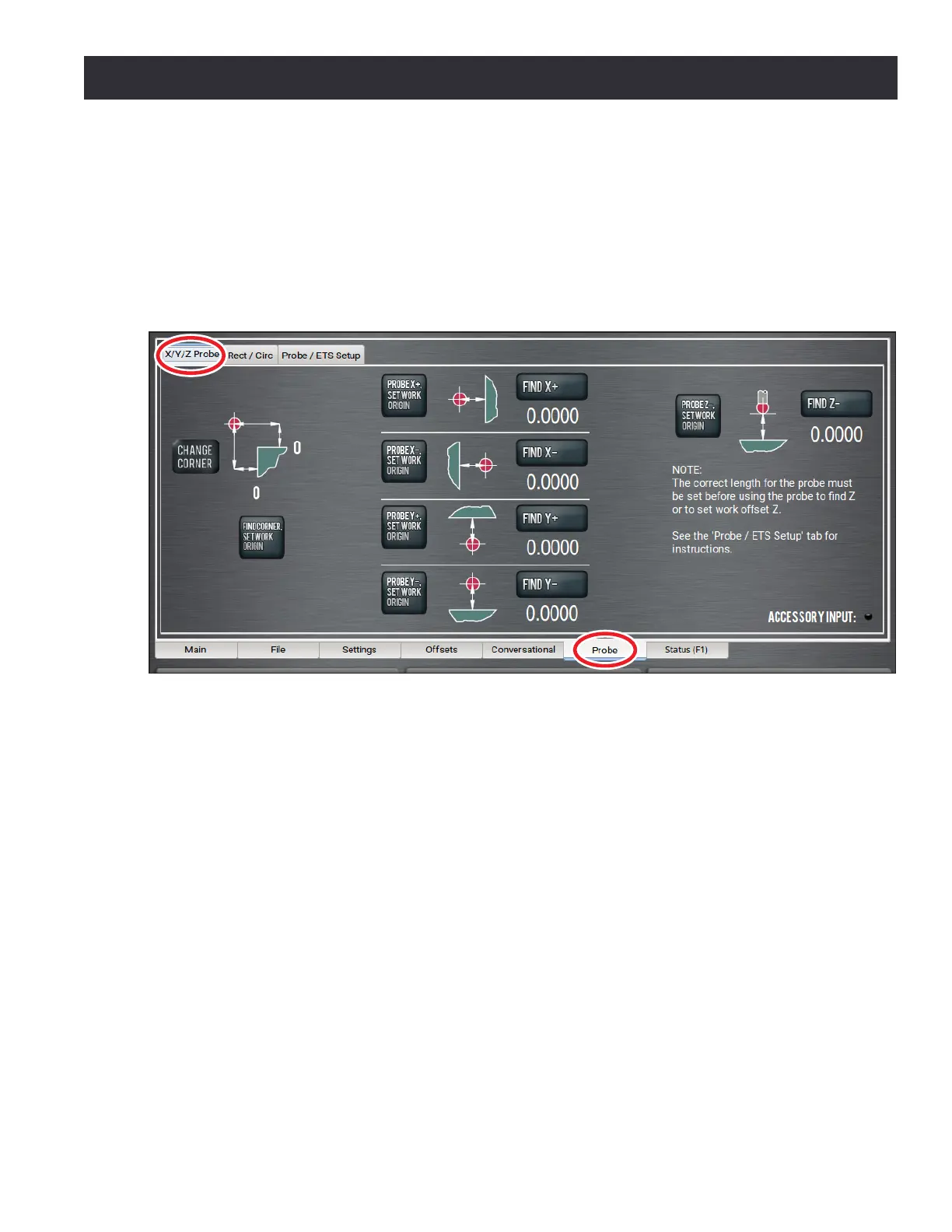
The X/Y/Z Probe tab allows the user to quickly touch o a workpiece or vise jaw to nd that feature’s
locaon in current work oset coordinates, or to touch o that feature and set the work oset zero
to the feature’s surface (see Figure 6.38).
The Find Corner, Set Work Origin buon is used to probe the corner of a vise jaw or rectangular
workpiece and set that corner to X/Y zero.
NOTE: To change the corner on which to probe a part, click Change Corner.
To use this buon, rst posion the probe below the surface of the vise jaw and roughly 1” away
from the vice jaw corner in X and Y (see Figure 6.38). Upon compleon of the probing moves, the
current acve work oset system (e.g. G54) is set such that the vise jaw corner is 0, 0 (the X/Y origin).
The Probe [Axis], Set Work Oset buons will probe in one axis only and set the current work oset
origin to the probed surface for that axis. The direcon of probing is specied by the + or – sign on
the buon and is described by the accompanying graphic.
Figure 6.38



 To Next Page