Chapter 6
56
UM10372_PCNC440_Manual_0221A
PATHPilOT iNTERFACE
Spindle Override – The Spindle Override Slider and RPM 100% buon allow you to override the
commanded spindle speed by percentages ranging from 1 percent to 150 percent. The RPM 100%
buon returns the override to 100 percent of the commanded value or no override. The spindle
must be running for these controls to have a noceable eect. If you override the spindle when it is
stopped, the speed is overridden the next me spindle starts. The override doesn’t drive the spindle
past its maximum speed. The Spindle Override seng is ignored during spindle-synchronized moves
or any me M48 (disable feed and speed overrides) is in eect.
Feedrate Override – The Feedrate Override Slider and Feed 100% buon work similarly to the Spindle
Override controls. They aect the commanded feedrate by a percentage ranging from 1 percent
to 150 percent. The feedrate override works for MDI, jogging, and G-code program G01/G02/G03
moves. The override has no eect on G00 (rapid) moves. The Feedrate Override seng is ignored
during spindle-synchronized moves or any me M48 (disable feed and speed overrides) is in eect.
Maxvel Override – The Maxvel Override and Maxvel 100% buon work similarly to the Feedrate
Override controls, except that these controls aect both G00 and G01 moves. They clamp the mill
velocity to a percentage of the maximum velocity. The Maxvel Override slider can be very useful
when running a G-code program for the rst me. You can use it to stop the mill by sliding it down
to 0% and verifying the Distance to Go (DTG) and X/Y/Z/A DROs look appropriate before connuing
(for more informaon, refer to Posion Status Group later in this chapter). The Maxvel Override
is a safety feature, and as such is not inhibited during spindle-synchronized moves or with M48.
Make sure that Maxvel is at a value that allows the mill to achieve the programmed feed rate during
spindle-synchronized moves or the move may fail to produce the intended results.
6.2.2 Position Status Group
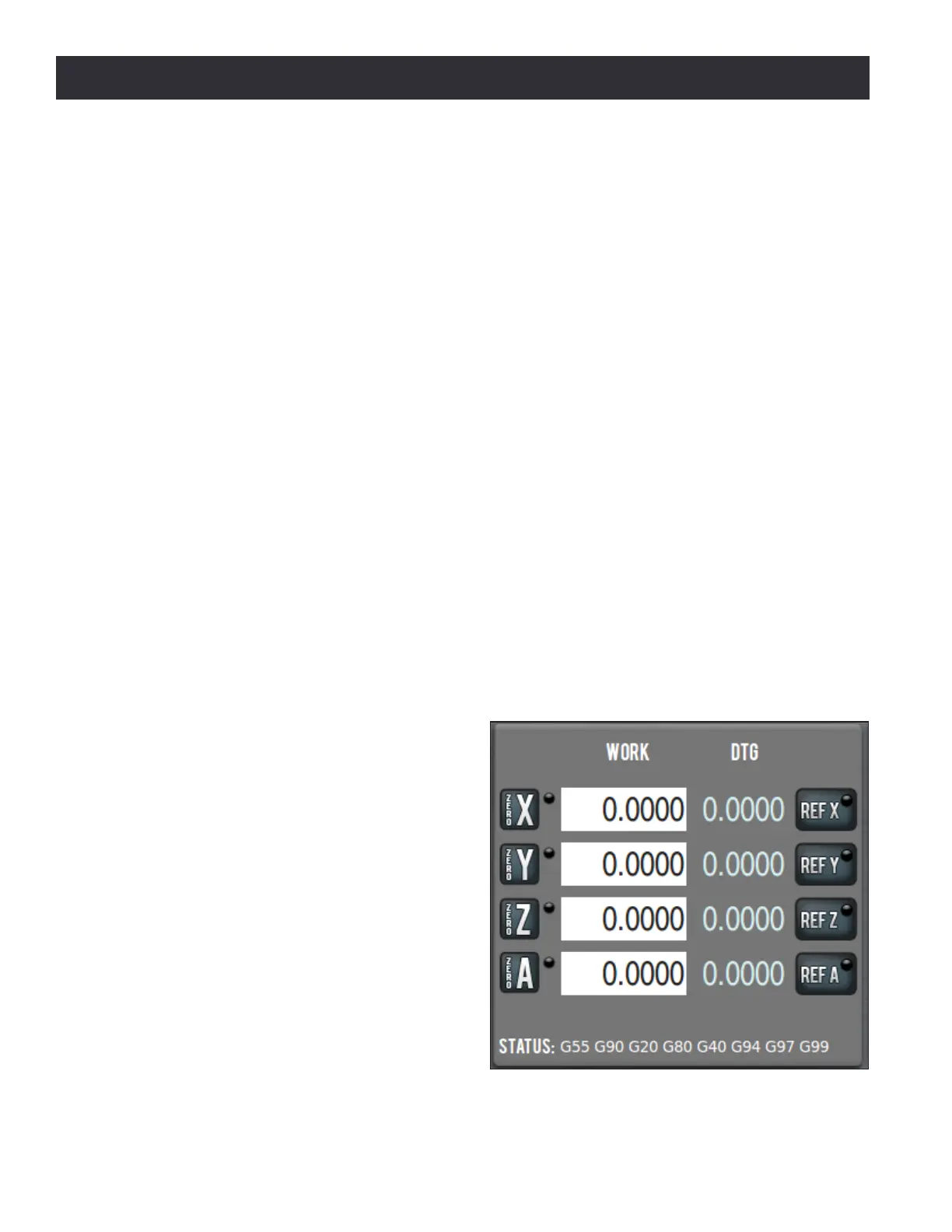
The buons, labels, and DROs of the Posion
Status Group pertain to mill posion, acve
G-code modalies, and feed/speed sengs
(see Figure 6.3). These controls may be used
at any me before or aer running a G-code
program or MDI move. They are unavailable
for operator input while mill is moving.
Axes Work Oset DRO – Displays the current
mill posion expressed in the currently acve
work oset coordinate system (G54, G55, etc.)
for the X-, Y-, Z-, and A-axis.
When the mill is at rest, these DROs are also
operator entry elds. Change the current
work oset posion by clicking in the DRO
eld, which illuminates. Type a number, for
example 4.0, and click the Enter key. Click the
Esc key to return to the original value.
Figure 6.3



 To Next Page