Running the machine
18
Original instructions: N4 Impression
Document version: H – 05/2019
5.3 Inserting / changing tools
Damaging of the spindle or the tool positions if
you use improper tools
Improper tools can damage the collet chuck of the spindle
and / or the tool positions.
h Onlyusetoolswith asucientlylargechamferat the
tool shank.
h Install a retaining ring as a stop ring according to DIN
471-A3.
h Only insert tools with a maximum diameter of 3 mm at
the thickest part into the collet chuck.
h Only insert tools with a maximum cutting edge diameter
of 2.6 mm into the tool magazines.
Þ
We recommend original tools as they are designed es-
pecially for the designated jobs.
You can insert up t
o 8 tools into the tool magazines in the
working chamber of the machine. The machine can change
tools automatically during machining so that it executes jobs
without your interference.
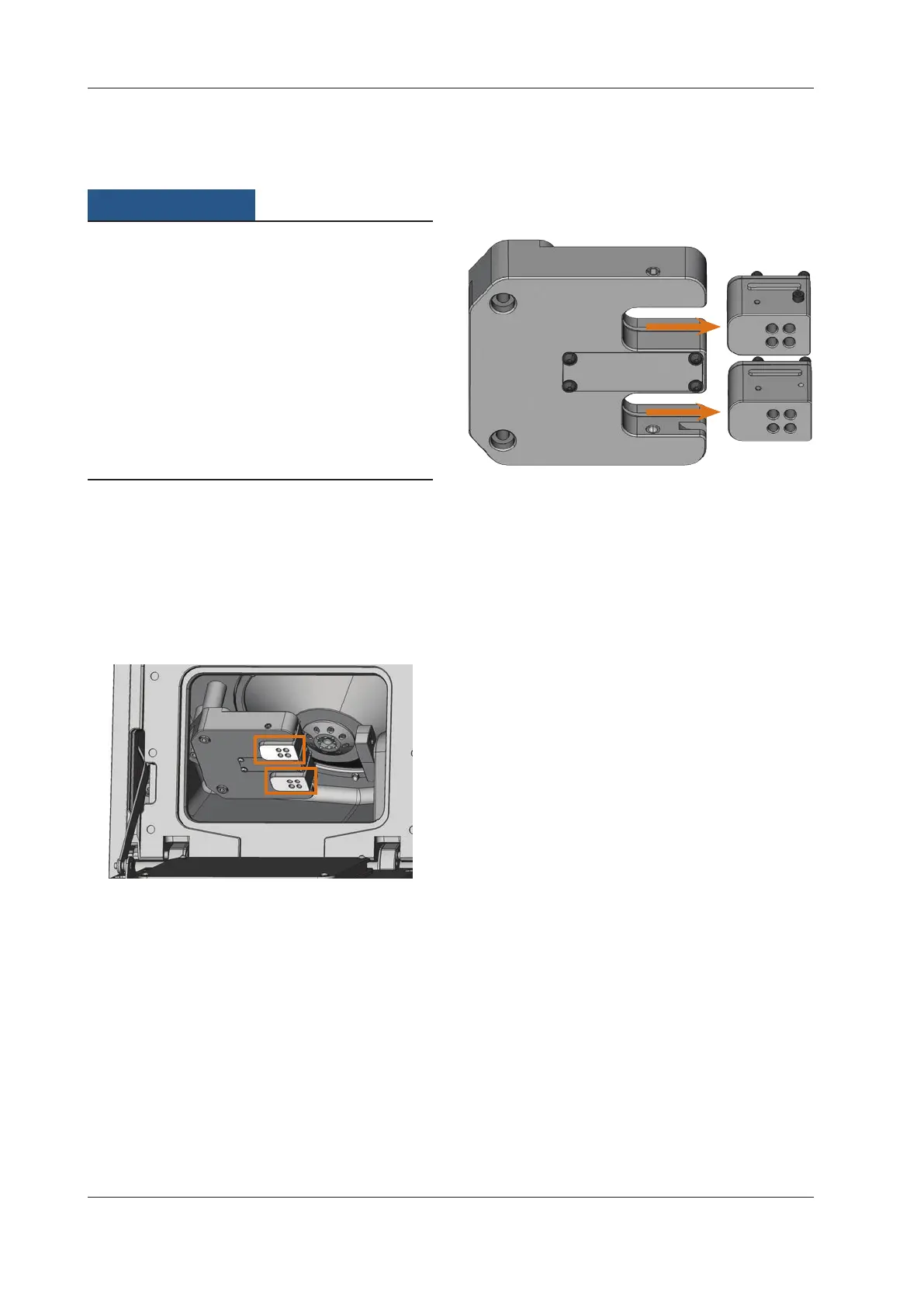
The 8 tool positions are located on two extractable tool mag
-
azines inside the N4 Impression.
Fig. 14: Tool magazines in the working chamber of the machine
Top marking: Tool magazine A
Bottom marking: Tool magazine B
You can equip the tool magazines in two ways:
Via the spindle – you insert a tool into the collet chuck
and the spindle deposits the tool in the tool magazine
afterwards. This function is described in the documen-
tation of the manufacturing software.
By inserting the tools into the tool magazines manually.
This is described below.
You insert the tools manually as follows:
The machine is in default position.
No items are mounted in the blank holder.
No tool is inserted in the collet chuck.
M1. Open the working chamber door of the machine and
pull out the tool magazines to the right.
Fig. 15: Pulling out the tool magazines
S2. Start DentalCNC. Call up the tool administration view.
S3. Select the tool magazine with the tools that you want
to insert into the machine or create a suitable maga
-
zine (e.g. for the next job).
M4.
Insert the tools into the tool positions on the upper side
of the tool magazines:
The positions of the tools in the blocks must match
the tool positions in DentalCNC (
Fig. 16).
Insert the tools straight into the tool positions and
push them in until the ring touches the rubber (
Fig. 17).
n
If the positions of the tools in the tool magazines do not
match the tool positions in DentalCNC, the machine
will use the wrong tools during job execution and the
job result will become unusable.



 To Next Page