186
FNC
56
1
2
M
3
○○○○
D S P D
S1
S2
D
X Y M S
D.b R.b
KnX KnY
KnM KnS
T C
D,R
V,Z
UnG
K,H
E
" $"
S1
D
S2
S1 : the external pulse input point
S2 : the sampling time for to count pulses (unit: ms)
D : the detection result
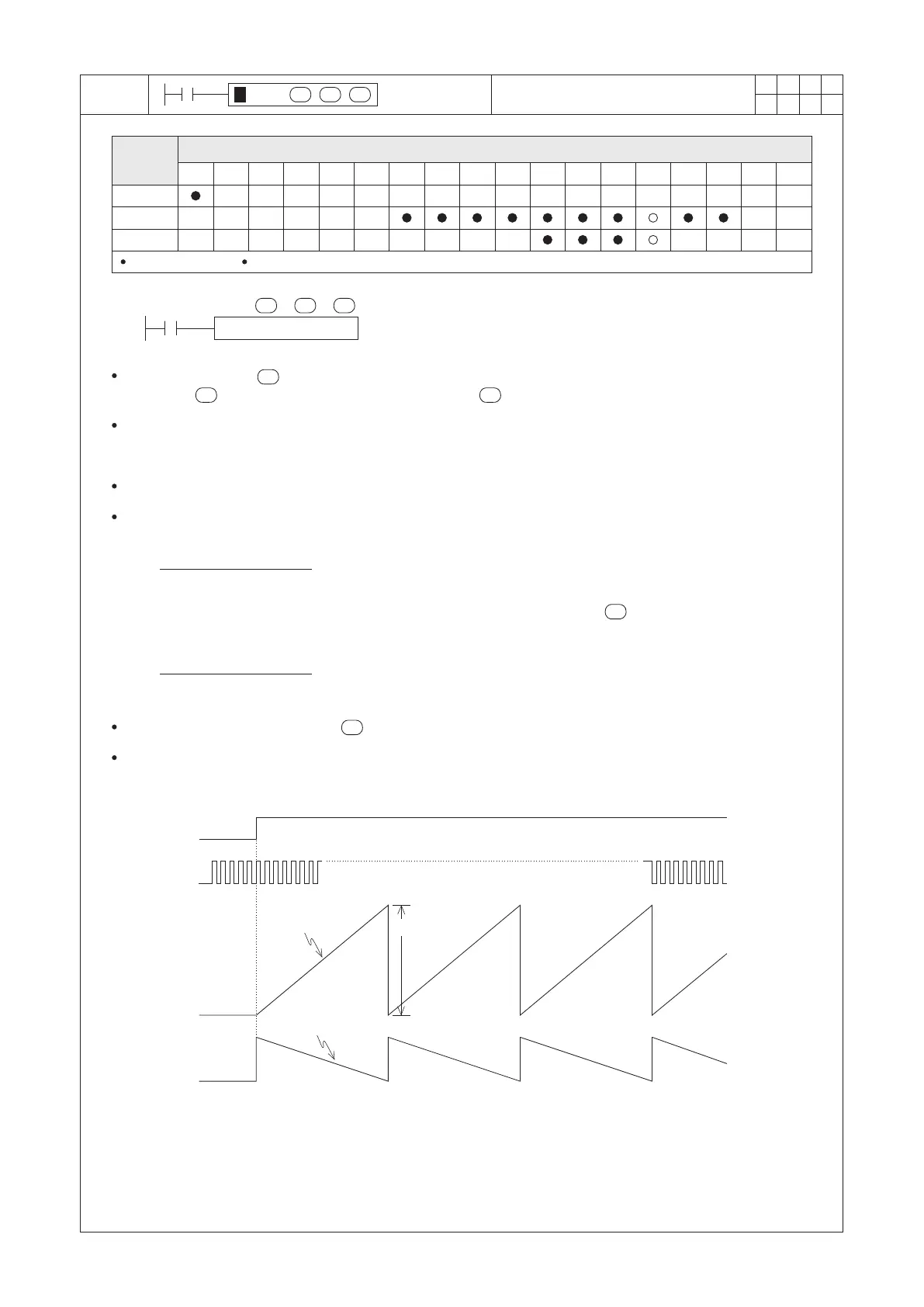
SPD X0 K1000 D0
X20
Within the designated sampling time (unit = ms), this instruction calculates the number of pulses coming from
the external input and stores the result into the register .
When X20=“ON”, the instruction started up and uses the register D1 to accumulate the number of input pulses
from the external input point X0. After 1000ms a period of the sampling time, it stores the D1’s accumulated result
to D0 then clears the current count value of D1 as “0”. And once again, it recalculates the number of input pulses
from the X0.
The D2 displays the remaining time of countdown timer (unit = ms).
The main purpose of the instruction is to acquire the rotation rate of the rotation device. The rotation rate can be
easily acquired from using the content value of D0 with the following equation:
As in the equation referred above, suppose that
n = 100 and (D0) = 3000, then we will have
N =
60×3000
100×1000(ms)
=1800
(
rpm)
X20
X0
1000
0
60× (the count value of D0)
N =
3
× 10
(
rpm)
n×t
S1
S2
D
S2
S1
D
S1
Operand
Devices
Speed Detection
S1 = X0~X7
D occupies 3 consecutive components
3
× 10
S2
N : Rotation rate
n : Number of pulses is generated by each turn of the
rotation device
t : Content value of
D2 : Remaining time (ms)
D1: Accumulate value
D0 : Detection
Result
Value
D1
Content value
D2
Content value
The exterior input designated by the in the instruction cannot be reused for any other high speed input function.
Since this instruction is by the Software High Speed Counter to get the pulse, please refer to the section
“2-15 The X0~X7 High Speed Input Function Description” to get the specication about external input.


 To Next Page