387
※ Usually the default delay response time is not necessary to change, except that:
When the communication mistake is caused by the signal collision in the circuit, try to extend the delay response
time.
CP1 CP1CP1
VS1-32M R
X0 1 2
3 4
5
6 7
10
21 22
23
RUN
ERR
Y0 1 2
3 4
5
6 7
10
11 12
13
PWR
20
11 12
13
14
15 16
17
DC2 4V
INP UT
STOP
MC
RUN
VSPC-200A
USB
Ladder Master S
M9000
MOV D0 K2Y0
ADD D0 K100 D1
Master VS PLC
Slave VS PLC #1 Slave VS PLC #2
MODBUS Master
Baud Rate: 19200 bps
MODBUS Slave
Baud Rate: 19200 bps
Station No.: #1
MODBUS Slave
Baud Rate: 19200 bps
Station No.: #2
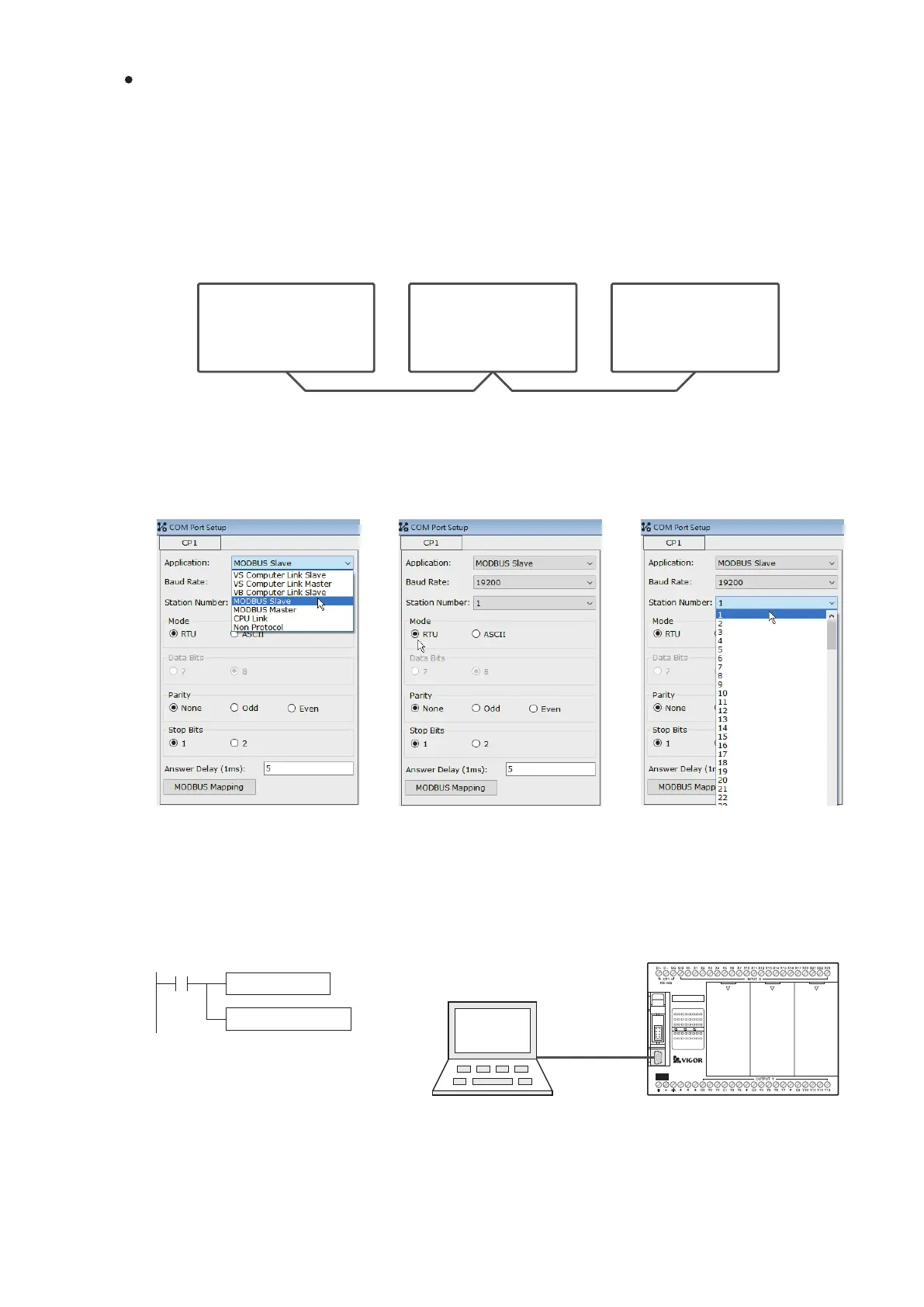
① Edit the project of Slave PLC #1
Please follow the procedures below to operate the test:
Use the Ladder Master S to set the CP1's parameters of Slave PLC #1 and compile relevant program. Then,
connect to the USB programming port of Slave #1 and write the project into the PLC.
Set the application type:
MODBUS Slave
Set the station No.:
Station #1
The program writes to the Slave
PLC #1.
By the USB programming port, the project is written into the Slave
PLC #1
Slave PLC #1
Set the baud rate and
relevant parameters
Application Example
In this example, those CP1s of three VS PLCs are connected by the RS-485 interface and execute the MODBUS
communication.
In the following gure, let the rst one from the left be the Master station of MODBUS communication to execute the
“MODBUS Master” application type and set the baud rate to be 19200 bps. Add the MBUS instruction in the
program and then edit the MBUS communication table, thereby to process data transmitting from or to the MODBUS
Slaves.
Another two are the MODBUS Slave PLCs, executing the “MODBUS Slave” application type. The baud rate of those
connected ports should be the same as the port of the Master PLC. Then, individually set the station numbers of
Slaves become the #1 and #2. Afterward, write the relevant control programs into the PLCs.


 To Next Page