1-52 SHB WL34 * 2.0
1 Maintenance
Maintenance
Information on hydraulic oil
Damage to hydraulic system due to incorrect hydraulic oil level.
► The hydraulic oil level must always be between the “Min.” and “Max.”
marks on the hydraulic oil meter.
► Check the hydraulic oil level regularly.
► Do not use the machine if the hydraulic oil level is not correct.
Damage to hydraulic system due to incorrect or dirty hydraulic oil.
► Use hydraulic oil as specified in Fluids and lubricants (overview) on
page 1-15.
► If the oil is cloudy this means that either water or air has entered the
system; this can damage the hydraulic oil pump. Do not use the
machine unless the problem has been rectified.
Checking the hydraulic oil level
Preparations
1. Park the machine on firm, level and dry ground.
2. Apply the parking brake.
3. Fully retract the loader unit and lower it to the ground.
4. Stop the engine.
5. Wait one minute.
6. Open the engine cover.
Check the hydraulic oil level
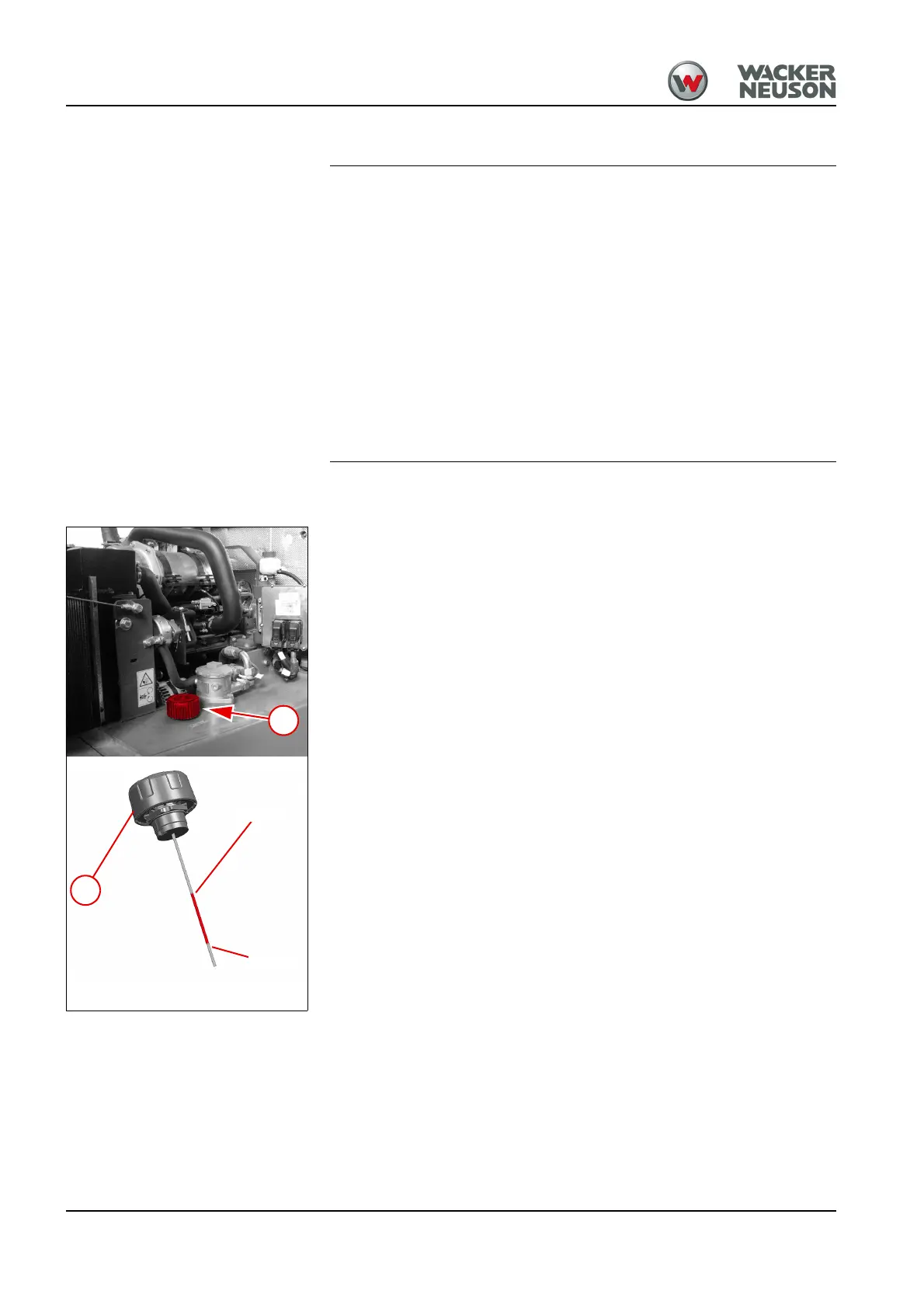
1. Unscrew breather filter B.
➥ Pressure is released from the reservoir.
2. Pull out the hydraulic oil dipstick K.
- The hydraulic oil dipstick is located on the lower side of the breather
filter.
3. Wipe the hydraulic oil dipstick with a clean and lint-free cleaning cloth.
4. Insert the hydraulic oil dipstick in the opening of the hydraulic oil
reservoir.
- Do not screw in the breather filter as you do so!
5. Pull out the hydraulic oil dipstick.
6. Check the hydraulic oil level.
➥ The hydraulic oil level must be between the “Min” and “Max” marks.
7. Re-insert the hydraulic oil dipstick and tighten the breather filter.



 To Next Page